
We may earn a commission if you buy through links on this page. It never changes a score or a ranking. How we make money
The bottom line
A practical pick for client approvals, if its profile-based and bundled pricing fits your account list.
Social Champ is worth considering if your small team handles client social accounts and needs separate workspaces, approval steps, and reporting. Its free plan covers one user, three social accounts, and 15 scheduled posts.
Paid pricing takes more comparing: you can pay per social profile or choose a bundle with set account and user limits. We’d check the total number of profiles and people who need access before choosing; bundled plans can cost more than a per-profile plan for a lean team.
Good fit if
- Agencies managing several client brands
- Teams that need client approvals
- Solo users testing basic scheduling
Skip it if
- Teams needing generous free scheduling
- Small teams needing many paid seats cheaply
- Buyers who need published support details
ScoresHow it rates
What works
- Free plan includes three social accounts
- Client workspaces can separate channels and calendars
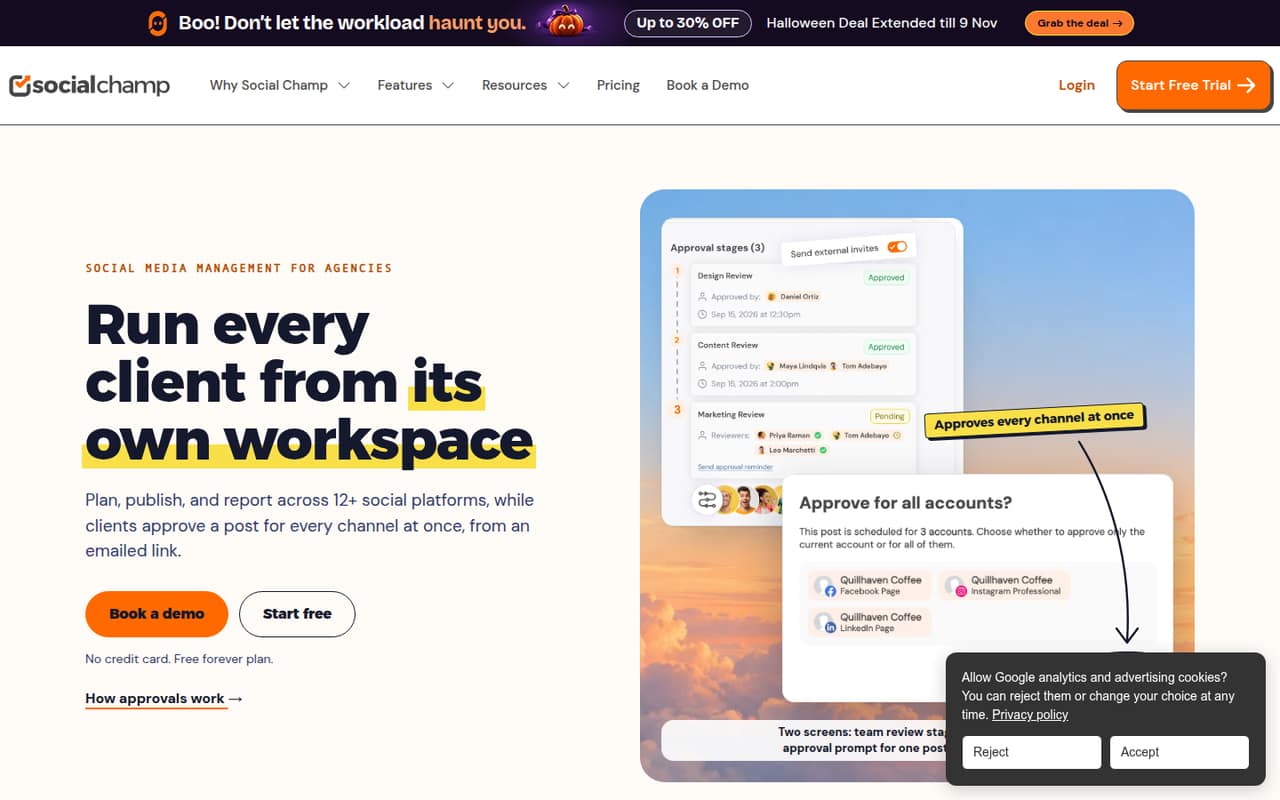
- Clients can approve from an emailed link
- Growth includes unlimited users and workspaces
- Reports export to PDF or PowerPoint
What doesn't
- Free plan stops at 15 scheduled posts
- Standard includes just two users
- Extra users cost $8 on Professional
- Social listening costs extra on Professional
- X add-on price is not published
01Who Social Champ is for
Social Champ is aimed at agencies and small teams handling social accounts for more than one brand. It brings scheduling, publishing, approvals, reporting, and inbox work into one tool across 12 social platforms. Each client can have a separate workspace with its own channels, calendar, team roles, and time zone.
That setup is useful when a team of one to ten needs client review without giving every client a login. Social Champ says clients can approve a post across its scheduled channels from an emailed link. The free plan can suit one person managing a few accounts; its limit is three accounts and 15 scheduled posts. For a team, the paid choice depends on how many people need access and how many profiles they manage. Per-profile Growth includes unlimited users, while bundles set user and account limits. We’d compare both before committing.
02Social Champ free plan and trial
Social Champ’s Free plan includes three social accounts, one user, one workspace, 15 scheduled posts, and 1 GB of media storage. That is enough for a solo user to try basic scheduling across a few accounts, but the 15-post ceiling can become restrictive if you plan content ahead or publish often.
The Free plan’s listed inclusions do not specify approvals, advanced analytics, or unlimited scheduling. If you need more scheduling capacity, the cheapest listed paid option is Starter (per profile), at $5 per social account per month or $4 per account per month with annual billing. A free trial is not published in the pricing details, so ask Social Champ whether a trial is available before paying.
03What a small team pays for Social Champ
For one person managing one social account, Free costs $0; Starter (per profile) costs $5 monthly or $4 per month with annual billing. Growth (per profile) is $9 monthly or $8 annual per profile, with unlimited users and workspaces. Those per-profile prices are per social account, not per person.
For a team of three or five that needs a bundle of multiple profiles, Professional (bundled) is the first listed bundle with enough seats: $59 monthly or $47.20 per month with annual billing. It includes five users and 12 social accounts. That works out to $19.67 monthly or $15.73 annual-billed per person for three users, and $11.80 or $9.44 for five. Standard costs less, at $29 monthly or $23.20 annual-billed, but includes only two users.
Watch the add-ons: Professional extra users are $8 each monthly, extra profiles are $4 each, and social listening is $29 monthly. The X add-on price is not published.
04Getting started with Social Champ
The vendor does not publish a setup-time estimate, so budget time to connect your channels and organize the workspaces rather than assuming setup is instant. Social Champ describes each client workspace as having its own channels, calendar, team roles, and time zone. Teams that use approval steps will also need to decide who reviews posts internally and who sends them to clients.
The product supports scheduling across 12 social platforms. Its social inbox includes WhatsApp and Discord, and its listed enterprise integrations include Salesforce and HubSpot. The X add-on is available on bundled paid plans, but its price is not published. Confirm that your specific channels and plan are supported before setup. One Reddit commenter said scheduling worked well for them and mentioned a notes feature; another user’s post raised questions about desktop access. We’d verify the current web and desktop options with Social Champ.
05When small teams outgrow Social Champ
The first pressure point is scheduled-post volume: Free tops out at 15 posts. The next is user count. Standard has two users, so a three-person team needs a per-profile Growth plan or a larger bundle. Professional covers five users, but extra users cost $8 each per month; Agency includes unlimited users and workspaces if the team also needs its 30-account allowance and white-label reports.
Account count can change the calculation too. Bundled extra profiles cost $5 each on Standard, $4 on Professional, and $3 on Agency per month. Per-profile add-on rates vary by volume, so compare the bill against your actual accounts.
Reddit feedback is limited and mixed: one commenter said Social Champ had been good for posting and scheduling but found its AI functions limited. Another comparison commenter thought it was more expensive than SocialBu. If cost or AI capability becomes a sticking point, compare alternatives before adding accounts or seats.
From the threadsWhat users say
The available Reddit comments are mixed and too limited to establish a broad user consensus. One commenter liked scheduling, while another found the AI functions limited; a comparison commenter raised price as a concern.
it's been pretty good for posting and scheduling
the ai functions are pretty limited
Social Champ also offers a great range of features, but I found it to be more expensive than SocialBu
Social Champ which is free for 1 user
Questions people ask
What does Social Champ’s free plan include?
The Free plan includes three social accounts, one user, one workspace, 15 scheduled posts, and 1 GB of media storage. It is suited to basic scheduling for one person. If you need more scheduled posts or more users, compare the paid per-profile plans and bundles.
Can clients approve Social Champ posts without an account?
Yes. Social Champ says clients can approve a post across all its scheduled channels from an emailed link without creating an account. Teams can also use multi-stage approvals, with internal review before a client is asked to approve.
How many social platforms does Social Champ support?
Social Champ says it supports scheduling and publishing across 12 social platforms. The platform names are not listed on the vendor's site, so check with the vendor that your exact channels are supported before choosing a plan.
Does Social Champ include a social inbox?
The listed key features include a social inbox for managing comments and messages, with WhatsApp and Discord as inbox channels. The Free plan’s feature list does not specify inbox access, so ask Social Champ which plans include the inbox before relying on it.
Does Social Champ offer a free trial?
A free trial is not published in the pricing details. Social Champ does offer a Free plan with three social accounts, one user, one workspace, 15 scheduled posts, and 1 GB of media storage. Ask the vendor whether a trial is available for paid features.