
We may earn a commission if you buy through links on this page. It never changes a score or a ranking. How we make money
The bottom line
Useful camera alerts for existing systems, with custom pricing that makes small-team budgeting hard.
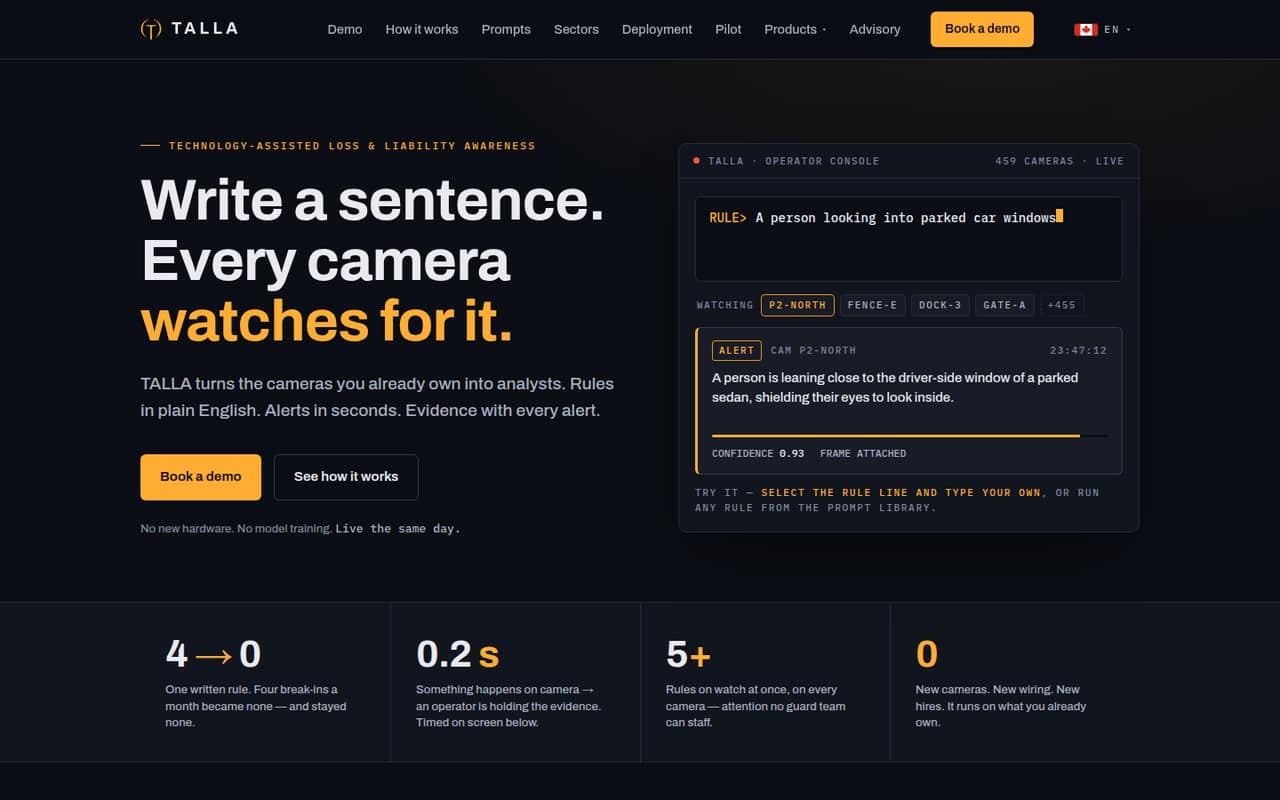
Talla turns existing security cameras into a source of alerts: operators describe situations in plain English, and the software watches camera frames for them. Alerts can include an evidence frame, observation, confidence score, and timestamp.
There is no free plan or published starting price for camera analytics. Talla lists custom, per-site deployments, so a small team will need a quote based on its cameras and deployment model before it can judge the cost.
Good fit if
- Teams with existing security cameras
- Sites needing plain-English alert rules
- Operators who want evidence-backed alerts
Skip it if
- Teams needing a published price
- Organizations without camera infrastructure
- Buyers who need known seat limits
ScoresHow it rates
What works
- Rules are written in plain English
- Works with existing cameras
- Multiple rules can run in parallel
- Alerts include evidence and timestamps
- Cloud, on-premises, and hybrid options
What doesn't
- No free plan
- Camera analytics pricing is custom
- Per-site starting price is not published
- Seat and usage limits are not published
- Setup effort and integrations are not published
01Who Talla is for
Talla is for organizations that already have security cameras and want software to watch for specific situations. Instead of training a model or writing code, an operator describes a rule in plain English. Talla applies rules to camera frames in real time, and multiple rules can run at once.
That can suit a small operations or security team responsible for one or more sites, especially when staff need alerts with evidence rather than a stream of footage to review. The product lists mobile alerts for iPhone, Android, Apple Watch, and Wear OS, along with cloud, on-premises, and hybrid deployment options. Those choices may fit different site requirements, but they also make the right plan dependent on the deployment.
For a team of one to ten, the key budget question is not a per-seat rate: Talla lists camera analytics as a custom deployment priced per site. Ask for a quote based on camera count and deployment model before treating it as a fit.
02Talla free plan and trial
Talla does not list a free plan for camera analytics. The pricing information lists a 30-day pilot for certain deployments, but does not say which deployments qualify or what the pilot includes. Ask Talla to confirm eligibility, pilot scope, and whether any fees apply before planning around it.
The cheapest way in is therefore a custom site quote; the vendor does not publish a starting price. Cost is scoped by camera count and deployment model, and seat and usage limits are not published. That makes it hard for a small team to estimate the full commitment from public pricing alone.
Older Starter and Growth prices listed for Customer Assist and Agent Assist are historical plans for those products, not published rates for Talla camera analytics. They should not be used as a budget estimate for a camera deployment.
03What a small team pays for Talla
The pricing page lists camera analytics as a custom deployment priced per site, scoped by camera count and deployment model. It does not publish a monthly or annual starting price, a seat rate, or seat and usage limits. So we cannot give a grounded cost for one person, three people, or five people, or calculate monthly versus annual per-seat totals. Ask for a quote that spells out both the site price and any user or usage charges.
The pricing information says annual terms are priced below month-to-month, but it gives no current camera-plan figures to compare. A 30-day pilot is available for certain deployments; confirm whether your site qualifies and what happens when it ends.
Historical prices for Talla Customer Assist and Agent Assist are separate from camera analytics. For context, those older plans listed Starter at $2,000 monthly or $1,700 per month billed annually, and Growth at $5,000 monthly or $4,250 per month billed annually. Those figures are not a valid price for a camera deployment. Historical add-on charges also belong to those plans, not this use case.
04Getting started with Talla
The basic workflow appears straightforward: connect the camera deployment, describe the situations to watch for in plain English, and review alerts with their evidence frames, observations, confidence scores, and timestamps. Talla also lists a prompt library for security, safety, parking, and other site situations. Multiple rules can run in parallel.
The vendor does not publish setup time, technical requirements, or a step-by-step setup process in the published product details. It also does not publish which camera systems or third-party integrations are supported. That leaves important day-one questions for the sales conversation: confirm compatibility with your cameras, what network or hardware changes are needed, and who configures the rules.
For a small team, the plain-language rules may reduce the need to write code or train models, but that does not establish how much installation work a particular site requires. Ask for the pilot scope and setup responsibilities in writing.
05When small teams outgrow Talla
Talla’s listed deployment is already custom and site-based, so growth may mean a new quote rather than moving through a published seat-based tier. If you add locations or cameras, ask how each affects the price, whether the deployment can scale across sites, and whether any usage limits apply. The vendor does not publish seat or usage caps for camera analytics.
A team may also need to reconsider fit if it requires a firm per-seat budget, known camera compatibility, or published setup and integration details before purchase. Those details are not listed in the pricing information, so a growing team should get them clarified before expanding.
The historical Customer Assist and Agent Assist tiers do not provide an upgrade path for camera analytics. They describe different products and should not be used to estimate a camera plan’s costs. Before committing to more sites, ask Talla for a written quote covering the intended camera count, deployment model, support, and any expansion charges.
Questions people ask
Does Talla have a free plan?
Talla does not list a free plan for camera analytics. The pricing information lists a 30-day pilot for certain deployments, but does not specify which deployments qualify or what is included. Ask Talla to confirm eligibility, scope, and any fees before relying on the pilot.
How much does Talla cost?
Talla lists camera analytics as a custom deployment priced per site. The quote is scoped by camera count and deployment model, and the vendor does not publish a starting price or per-seat rate. Request a quote with the site, user, and usage costs spelled out.
Can a small team use Talla without coding?
Talla says operators can describe situations in plain English without writing code or training models. It applies those rules to camera frames and can run multiple rules in parallel. The vendor does not publish how much installation or configuration work a particular camera system requires.
What do Talla alerts include?
Talla alerts can include an evidence frame, an observation, a confidence score, and a timestamp. Alerts are listed for iPhone, Android, Apple Watch, and Wear OS. Confirm with Talla how alert delivery is configured for your site and deployment.
Can Talla run on-premises?
Yes. Talla lists cloud, on-premises, and hybrid deployment options. The pricing information says deployments are scoped by camera count and deployment model, but it does not publish the technical requirements or price differences. Ask the vendor which option fits your site and what it costs.