
We may earn a commission if you buy through links on this page. It never changes a score or a ranking. How we make money
The bottom line
Good value for teams that want notes, tasks, and planning together and can handle a learning curve.
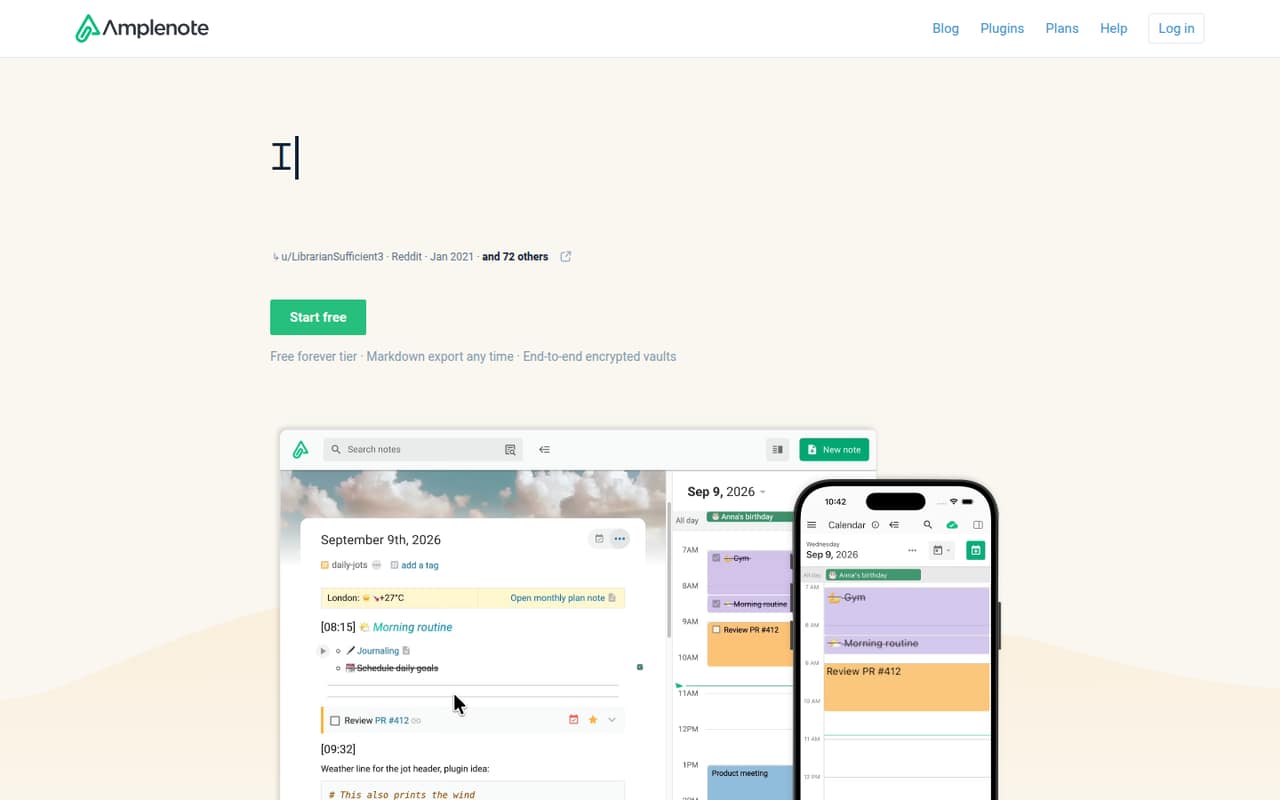
Amplenote combines linked notes, tasks, and calendar planning in one app. The free Personal plan is useful for non-commercial use, while teams that need collaboration will likely need Pro, listed at $5.84 per user per month equivalent when billed annually.
Reddit users praise its range of features but describe a steep learning curve and an interface that can feel overwhelming. We’d shortlist it for a small team willing to learn one shared workflow, not for people who want a simple notes app from day one.
Good fit if
- Small teams consolidating notes and tasks
- Teams that plan work on a calendar
- Non-commercial solo users on a budget
Skip it if
- Teams needing a simple interface immediately
- Commercial users who need a free plan
- Teams needing published monthly seat prices
ScoresHow it rates
What works
- Brings notes, tasks, and calendar planning together
- Free Personal plan for non-commercial use
- Pro includes tag sharing for group collaboration
- Two-way Google calendar sync
- Markdown export is available
What doesn't
- Free plan is licensed for non-commercial use
- Paid monthly prices are not published
- Pro's annual equivalent is $5.84 per month
- Reddit users report a steep learning curve
- Team seat costs and add-ons are not published
01Who Amplenote is for
Amplenote suits a one-to-five-person team that wants to keep meeting notes, action items, and calendar planning together. Instead of writing a note in one app and managing its tasks elsewhere, you can create tasks inside notes, view them separately, and schedule them on a calendar. Linked notes, daily notes, and Markdown formatting help people connect work without building a database system.
For a small team watching its budget, the free Personal plan is for non-commercial use, so it is not the right free tier for a business. Pro is the plan described for larger uploads and tag sharing for group collaboration; its listed annual equivalent is $5.84 per month. That makes the paid entry price look reasonable, but the vendor does not publish monthly paid prices or standalone seat costs. Amplenote is a better fit if your team likes flexible, connected workflows than if everyone expects a familiar, simple task list.
02Amplenote free plan and trial
The Personal plan is free forever and includes file uploads up to 5 MB. The important catch for a small business: the plan is licensed for non-commercial use. It may suit an individual exploring the app for personal projects, but a business should check the paid plans rather than assume the free tier covers work.
The pricing details list a 14-day free trial, but do not specify which paid plan the trial covers. Pro is the first listed paid plan, with uploads larger than 5 MB and tag sharing for group collaboration. The pricing page lists Pro at $5.84 per month when billed annually; its monthly billing price is not published. Ask Amplenote which plan the trial includes and whether it supports your intended business use.
03What a small team pays for Amplenote
The pricing page lists Pro at $5.84 per month per listed unit, billed annually. If each person needs a paid plan, that works out to $5.84 for one person, $17.52 for three, and $29.20 for five per month equivalent. Those totals are billed annually, and the actual monthly billing prices are not published. The vendor also says standalone seat costs are not published, so confirm team billing before budgeting.
Pro is the practical starting point for a group: it includes tag sharing for collaboration and uploads larger than the free plan's 5 MB limit. Unlimited is listed at $10 per month equivalent billed annually, or $30 for three and $50 for five at that rate. It adds Vault Notes for client encryption, publishing notes as web pages, Desktop MCP Server access, and eight color themes. Founder is listed at $20 per month equivalent annually. Standalone add-ons and overages are not published, so ask about any extra charges and minimum seats before signing up.
04Getting started with Amplenote
A team can start by putting notes and tasks together, then decide how it wants to use tags, linked notes, and calendar scheduling. Task Score prioritizes work, and the Eisenhower matrix sorts tasks by importance and urgency. The product details list two-way Google calendar sync and drag-and-drop task scheduling. Those are useful starting points for a team already planning in Google Calendar; no other day-one integrations are specified here.
Expect some orientation time rather than an instant, familiar task app. Reddit users describe a steep learning curve, and one commenter says the interface can feel overwhelming at a glance. Another reports that mobile functionality is diminished compared with desktop. Those are individual user opinions, not a guarantee of every team's experience, but they are worth weighing if your team needs quick adoption. Agree on a small set of tags and a shared note-and-task routine before moving all work over.
05When small teams outgrow Amplenote
The first reason to upgrade is straightforward: Personal is licensed for non-commercial use, while Pro adds group tag sharing and uploads larger than 5 MB. A team may also consider Unlimited if it needs Vault Notes for client encryption, published web pages, or Desktop MCP Server access. At the listed annual equivalents, moving from Pro to Unlimited adds $4.16 per person per month; the monthly paid rates and standalone seat costs are not published.
The bigger reason to move may be fit, not a feature cap. Reddit commenters describe the interface as overwhelming and the learning curve as steep; one says mobile lacks some desktop functionality, including drag-and-drop tasks. Another calls sharing and collaboration unnecessarily complicated. These are user reports, not universal limits, but growing teams should check how their own handoffs, mobile use, and access needs work before committing. Ask the vendor about seat pricing, add-ons, and any team requirements that are not listed.
From the threadsWhat users say
Reddit sentiment is mixed: some users value Amplenote as a place to bring notes, tasks, and planning together. Others find its interface, learning curve, or collaboration workflow harder to adopt.
I really appreciate having everything in one tool, and for me the task handling in Amplenote is sufficient for my needs
I think Amplenote has a pretty steep learning curve to overcome and that turns off some people
Ample note is actually so brilliant once the learning curve is past. You wouldnt need another app. But at the expense of that level of utility is that it can look overwhelming at a glance
Also sharing and collaboration is unnecessarily complicated
Questions people ask
Is Amplenote free for business use?
The Personal plan is free forever, but it is licensed for non-commercial use. A business should review the paid plans and confirm the terms with Amplenote rather than assume the free plan covers work. Pro is the first listed paid plan and includes tag sharing for group collaboration.
What does Amplenote Pro include?
The pricing page lists file uploads larger than 5 MB and tag sharing for group collaboration on Pro. Its annual price is listed as $5.84 per month equivalent. The monthly price is not published, so confirm the billing amount with Amplenote before choosing it.
Does Amplenote sync with Google Calendar?
The product details list two-way Google sync and calendar scheduling, including drag-and-drop task scheduling. If Google Calendar is central to your team's workflow, confirm the setup and plan requirements with Amplenote before moving your calendar process.
Does Amplenote offer a free trial?
A 14-day free trial is listed. The pricing details do not say which plan the trial covers, so ask Amplenote whether it includes the features your team needs, such as Pro's tag sharing or larger uploads.
Can I export notes from Amplenote?
Markdown export is listed as a product capability. That gives teams a way to take notes out in a text-based format, but the details here do not specify export limits or whether tasks and other content are included. Confirm those details if portability is important.
Sources
- Amplenote homepage
- Amplenote pricing, compiled via web search from amplenote.com, getapp.com.au, productivity.directory
- Reddit: I don’t like Evernote either. However. obsidian is dumb - AmpleNote is just not going to work. OneNote has 0 privacy. I’m about to be angry and pay $130 to Evernote. What else should I try
- Reddit: Amplenote has been around for a few years. Why do you think it has not found a wider audience? it is a pretty good app with remarkably rich and useful features, but for some reason, it isn't as popular.
- Reddit: Longtime Notion user looking to simplify — is Amplenote the go-to ?
- Reddit: Why Amplenote’s Design is Holding It Back (And Why I'm Not Using It)