
We may earn a commission if you buy through links on this page. It never changes a score or a ranking. How we make money
The bottom line
A capable creator site, but the lack of a free plan makes the price harder to justify.
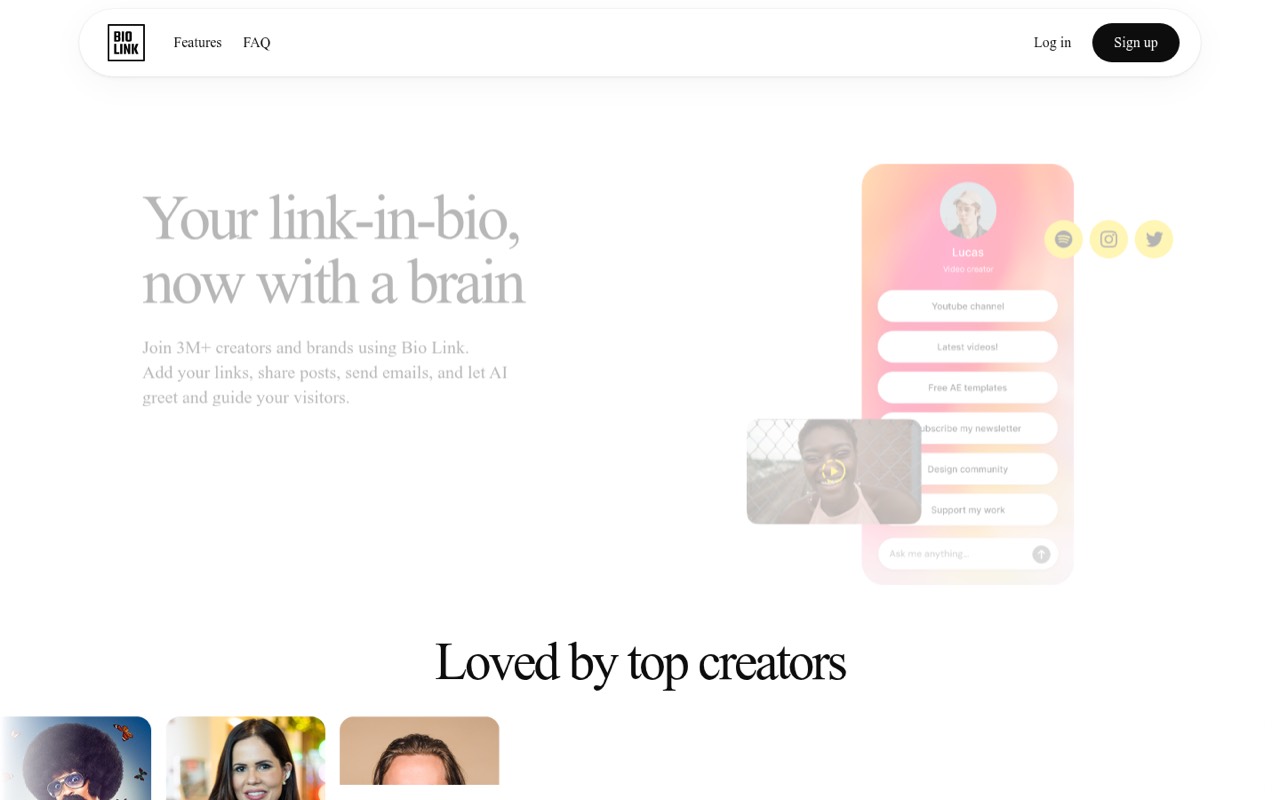
Bio.link brings links, posts, email signups, embeds, analytics and an AI assistant into one customizable creator page. Its Pro plan also includes a custom domain and removes Bio.link branding.
The catch for a budget-conscious team: there’s no free plan. Pro costs $14.99 monthly or $7.49 per month with annual billing, and the vendor doesn’t publish seat pricing. It’s best when the extra publishing and AI features earn their keep.
Good fit if
- Creators building a branded landing page
- Small teams publishing posts and email signups
- Brands that want AI visitor assistance
Skip it if
- Teams that need a free plan
- Anyone needing published per-seat pricing
- Teams seeking a basic link list only
ScoresHow it rates
What works
- 15+ themes plus font, color and section customization
- Links, embeds, posts and email list tools in one site
- AI assistant answers visitors using site content
- Analytics cover views, clicks, popular content and AI interactions
- Pro includes a custom domain and no Bio.link branding
What doesn't
- No free plan
- Monthly billing costs $14.99
- Seat pricing is not published
- Trial feature access and restrictions are not published
- Support options are not specified
01Who Bio.link is for
Bio.link suits a solo creator, small brand or team of roughly 1–10 people that wants a public-facing page for more than social links. The page can bring together links, embedded content, posts and email signups, while analytics track views, link clicks, popular content and AI interactions. An AI assistant uses the site’s content to answer visitors’ questions.
That breadth is useful if one page needs to support publishing and audience building, not just send people elsewhere. The Pro plan lists unlimited sites and visitors, so a small team managing multiple projects may find that useful. But there’s no free plan, and the vendor doesn’t publish per-seat pricing. For a team watching every subscription, the key question is whether posts, email capture and AI chat will get regular use. If you only need a short list of links, paying for Pro may be more than the job calls for.
02Bio.link free plan and trial
Bio.link does not list a free plan. The vendor lists a 7-day free trial, but the pricing details don’t specify which Pro features are available during the trial or what restrictions apply. Check those terms before building a page around a feature you need.
The cheapest listed way to keep using Bio.link is Pro with annual billing: $7.49 per month, or $89.88 for the year. That plan includes unlimited sites and visitors, an AI chat assistant, a custom domain, white-labeling with no Bio.link branding, posts and an email list. Monthly billing is also available at $14.99 per month. For a creator who needs ongoing access, the trial is a short evaluation window, not a lasting free tier.
03What a small team pays for Bio.link
The pricing page lists one plan, Pro, at $14.99 per month or $7.49 per month billed annually. Annual billing totals $89.88 for one plan. The pricing details don’t say whether Pro is priced per seat or whether several teammates can share an account, so these team totals are estimates only if each person needs a separate plan.
On that assumption, one person pays $14.99 monthly or $89.88 annually. Three separate plans would be $44.97 monthly or $269.64 annually; five would be $74.95 monthly or $449.40 annually. The annual figures use the listed $89.88 yearly cost per plan.
The pricing page lists no add-ons. Pro includes unlimited sites and visitors, AI chat, custom domains, white-labeling, posts and an email list. Before budgeting for multiple people, ask the vendor to confirm seat rules and whether one subscription covers a shared team workflow.
04Getting started with Bio.link
The core setup is choosing a theme or adjusting fonts, colors and page sections, then adding links, embeds, posts or an email signup. Bio.link lists more than 15 themes and support for a custom domain or a bio.link URL. You can also add the AI assistant, which uses site content to answer visitors.
That feature set suggests a creator can start with a simple page and add more as needed, but the vendor doesn’t publish a setup-time estimate or a step-by-step setup guide in the pricing details. It also doesn’t specify which third-party apps can be embedded or how email signups connect to a mailing service. For day one, decide which links and content belong on the page, whether you need a custom domain, and what the assistant should answer. Confirm any must-have integrations with the vendor before committing.
05When small teams outgrow Bio.link
The clearest pressure point is price. Bio.link has no free plan, and each additional subscription would add $14.99 per month or $89.88 per year if every teammate needs a separate plan. Because the vendor doesn’t publish seat rules, confirm whether a shared account is allowed before treating those estimates as a team bill.
A growing team may also need details that aren’t specified in the plan information: user roles, approval workflows, deeper analytics or particular email and embed integrations. That doesn’t mean Bio.link lacks them; ask the vendor before making them part of your process. Pro already lists unlimited sites and visitors, so those aren’t stated caps to plan around. Consider moving on when the team needs confirmed collaboration controls, integrations or pricing that better fits several people, or when it mainly needs a basic link page and won’t use the posts, email and AI features.
Questions people ask
What is Bio.link on Instagram?
Bio.link is a customizable page for sharing links, posts, email signups and embedded content. A creator can put the Bio.link URL in an Instagram profile so visitors have one place to find those destinations. Bio.link also lists themes, analytics, custom domains and an AI assistant that uses page content to answer visitor questions.
Are Bio.link pages safe to use?
The vendor’s feature and pricing details don’t establish security practices or guarantee that every linked destination is safe. As with any link-in-bio page, check the URL and the sites it points to before entering personal or payment information. Ask Bio.link about its security and privacy practices if those are important for your use.
Does Bio.link have a free plan?
Bio.link does not list a free plan. The vendor lists a 7-day free trial, but its pricing details don’t specify which features the trial includes or any restrictions. Ongoing access starts with Pro, listed at $14.99 per month or $7.49 per month with annual billing.
How much does Bio.link cost for a small team?
Pro costs $14.99 per month or $89.88 per year per plan. If each of three people needs a separate plan, that would total $44.97 monthly or $269.64 annually; five would total $74.95 monthly or $449.40 annually. The vendor doesn’t publish seat rules, so confirm how team access is billed.
Can I use a custom domain with Bio.link?
Yes. The Pro plan lists a custom domain, along with the option to use a bio.link URL. The pricing details don’t specify domain registration costs or the steps for connecting a domain. Check whether your existing domain is supported and what setup requires before switching a live creator page.