
We may earn a commission if you buy through links on this page. It never changes a score or a ranking. How we make money
The bottom line
Worth a look for field-service teams, but its $49 monthly minimum rules out the smallest crews.
Small teams only need Chronotek if they manage hourly employees working away from a central office and need to track their time and locations. Chronotek Pro combines GPS clock-ins with scheduling, messaging, payroll preparation, and job costing.
There’s no free plan, and the $49 monthly starting price covers a five-employee minimum. That can work for a field crew of five, but teams with fewer employees pay for unused seats. A 30-day free trial gives eligible teams a chance to assess the fit.
Good fit if
- Field-service teams with five or more employees
- Managers tracking time at job sites
- Teams preparing hourly payroll
Skip it if
- Solo operators seeking a free plan
- Teams with fewer than five employees
- Office teams needing basic timesheets
ScoresHow it rates
What works
- GPS clock-ins and location review
- Alerts for late or missed clock-ins
- Scheduling tracks travel, overtime, and breaks
- Payroll previews and company exports
- Job costing includes predicted profitability
What doesn't
- No free plan
- Five-employee minimum costs $49 monthly
- Volume pricing starts at 250 employees
- Annual prepayment price is not published
- Setup effort and integrations are not published
01Who Chronotek is for
Chronotek is built for employers managing hourly workers away from a central office. It makes the most sense for field-service teams with five or more employees, since the listed monthly plan has a five-employee minimum. Smaller teams can still sign up, but they pay the same minimum charge.
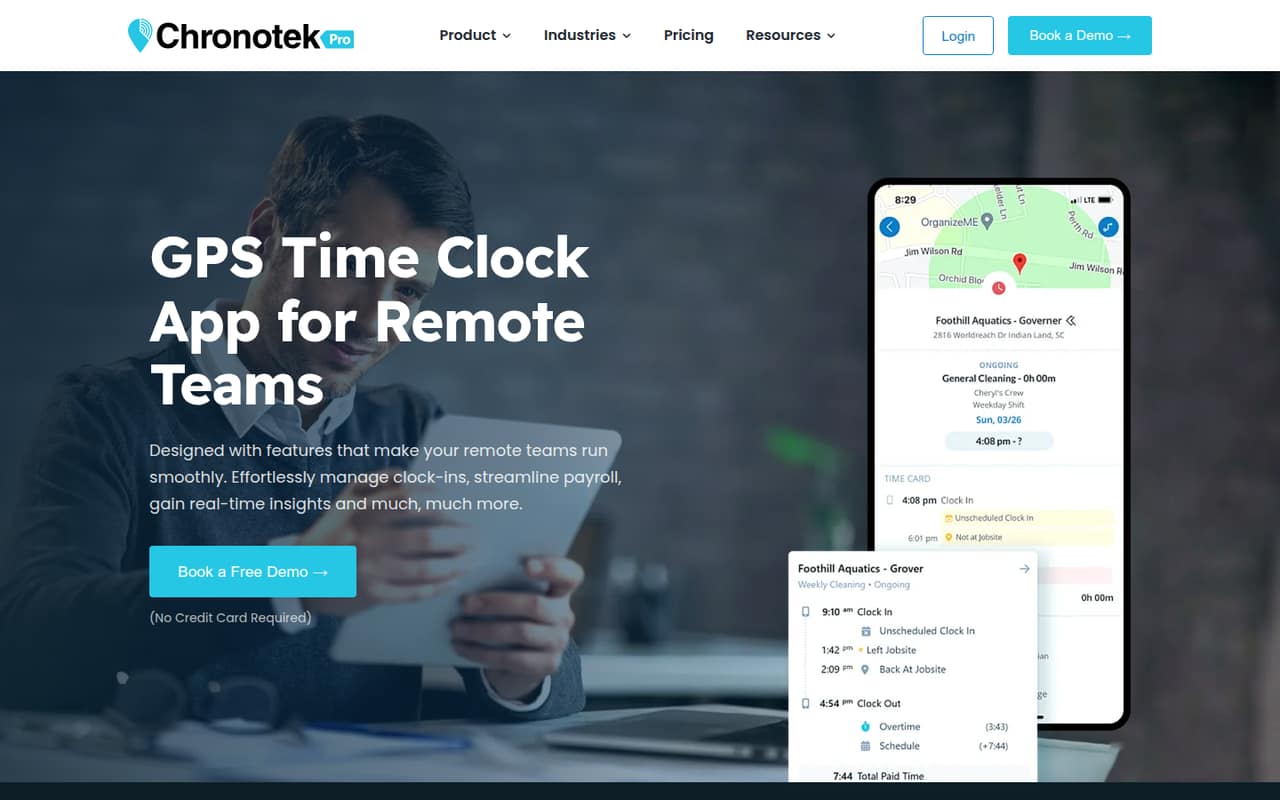
Chronotek Pro brings several workforce tasks together. Employees can clock in and out from job sites, while managers review location information and time-card exceptions. The product also supports attendance alerts, flexible scheduling, team messages, payroll preparation, and job costing. That mix is more useful when managers need to coordinate people across locations than when a team just wants a basic timesheet.
Budget at least $49 per month for the standard plan. Teams that want GPS timekeeping and workforce management in one tool may find that reasonable; a business looking only to record a few hours should compare simpler options first.
02Chronotek free plan and trial
Chronotek does not list a free plan. The pricing page lists a 30-day free trial for Chronotek Pro, the paid plan for teams with five or more employees. The listed monthly rate is $19 plus $6 per employee, with a five-employee minimum, so the standard minimum monthly charge is $49.
The trial is a way to evaluate the paid product before committing, not a permanent free tier. The pricing details do not specify trial seat limits, whether every feature is included during the trial, or what happens when it ends. Ask Chronotek to confirm those points before enrolling, especially if your team has fewer than five employees. If you continue after the trial, budget for at least $49 per month on monthly billing.
03What a small team pays for Chronotek
The pricing page lists Chronotek Pro at $19 per month plus $6 per employee, with a five-employee minimum. That makes the monthly bill $49 for one employee, $49 for a three-person team, and $49 for five employees: teams below five still pay the minimum. For five employees, the listed calculation is $19 + ($6 × 5) = $49.
At the minimum monthly rate, 12 months of monthly billing totals $588. The vendor lists a 15% discount for annual prepayment, but the annual price is not published, so ask Chronotek for the actual quote rather than assuming a discounted total. The pricing material lists no add-ons. Volume Pricing is available for organizations with 250 or more employees, but its price is not published. For a small team, the practical starting point is the $49 monthly minimum, not a per-person rate for a smaller crew.
04Getting started with Chronotek
The product combines employee clock-ins, schedules, messaging, payroll preparation, and job costing, so a team will need to decide which workflows to use and who will manage them. Employees clock in and out from job sites, and managers can review location data and time-card exceptions. The 30-day trial gives a team a window to check whether those workflows suit its jobs.
Chronotek does not publish setup time, a step-by-step onboarding estimate, or a list of integrations in the pricing material. Payroll exports are listed, but the supported payroll companies and connection details are not specified there. Before signing up, ask the vendor how to set up job sites, schedules, pay codes, and employee access, and confirm that its payroll exports work with your provider. We can’t give a reliable learning-curve estimate without those details.
05When small teams outgrow Chronotek
Chronotek’s listed pricing does not show a per-team size cap for Chronotek Pro, but it does make small crews pay for at least five employees. That cost can feel wasteful if your headcount stays below five, or if you mainly need simple time entry rather than location review, scheduling, and job-cost tracking.
As a team grows, the listed $6-per-employee monthly charge increases the bill above the $19 base fee. Organizations with 250 or more employees can ask about Volume Pricing, though the vendor does not publish its rates. The available details do not identify feature limits or a point where a team must upgrade, so confirm those with Chronotek before expansion.
A growing team may also need to check whether its payroll provider is supported and whether Chronotek handles its scheduling and job-costing needs. If those requirements are not met, compare alternatives before adding more employees to the account.
Questions people ask
How does Chronotek work?
Employees clock in and out from job sites, and managers can review location data and time-card exceptions. Chronotek Pro also supports attendance alerts, scheduling, team messaging, payroll preparation, and job costing. The product is intended for employers managing hourly employees who work away from a central office.
Does Chronotek have a free plan?
No free plan is listed. Chronotek offers a 30-day free trial of Chronotek Pro, according to the pricing details. The listed monthly plan costs $19 plus $6 per employee, with a five-employee minimum, making the standard minimum charge $49 per month.
How much does Chronotek cost for a small team?
The pricing page lists a $19 monthly base fee plus $6 per employee, with a five-employee minimum. That means one employee, three employees, or five employees each cost $49 per month under the minimum. Annual prepayment gets a listed 15% discount, but the actual annual price is not published.
Can employees clock in from job sites?
Yes. Chronotek is described as mobile timekeeping for field-service teams, and employees can clock in and out from job sites. Managers can review location data and time-card exceptions. Ask the vendor about device requirements and any location settings your team needs before starting.
Does Chronotek prepare payroll?
Chronotek supports payroll preparation, including payroll previews, pay-code totals, locked pay periods, and payroll-company exports. The pricing details do not name supported payroll companies or specify integration requirements. Confirm compatibility with your payroll provider directly with Chronotek before you commit.