
We may earn a commission if you buy through links on this page. It never changes a score or a ranking. How we make money
The bottom line
Unlimited Cloudcraft users and diagrams cost $0 extra, but you need a Datadog subscription.
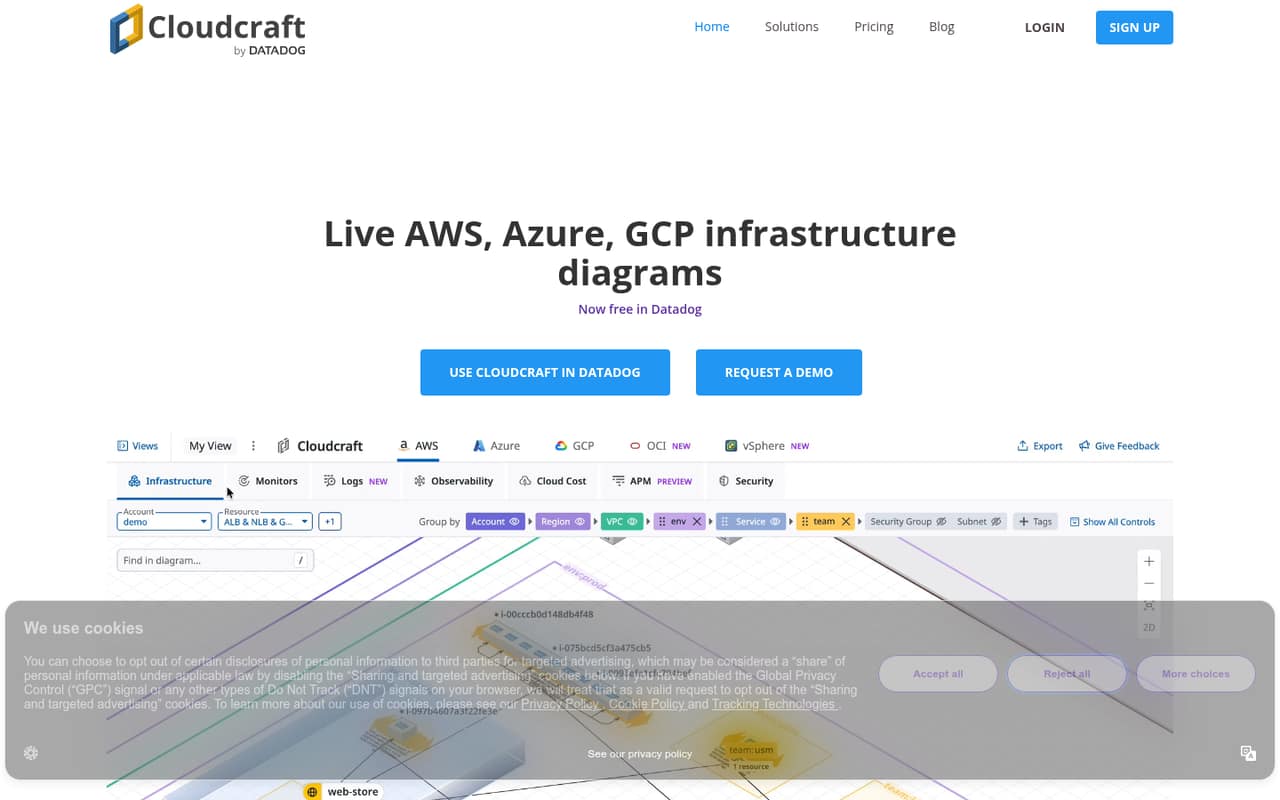
Cloudcraft turns Datadog data into live infrastructure diagrams, with overlays for alerts, logs, security findings, and costs. The pricing page lists it as free with any Datadog subscription, including unlimited users and diagrams.
For a team already using Datadog, that makes the Cloudcraft price easy to budget. The catch: the Datadog subscription is required, and its cost—and separate pricing for some overlays—needs to be checked against your existing plan.
Good fit if
- Small teams already using Datadog
- Teams mapping changing infrastructure
- Multi-account and multi-region views
Skip it if
- Teams seeking a standalone diagram tool
- Teams avoiding Datadog subscriptions
- Teams needing published total pricing
ScoresHow it rates
What works
- Free with any Datadog subscription
- Unlimited users and diagrams
- Diagrams update as infrastructure changes
- Overlays cover alerts, security, and costs
- Shows multi-account and multi-region infrastructure
What doesn't
- Requires a Datadog subscription
- Monthly and annual prices aren't published
- Overlay access corresponds to Datadog subscriptions
- Separate overlay prices aren't published
- Setup details and learning curve need confirmation
01Who Cloudcraft is for
Cloudcraft is most practical for a one-to-ten-person team that already pays for Datadog and needs a shared picture of its infrastructure. It turns data Datadog collects into diagrams that update as infrastructure changes, then puts alerts, logs, Kubernetes issues, security findings, and costs in context on those diagrams.
That can help a small team see what a resource connects to while troubleshooting, or review infrastructure across accounts and regions. Cloudcraft also covers on-premises environments, according to its product description. The pricing page lists unlimited users and diagrams at no additional Cloudcraft charge with any Datadog subscription, so a three- or five-person team does not face a Cloudcraft seat bill. But the offer is tied to Datadog: if your team does not use Datadog, compare the cost of subscribing with the value of the diagrams before treating Cloudcraft as a free tool.
02Cloudcraft free plan and trial
The pricing page lists Cloudcraft as free with any Datadog subscription. That includes unlimited users and unlimited diagrams, with overlays corresponding to Datadog products. So a small team already subscribed can add Cloudcraft without a separate per-seat charge, according to the listed plan.
The free offer does not mean Datadog itself is free: you need a Datadog subscription to use Cloudcraft, and the pricing page does not publish a monthly or annual Cloudcraft price. It also says Logs, Cloud Cost, and Cloud Security overlays correspond to Datadog subscriptions; separate prices for those overlays aren't published. Trial availability and terms aren't published either. An older Reddit discussion described Cloudcraft's diagram drawing as entirely free, but the current pricing page ties the offer to a Datadog subscription.
03What a small team pays for Cloudcraft
The pricing page lists Cloudcraft at $0 extra per month with any Datadog subscription, with unlimited users. On that basis, the Cloudcraft portion is $0 for one person, $0 for three people, and $0 for five people. There is no per-seat arithmetic to add for a small team, and the page does not list separate monthly and annual Cloudcraft rates.
That is not the same as a $0 total bill. Datadog is required, and its subscription cost is separate from the Cloudcraft offer; the pricing page does not give a Datadog price to calculate a full one-, three-, or five-person team total. The page also says Logs, Cloud Cost, and Cloud Security overlays correspond to Datadog subscriptions. Separate overlay prices aren't published, so check which Datadog subscriptions your team needs before budgeting. In short: if Datadog is already in your budget, Cloudcraft adds no listed seat cost; if not, ask Datadog for a full quote.
04Getting started with Cloudcraft
The first practical step is having a Datadog subscription, since Cloudcraft is listed as free with one and turns Datadog-collected data into diagrams. A team should also confirm which Datadog products it needs for the overlays it wants: the pricing page links Logs, Cloud Cost, and Cloud Security overlays to corresponding subscriptions.
The vendor does not publish setup time, onboarding steps, or learning-curve details on the pricing page. The product description identifies the kinds of information the diagrams can show, but does not spell out connection or configuration steps. An older r/aws discussion praised the editor, while also describing Cloudcraft at an earlier stage of development; that is a useful signal, not a guide to current setup. Before rolling it out, ask Datadog what permissions, integrations, and configuration your environment requires.
05When small teams outgrow Cloudcraft
Headcount alone may not be the reason to move on: the pricing page lists unlimited users and diagrams, so it does not show a Cloudcraft seat limit that kicks in as a team grows. The more relevant budget trigger is whether the team wants the diagrams enough to pay for Datadog, plus any subscriptions needed for its chosen overlays. The vendor does not publish separate prices for those overlays.
A growing team may also need to confirm whether Cloudcraft covers its particular providers, configuration, and operating process before making diagrams central to incident response. An older Reddit thread called the product early in its development and asked for more service blocks; another commenter noted that static diagrams are hard to keep current. Those are historical user comments, not proof of current gaps. Ask Datadog about present-day coverage and workflow needs before deciding to upgrade or switch.
Questions people ask
What does Cloudcraft do?
Cloudcraft turns data Datadog collects into live infrastructure diagrams. Teams can view alerts, logs, Kubernetes issues, security findings, and costs on diagrams spanning cloud and on-premises environments. It also supports cross-account and multi-region views, cost heatmaps, and Fleet Automation features for spotting agent blind spots and updating host configurations.
Is Cloudcraft free to use?
The pricing page lists Cloudcraft as free with any Datadog subscription, with unlimited users and diagrams. That is a $0 additional Cloudcraft charge, not a promise that your overall bill is $0. Datadog is required, and the applicable Datadog subscription costs are separate.
How many users and diagrams are included?
The listed Cloudcraft plan includes unlimited users and unlimited diagrams with any Datadog subscription. The pricing page does not give a separate seat limit or diagram limit. Check the subscriptions required for the overlays your team wants, since those are tied to Datadog products.
Do I need separate subscriptions for Cloudcraft overlays?
The pricing page says that Logs, Cloud Cost, and Cloud Security overlays correspond to Datadog subscriptions. It does not publish separate prices for those overlays. Check your Datadog plan and ask Datadog which subscriptions are needed for the views your team expects to use.
Is Cloudcraft safe for my infrastructure data?
Cloudcraft's listed features include security overlays for misconfigurations and vulnerabilities, but that does not answer how the service protects your data. The pricing page does not publish security controls or compliance details. Ask Datadog about permissions, data handling, retention, and any compliance requirements before connecting an environment.