
We may earn a commission if you buy through links on this page. It never changes a score or a ranking. How we make money
The bottom line
Good for occasional watermark cleanup; check credit use and team access before scaling.
Dewatermark.ai removes image watermarks with AI, offers a manual brush for leftover artifacts, and supports batch processing. Its free plan gives 3 credits per day, while one-time credit packs start at $7.
For a small team, the main catch is that pricing is based on credits, not published seats. Pro Model image removal uses 3 credits per image, and the vendor does not publish whether credits can be shared across a team.
Good fit if
- Teams cleaning up occasional images
- People removing varied watermark types
- Small batches without seat pricing
Skip it if
- Teams needing published seat costs
- High-volume users on free credits
- Workflows requiring guaranteed results
ScoresHow it rates
What works
- Free plan includes 3 credits daily
- Manual AI brush targets leftover artifacts
- Batch processing handles up to 50 images
- One-time credit packs do not expire
- Supports common image formats and AVIF
What doesn't
- Pro Model uses 3 credits per image
- No published per-seat team pricing
- Free credits may not suit regular volume
- Pro Pack is billed yearly
- Supported files are limited to 10MB or 6000×6000px
01Who Dewatermark.ai is for
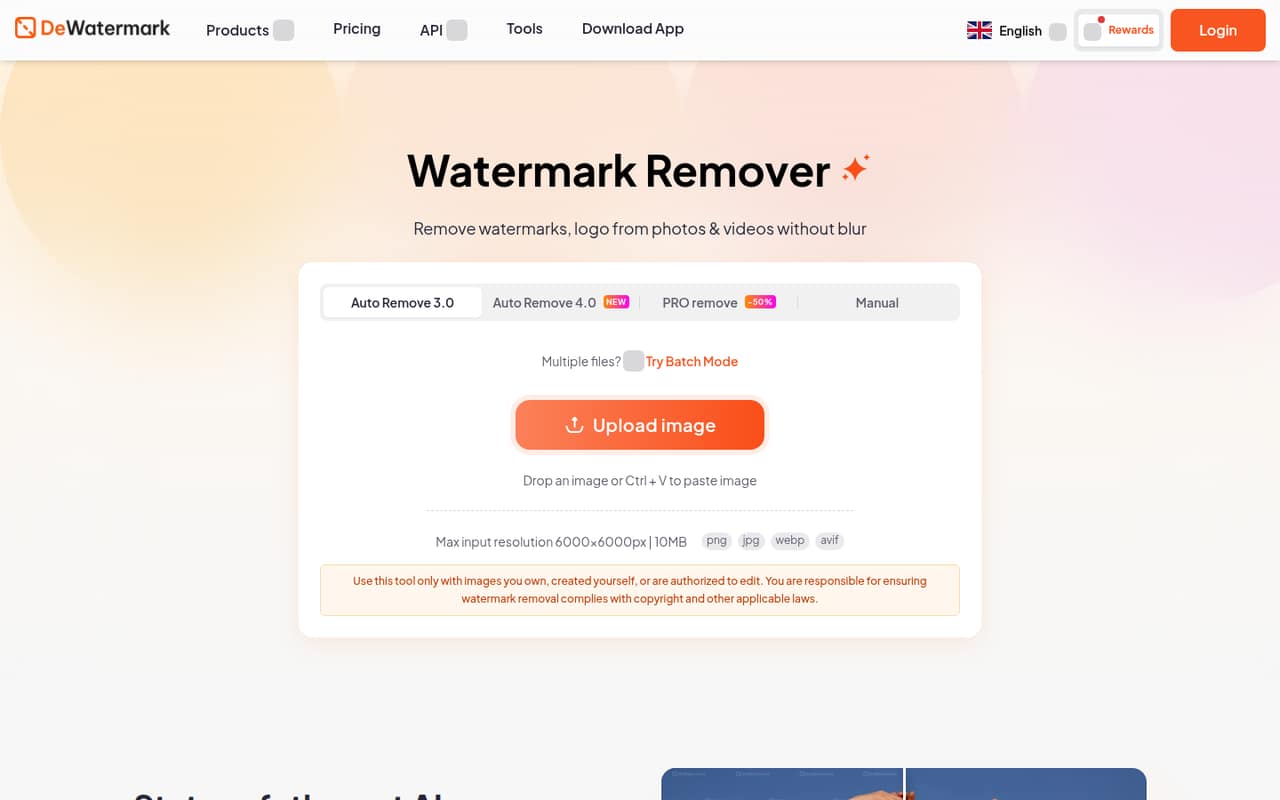
Dewatermark.ai is for a small team that occasionally needs clean images without paying for a full-time editing tool. It uses AI to remove text, logos, timestamps, signatures, emojis, and repeated overlays, then reconstructs the background. If the automatic pass leaves marks behind, a manual AI brush lets you paint over a specific area.
The free allowance may be enough for a few routine fixes. For more regular work, the pricing page lists credit packs from $7, so a budget-conscious team can buy credits as needed rather than commit to a subscription. The tool also offers batch processing for up to 50 images, browser-based editing, and mobile and desktop apps. We would check the credit cost against your typical image volume first: standard models use 1 credit per image, while the Pro Model uses 3. Teams that need a fixed per-person budget should ask whether credits can be shared, since the vendor does not publish seat pricing.
02Dewatermark.ai free plan and trial
The free plan includes 3 credits per day, AI image, video, and text removal, and a manual editor. For images, the 3.0/4.0 model costs 1 credit each; the Pro Model costs 3 credits per image. That means the daily allowance covers up to three standard-model images, or one Pro Model image, if you use the full allowance on that task.
The free plan is a recurring daily allowance, not a stated free trial. It is a practical way to try the removal and editing workflow, but regular batches can use credits quickly. The vendor also lists one-time credit packs starting at $7 for 100 credits. Those credits do not expire, making the smallest pack the lowest published paid option for users who need more than the free allowance but do not want a yearly plan.
03What a small team pays for Dewatermark.ai
The pricing page lists Pro Pack at $120 billed yearly, or $10 per month equivalent, with no auto-renewal. Credit options listed are 1.2K, 2.4K, 6K, or 12K; the price details do not map each option to an individual tier. For a one-person budget, that is $120 upfront for the year. If three or five people each need a separate Pro Pack, the arithmetic is $360 or $600 yearly, equivalent to $30 or $50 per month. That is a budgeting example, not published per-seat pricing; ask whether one credit balance can serve several users.
Pay as you go is a one-time purchase, with 100 credits for $7, 500 for $18, 1,000 for $25, and larger packs up to 100,000 credits for $800. At the smallest pack price, three separate 100-credit purchases would cost $21, and five would cost $35. A standard-model image costs 1 credit; Pro Model costs 3. The vendor does not publish a fixed monthly team plan, so estimate your image volume before choosing.
04Getting started with Dewatermark.ai
The basic workflow should be straightforward for a small team: use the browser-based editor, submit an image, choose an automatic removal model, and brush over any remaining artifacts with the manual AI tool. The listed file types are JPG, JPEG, PNG, WEBP, and AVIF, with a 10MB or 6000×6000px limit. Batch processing can handle up to 50 images and download them together as a ZIP file.
The vendor does not publish a setup time or a detailed onboarding checklist, so we would not promise a precise learning curve. There are also mobile and desktop apps, plus a Watermark Remover API and Remove Watermark MCP for workflow integration. A team that only needs occasional edits can start in the browser; teams automating repeated work should confirm API access, documentation, and any related costs with the vendor. The Reddit discussion we found here is about building a similar tool, not about onboarding to Dewatermark.ai.
05When small teams outgrow Dewatermark.ai
You may outgrow the free plan when daily work regularly exceeds 3 credits. Pro Model use makes that allowance particularly small at 3 credits per image. The paid packs and yearly Pro Pack add more capacity, but the vendor does not publish per-seat pricing or whether several team members can share credits. That makes forecasting harder as more people need access.
Volume and image limits can also become practical constraints: listed uploads top out at 10MB or 6000×6000px, and batch processing handles up to 50 images at a time. Ask the vendor about higher-volume workflows, account controls, and API or MCP pricing before building a process around them. One Reddit thread discusses creating a similar remover for a private dataset, with commenters focusing on training data and watermark placement; it does not establish how well Dewatermark.ai performs. If your team needs predictable output or a custom workflow, compare a specialist service or an internally managed process rather than assuming more credits solve every need.
From the threadsWhat users say
The available Reddit discussion is about building a similar watermark-removal tool, not reviewing Dewatermark.ai itself. It offers useful technical conversation but is too limited to support a strong verdict on customer satisfaction.
synthetic augmentation is the safest answer here
your u-net is likely overfitting to the specific spatial locations
I got much better results using SAM2 (and SAM3)
there was still lot of other positions and there could be pixel difference in placment
Questions people ask
Does Dewatermark.ai have a free plan?
Yes. The free plan includes 3 credits per day, AI image, video, and text removal, and a manual editor. Image removal costs 1 credit per image with the 3.0/4.0 model or 3 credits with the Pro Model, so the daily allowance goes further with the standard model.
How much does Dewatermark.ai cost for a small team?
The pricing page lists one-time credit packs from $7 for 100 credits and a Pro Pack at $120 billed yearly, equivalent to $10 per month. Dewatermark.ai does not publish per-seat pricing or whether teams can share credits, so confirm access and billing details before calculating a team total.
How many images can Dewatermark.ai process at once?
The listed batch feature handles up to 50 images and lets you download them together as a ZIP file. Image credit use depends on the model: the 3.0/4.0 model uses 1 credit per image, and the Pro Model uses 3 credits per image.
What image files does Dewatermark.ai support?
The listed formats are JPG, JPEG, PNG, WEBP, and AVIF. The stated upload limit is 10MB or 6000×6000 pixels. If your team works with larger files, ask the vendor whether another workflow or plan supports them.
Does Dewatermark.ai offer an API?
Yes. The feature list includes a Watermark Remover API and Remove Watermark MCP for workflow integration. The vendor does not publish API pricing in the listed plan details, so ask about access, credit use, and any separate charges before connecting it to a production workflow.