
We may earn a commission if you buy through links on this page. It never changes a score or a ranking. How we make money
The bottom line
A strong free wiki for small teams that can accept self-hosting and live without paid security features.
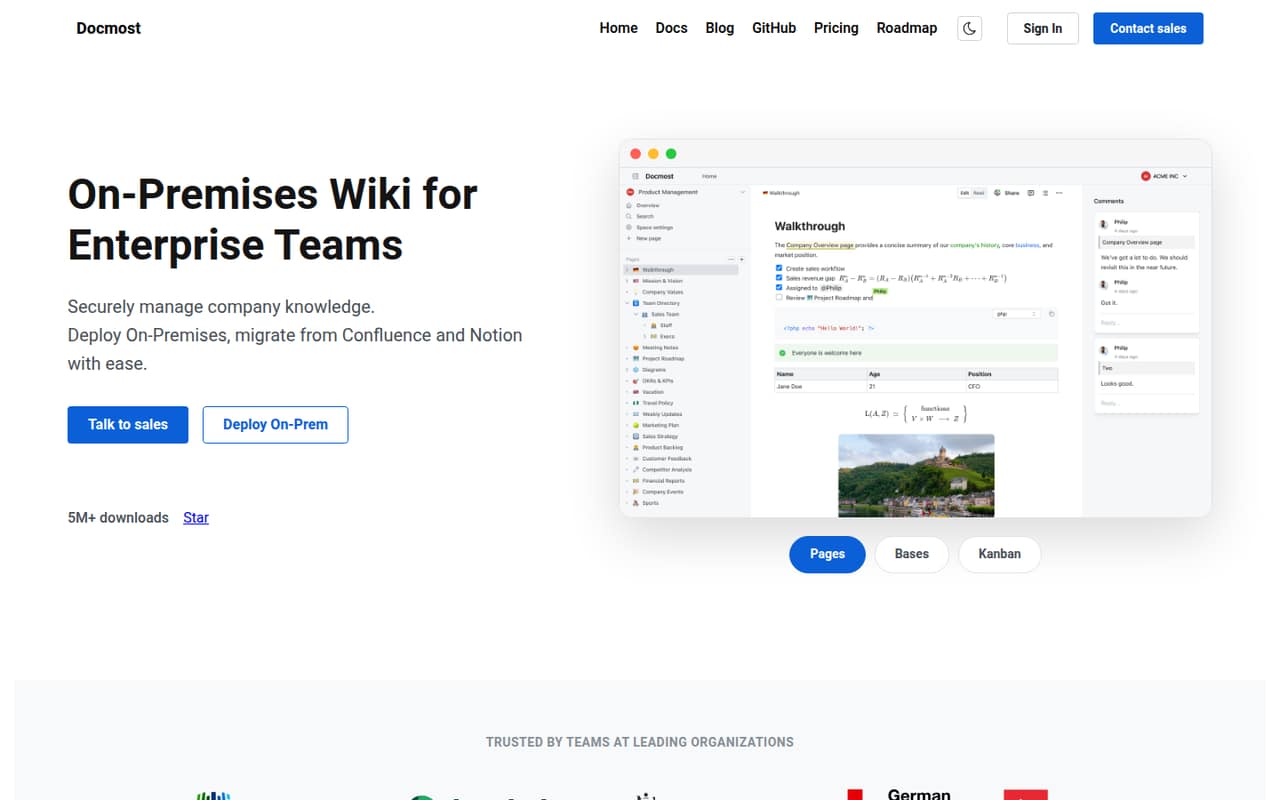
Docmost makes sense if your small team wants a shared, self-hosted knowledge base with real-time editing, search, permissions, and diagrams. The free Community plan includes unlimited spaces, collaboration, and full-text search.
The catch is the paid-plan minimum: Business costs $6 per seat per month when billed annually, but requires 10 seats. That makes the minimum annual commitment $720, even if only a few people need SSO, AI and MCP, or Confluence import.
Good fit if
- Small teams comfortable self-hosting
- Teams organizing knowledge by space
- Wiki users who want live editing
Skip it if
- Teams needing paid SSO for a few users
- Teams that want vendor-hosted setup
- Notion users needing databases
ScoresHow it rates
What works
- Community includes unlimited spaces
- Real-time collaboration is included free
- Full-text search is included free
- Built-in Draw.io, Excalidraw, and Mermaid
- Supports migration from several wiki formats
What doesn't
- Business requires a 10-seat minimum
- Monthly Business billing price is not published
- SSO is listed on Business, not Community
- Self-hosting adds server setup and upkeep
- A Reddit commenter says it lacks databases
01Who Docmost is for
Docmost is for teams that want to run their own company wiki rather than use a hosted knowledge base. A team of one to 10 can use Community for free, with unlimited spaces, real-time collaboration, and full-text search. That suits a small group collecting procedures, project notes, and internal documentation without adding another per-seat bill.
The product is more than a page editor: it includes team spaces, access controls, page verification, diagrams, and an AI assistant that can work with self-hosted or cloud language models. The trade-off is that your team has to deploy Docmost on its own servers. If you need paid features such as SSO or Confluence import, Business is the entry point, and its 10-seat minimum makes it a costly fit for a team of three or five. We’d shortlist it when self-hosting matters more than a low-cost paid plan.
02Docmost free plan and trial
Community is free and includes unlimited spaces, real-time collaboration, and full-text search. That is a useful core for a small team building an internal wiki. The pricing page does not publish a seat limit, so ask Docmost if the number of users matters to your deployment.
The plan comparison lists SSO (SAML 2.0/OIDC/LDAP), AI and MCP, Confluence import, and email support under Business, not Community. If those are must-haves, the free plan is not the complete fit. Business starts at $6 per seat per month with annual billing, but requires at least 10 seats. A free trial is not listed. The product is designed for deployment on your own servers, so Community is free software access, not a hosted service price.
03What a small team pays for Docmost
Business is listed at $6 per seat per month when billed annually. At the per-seat rate, one person works out to $6 per month or $72 per year; three people, $18 per month or $216 per year; and five people, $30 per month or $360 per year. Those are rate calculations, not purchasable team totals: Business requires at least 10 seats. The actual minimum is therefore $60 per month equivalent, paid annually as $720.
The monthly billing price is not published, so we can’t give a monthly-pay total. Community costs $0 and avoids that commitment if its feature set is enough. Business adds SSO, AI and MCP, Confluence import, and email support. Enterprise has custom pricing and adds SCIM, audit logs, SIEM, and priority support. There are no add-on prices listed; ask Docmost for a quote if you need Enterprise or want to confirm whether other costs apply to your deployment.
04Getting started with Docmost
Docmost is an on-premises product, so getting started means arranging a server deployment rather than simply inviting a team to a hosted workspace. The vendor does not publish a typical setup time in the information available here; check the docs for the current deployment prerequisites and maintenance requirements before choosing it. A team without someone comfortable managing its own server should count that work as part of the cost.
Once deployed, the product is organized around spaces and pages, with real-time editing, permissions, and search. Its listed migration sources include Confluence, Notion, HTML, and Markdown; Confluence import is specifically listed as a Business feature. Teams can also use Draw.io, Excalidraw, and Mermaid diagrams. The product description says the AI assistant can use self-hosted or cloud language models, but the pricing page lists AI and MCP under Business. Reddit users describe the interface as good and easy to use, though those comments do not establish how long setup takes.
05When small teams outgrow Docmost
The main trigger to upgrade is a need for Business features, not a stated Community space limit. The plan comparison puts SSO, AI and MCP, Confluence import, and email support on Business. For a team under 10, that means paying for the 10-seat minimum even when only a few people use the features. The annual minimum comes to $720, and the monthly billing price is not published.
A growing organization may need Enterprise features such as SCIM, audit logs, SIEM, or priority support; those prices are custom. Some Reddit users praise Docmost’s interface and multiple spaces, while others object to paid SSO and the seat minimum. One commenter also says Docmost lacks databases, so teams that rely on database-style records should check that requirement before moving their knowledge base. For a small team, outgrowing Community may mean comparing the paid minimum with another tool or keeping Docmost for documentation while handling other workflows elsewhere.
From the threadsWhat users say
Reddit comments show real appreciation for Docmost’s interface and wiki features, alongside frustration with paid SSO and the Business seat minimum. Sentiment is mixed rather than uniformly negative: some users say the pricing is reasonable, while others say it puts them off recommending the tool.
The UX is pretty damn good
easy to use, clean, stable and regularly updated
Yep. Completely scummy pricing practices. Absolutely despise their model
Seems reasonable to me as well
Questions people ask
Is Docmost free for a small team?
Yes. The Community plan is free and lists unlimited spaces, real-time collaboration, and full-text search. The pricing page does not publish a seat limit. Features such as SSO, AI and MCP, Confluence import, and email support are listed on Business instead.
How much does Docmost Business cost?
Business is listed at $6 per seat per month when billed annually, with a 10-seat minimum. That makes the minimum $60 per month equivalent, or $720 per year. The monthly billing price is not published.
Can a team of three buy Docmost Business?
The listed minimum is 10 seats, so a three-person team cannot buy Business at the cost of just three seats. The minimum annual-billing commitment works out to $720 per year. A three-person team can use Community free if its listed features are enough.
Does Docmost support SSO?
SSO is listed as a Business feature, with SAML 2.0, OIDC, and LDAP named on the pricing page. Business has a 10-seat minimum. Community’s listed inclusions do not include SSO.
Can Docmost import content from Confluence or Notion?
Docmost’s product description lists migration support from Confluence, Notion, HTML, and Markdown. The pricing page specifically lists Confluence import as a Business feature. Check with Docmost about the requirements for your source and plan before planning a migration.
Sources
- Docmost homepage
- Docmost pricing page
- Reddit: Docmost - greedy pricing and hiding source code
- Reddit: I am looking for a "wiki" or "knowledge base."
- Reddit: Docmost is one of the best open source notion alternative out there
- Reddit: Looking for a self-hosted documentation tool for my homelab (Wiki.js, Docmost alternatives?)