
We may earn a commission if you buy through links on this page. It never changes a score or a ranking. How we make money
The bottom line
Five users can start free, but check group limits and upgrade prices before building around Glue.
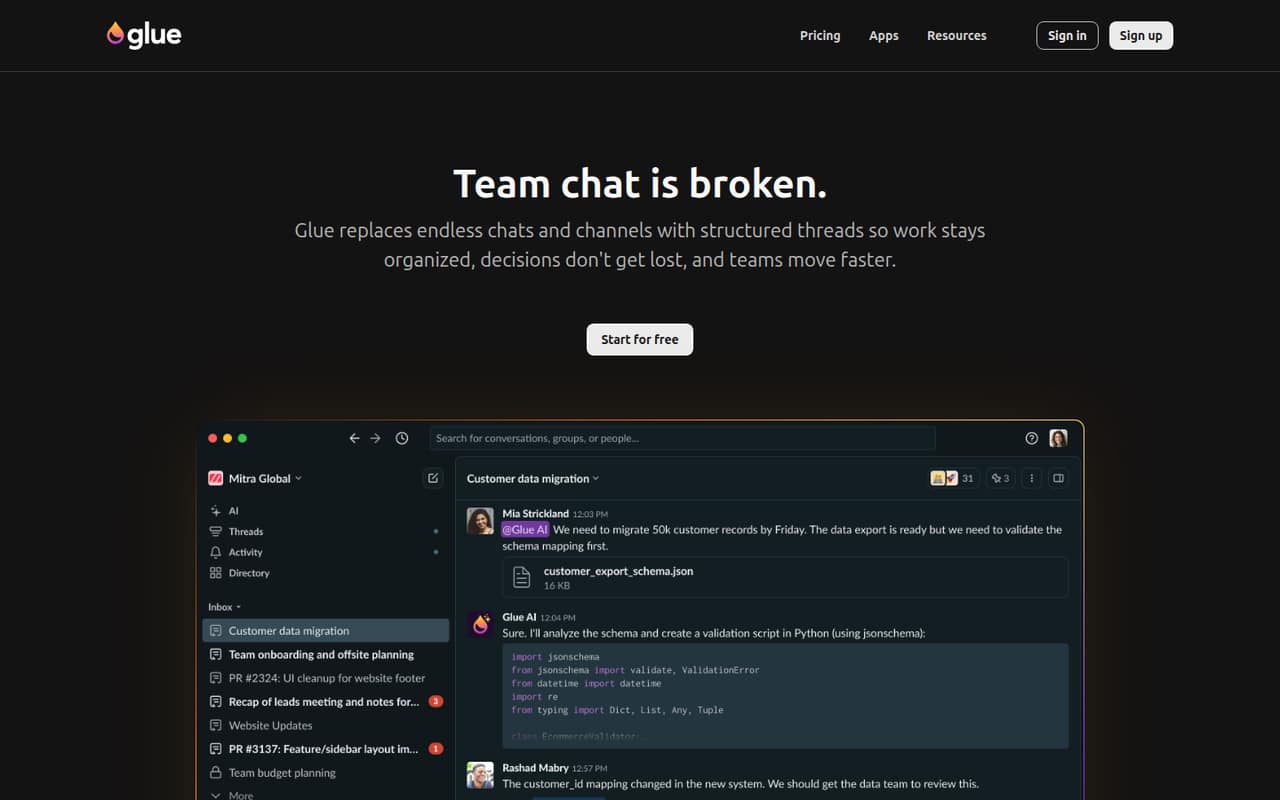
Glue replaces channel-based chat with named, persistent threads that teams can close when work is done. AI agents can help summarize, find context, and generate ideas inside conversations, and the homepage says Slack history can be imported.
The Startup plan covers five users free, with limits of five groups and one admin. Above five users, the listed price is $6 per user monthly. That is an appealing entry point, but teams should confirm Business pricing if they need more groups, admins, or imports.
Good fit if
- Teams tired of channel sprawl
- Groups of up to five people
- Teams curious about AI in chat
Skip it if
- Teams needing many groups for free
- Organizations requiring published upgrade prices
- Teams needing enterprise controls on Startup
ScoresHow it rates
What works
- Five users are free on Startup
- Unlimited messages and history on Startup
- Unlimited integrations on Startup
- Persistent threads keep work organized
- AI agents can summarize and find context
What doesn't
- Startup is limited to five groups
- Startup includes only one admin
- Users beyond five cost $6 monthly each
- Business and Enterprise prices are not published
- Annual billing prices are not published
01Who Glue is for
Glue is for small teams that want chat organized around pieces of work rather than channels and an ongoing stream of messages. A founder and a few teammates can keep each project or question in a named thread, build context there, and close it when the work is finished. The free Startup allowance makes it worth considering for a team of up to five watching its software budget.
The tool also suits teams that want AI help inside conversations: Glue says members can mention @Glue or @Cursor to summarize, pull context, and generate ideas. That is useful if those tasks belong in the same place as team discussion. Startup has only five groups and one admin, so it fits a small, structured workspace better than a team that needs many separate work areas. If you need Slack history imported or more admins and groups, check Business requirements and pricing before you commit.
02Glue free plan and trial
Startup includes five users free, along with five groups, one admin, unlimited messages and history, and unlimited integrations, according to the pricing page. For a team of one to five, the listed user charge is $0 per month as long as you stay within those limits. The plan is a practical way to try persistent threads without paying for seats.
The boundaries are clear: you cannot add a sixth group or second admin on the listed Startup allowance. Users beyond the five free seats cost $6 each per month. Glue also lists a 30-day free trial, but the trial's plan coverage and terms are not published. Ask Glue what the trial includes and whether it changes any Startup limits. Business adds unlimited groups and admins, but its price is not published.
03What a small team pays for Glue
Startup lists five free users, then $6 per user per month for users beyond those five. That makes a one-person team $0 monthly, a team of three $0, and a team of five $0, provided each stays within Startup's five-group and one-admin limits. A six-person team has one paid seat, or $6 per month; a ten-person team has five paid seats, or $30 per month. These are monthly calculations from the listed per-user price.
Annual billing is not published, so we cannot give an annual total or assume a discount. Startup lists unlimited integrations, messages, and history without a separate charge. Business includes unlimited groups and admins, imports up to 100 MB, and premium AI models, but Glue does not publish its price. Enterprise includes unlimited data imports and organization controls, but its price is also not published. If you need those upgrades, ask for a quote before budgeting.
04Getting started with Glue
The basic workflow is easy to describe: create named threads for work, keep discussion and context in each one, and close threads when the work is done. Glue says members can mention @Glue or @Cursor in a thread for summaries, context, and ideas. Its homepage also says Slack history can be imported, while the pricing page lists data imports up to 100 MB on Business. Confirm which plan supports the Slack import you need.
Glue does not publish setup time or a step-by-step onboarding guide in the material available to us, so we would not promise a same-day migration. Startup lists unlimited integrations, but the specific integrations and setup steps are not listed there. Before switching, ask which tools connect to Glue, what Slack import includes, and whether your team needs an admin to configure agents. The basic chat structure should be straightforward to explain, but the migration effort depends on your history and integrations.
05When small teams outgrow Glue
The first pressure point is Startup's five-group cap. If your team needs more work areas, Business lists unlimited groups and admins, plus imports up to 100 MB and premium AI models. The second is staffing: each user after the first five adds $6 per month on Startup, so a ten-person team pays $30 monthly before any upgrade. Annual billing is not published.
A team may also need Enterprise when it requires unlimited data imports, SAML and SCIM, priority support, or white-glove onboarding; those are the listed Enterprise inclusions. Glue does not publish Business or Enterprise prices, so a growing team cannot compare those tiers using a public per-seat total. Ask for a quote and confirm which plan supports your import and AI needs. If Startup's group or admin limits are already getting in the way, price the upgrade before moving more team conversations into Glue.
Questions people ask
Is Glue free for a small team?
The Startup plan includes five users free, with five groups, one admin, unlimited messages and history, and unlimited integrations. A team of up to five can pay $0 per month if those limits work for it. Users beyond the first five cost $6 per user monthly.
What does Glue cost for a team of 10?
Startup includes five users free, then lists $6 per user per month for additional users. A ten-person team therefore has five paid seats, which comes to $30 per month. Business pricing is not published, so ask Glue for a quote if you need its extra features.
Can Glue import Slack history?
Glue's homepage says Slack history can be imported. The pricing page lists Business data imports up to 100 MB, but does not specify whether or how the Slack import fits that limit. Ask Glue which plan supports your migration and what data the import brings over.
What are Glue's Startup plan limits?
Startup includes five users free, five groups, and one admin. It also lists unlimited messages and history and unlimited integrations. Users beyond the five free seats cost $6 each per month. Business lists unlimited groups and admins, but its price is not published.
Does Glue offer a free trial?
Glue lists a 30-day free trial. The trial's plan coverage and terms are not published, so confirm what features and limits apply before starting. Startup also includes five users free, which can provide a no-cost option for a small team within its listed limits.