
We may earn a commission if you buy through links on this page. It never changes a score or a ranking. How we make money
The bottom line
A practical browser-based status board, if your team can justify the $15 monthly starting plan.
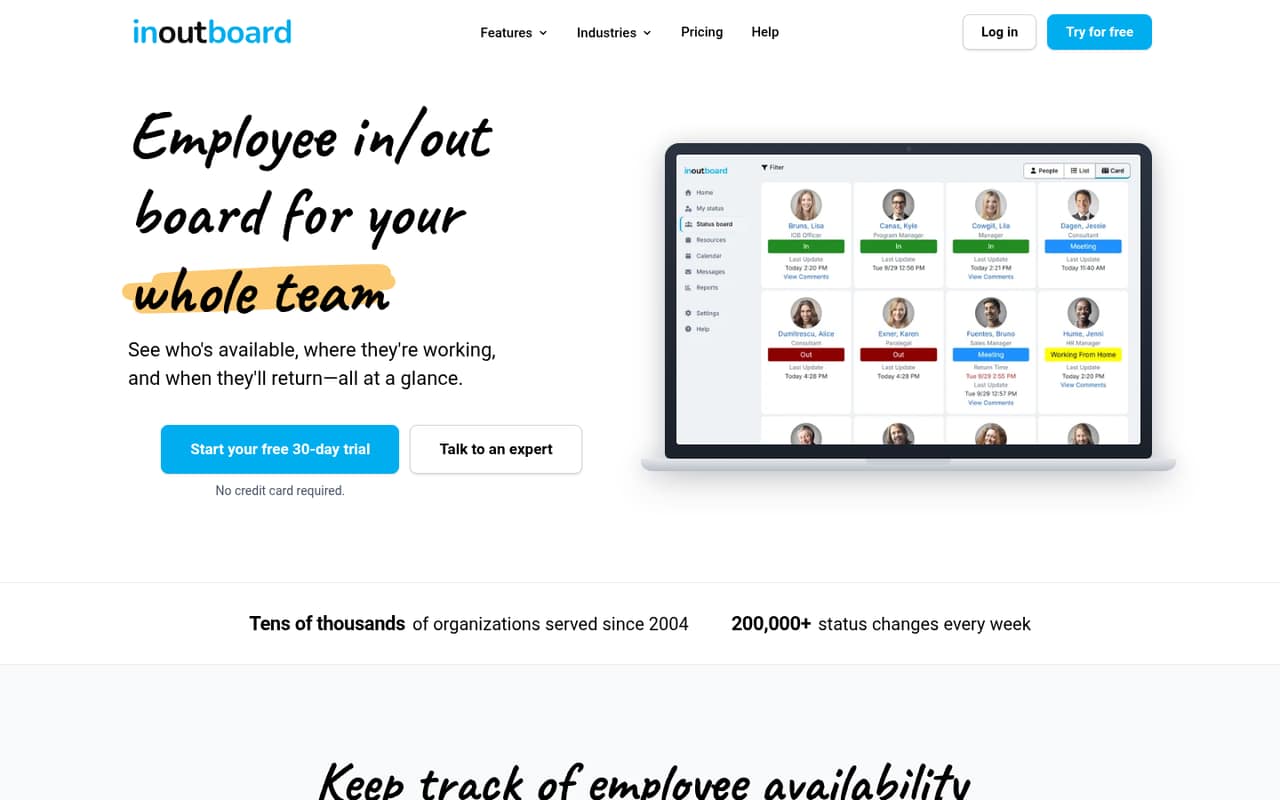
InOutBoard gives small teams one shared place to see who is in, where people are working and when they expect to return. It also includes resource reservations, calendar events, messages and overdue alerts on every plan.
There’s no free plan. The cheapest option is $15 a month for up to 10 users, or $13.75 a month equivalent with annual billing. That is reasonable for a team that needs a dedicated status board, but more than a solo user needs to pay.
Good fit if
- Small offices tracking daily availability
- Teams sharing rooms and equipment
- Groups wanting a simple browser board
Skip it if
- Solo users seeking a free tool
- Teams needing published integrations
- Organizations wanting per-seat billing
ScoresHow it rates
What works
- Every plan includes all listed features
- Shared board works in a browser
- Room and equipment reservations included
- Calendar events can update status
- Plans start at $15 per month
What doesn't
- No free plan
- Smallest plan charges for up to 10 users
- No per-seat plan is listed
- Setup effort and integrations aren't published
- Private hosting starts at $10,000 annually
01Who InOutBoard is for
InOutBoard suits a small office or team of up to 10 people that needs a shared answer to “Who’s in, where are they, and when will they be back?” The browser-based board lets employees update their work status and expected return time, so coworkers can check availability without tracking people down.
It is also a fit for teams that share rooms or equipment: the product includes resource reservations and availability checks. Calendar events can update a person’s status automatically when enabled, and the board also offers messages and overdue alerts. The pricing page lists all features on every plan, so a small team does not have to pay more to get reservations or alerts. The catch is the minimum price: there’s no free plan, and the least expensive subscription covers up to 10 users. A team of one to five pays the same base price as a team using all 10 seats.
02InOutBoard free plan and trial
InOutBoard has no free plan, per the pricing information. Instead, each listed standard plan includes a 30-day free trial. The entry plan covers up to 10 users and includes all features, including the status board, resource reservations, calendar events, messages and overdue alerts. The pricing page also lists the ability to cancel any time for the 10-user and 25-user plans.
After the trial, the cheapest way to keep using InOutBoard is the 10-user plan: $15 per month when billed monthly, or $13.75 per month equivalent with annual billing. Annual billing costs the equivalent of 11 months for 12 months of service. The trial is a way to try the paid plan, not a permanently free option. A team that only needs one or a few seats still pays for the plan’s capacity of up to 10 users.
03What a small team pays for InOutBoard
The pricing page lists the 10-user plan at $15 per month with monthly billing, or $13.75 per month equivalent when billed annually. That works out to $180 for 12 monthly payments, compared with $165 for a year billed annually. The annual rate is the equivalent of 11 months for 12 months of service.
InOutBoard sells this as capacity for up to 10 users, not as individual seats. A one-person team still pays $15 monthly or $13.75 monthly equivalent annually. For three people, that is effectively $5 per person per month on monthly billing, or about $4.58 on annual billing. For five, it is $3 or $2.75 per person, respectively. Those are simple per-person calculations; the subscription charge remains the full plan price.
The next tier is up to 25 users, at $30 monthly or $27.50 monthly equivalent annually. Custom private hosting starts at $10,000 per year, billed annually in advance, with price depending on user count. Custom development is billed separately at an hourly rate.
04Getting started with InOutBoard
The basic use case is straightforward to understand: employees update their status and expected return time, then coworkers view the shared board in a browser. The product also describes reservations, messages and overdue alerts, so teams can use the same service for more than a basic in/out list.
The vendor does not publish a setup-time estimate or a detailed account of onboarding steps in the available product details. It also does not publish an integration list. Calendar events can update status automatically when enabled, but the product details do not specify which calendar services connect or how to configure them. We would confirm those points with the vendor before relying on calendar automation.
For day one, a team can start with the core board and add other features as needed; the pricing page says every feature is included on every plan. Ask the vendor about user setup, calendar compatibility and any training or support included before rollout.
05When small teams outgrow InOutBoard
The clearest reason to upgrade is headcount. The smallest plan covers up to 10 users; the next listed option covers up to 25 for $30 per month or $27.50 monthly equivalent with annual billing. Larger tiers cover 50 users for $50 monthly or $45.83 annually equivalent, and 100 users for $60 monthly or $55 annually equivalent. The annual figures reflect the listed 11-month cost for 12 months of service.
Teams may also outgrow the product if they need a specific integration, onboarding process or reporting capability that is not spelled out in the product details. The vendor lists custom fields and reports with its private solution, but that option starts at $10,000 per year and depends on user count; custom development costs extra at an hourly rate.
Before moving to a larger plan, check how many people need board access and whether the 25-user tier covers expected growth. If your team needs capabilities beyond the published feature set, ask the vendor what is available and what it will cost.
Questions people ask
Does InOutBoard have a free plan?
No. The pricing information lists no free plan. InOutBoard offers a 30-day free trial on its standard plans, including the 10-user option. After the trial, the cheapest listed plan costs $15 per month with monthly billing or $13.75 per month equivalent when billed annually.
How much does InOutBoard cost for a small team?
The lowest plan costs $15 per month and covers up to 10 users. Annual billing reduces the monthly equivalent to $13.75, billed annually. Whether your team has one, three or five people, the listed subscription price is the same; per-person figures are just the plan price divided by the number of users.
What features are included in InOutBoard?
The product includes an employee status board, status updates, resource reservations, calendar events that can update status when enabled, messages and overdue alerts. The pricing page says every feature is included on every plan, so the listed tiers differ by user capacity rather than feature access.
Can InOutBoard update someone’s status from calendar events?
Yes. The product description says personal calendar events can update status automatically when enabled. It does not specify which calendar services are supported or how to configure the connection. Ask the vendor to confirm compatibility with your team’s calendar before depending on automatic updates.
What happens when my team exceeds 10 users?
The next listed plan covers up to 25 users and costs $30 per month or $27.50 per month equivalent with annual billing. Larger plans cover 50 users and above. If your needs go beyond the listed plans, the vendor also offers a custom private solution; pricing depends on user count.