
We may earn a commission if you buy through links on this page. It never changes a score or a ranking. How we make money
The bottom line
Worth considering for complex time tracking; small teams should budget for add-ons and confirm setup needs.
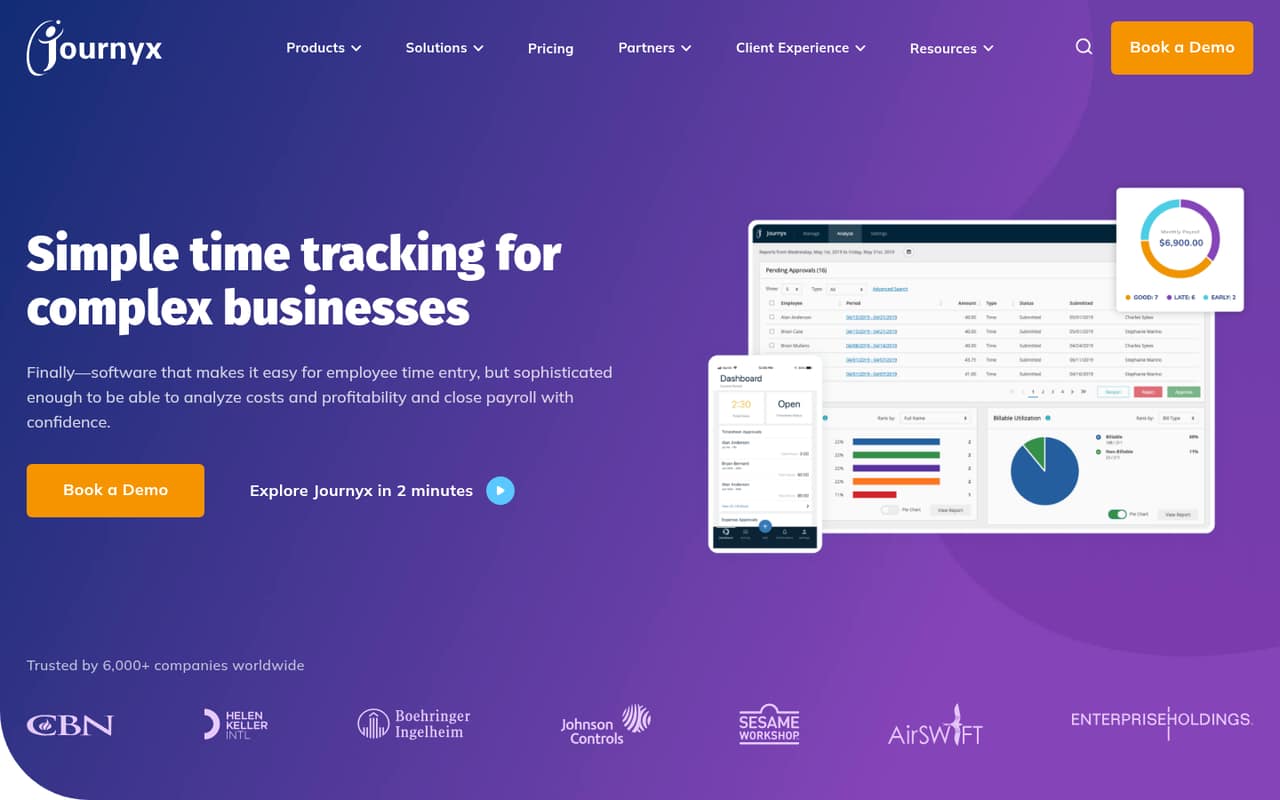
Journyx combines project time tracking, attendance, approvals, reporting, scheduling, and resource planning. That breadth may suit a small team juggling client billing and project costs, but could be more system than a team that just needs a basic timer.
There’s no free plan, and the vendor doesn’t publish a free-trial offer. The pricing page lists attendance at $5 per user monthly and project time tracking at $13. Annual prices and add-on costs aren’t published, so confirm the full bill before committing.
Good fit if
- Teams tracking project costs
- Businesses managing attendance and schedules
- Client-billing teams needing time records
Skip it if
- Teams looking for a free tracker
- Anyone needing a simple timer
- Buyers requiring predictable add-on costs
ScoresHow it rates
What works
- Tracks time, expenses, and equipment for projects
- Supports web, mobile, and physical time clocks
- Offers custom rules for auto-filling timesheets
- Includes simple and multi-level approval workflows
- Reports on attendance, costs, and project data
What doesn't
- No free plan
- Free-trial availability isn't published
- Annual prices aren't published
- Add-on prices aren't published
- Project tracking costs more than attendance
01Who Journyx is for
Journyx is aimed at organizations that need more than a basic start-and-stop timer. For a 1–10-person team, it makes the most sense when people track time against projects, bill clients, manage attendance, or need approvals and cost reports. The software also covers expenses, equipment, schedules, and resource planning, so it can bring several time-related jobs into one system.
That breadth has a price: the project time tracking plan is $13 per user monthly, and add-ons may increase the bill. A team that only needs to record hours may find the $5 attendance plan closer to its needs—or may not need a dedicated system with this many functions. We’d shortlist Journyx when project costs, payroll-related time records, or client billing make detailed tracking important. Before choosing it, decide which modules you actually need and ask the vendor to quote the complete setup.
02Journyx free plan and trial
Journyx has no free plan. The vendor doesn’t publish a free-trial offer, so ask directly whether your team can try the software before signing and whether any trial has limits or charges.
The cheapest listed way in is the Time and attendance plan at $5 per user per month. That’s $5 monthly for one person, or $15 for three, before any add-ons. If you need project time tracking, the listed plan is $13 per user monthly instead. These prices are the entry point, not necessarily the full cost: Journyx lists onboarding, integrations, additional modules, and time clocks as add-ons, with their prices not published.
03What a small team pays for Journyx
The pricing page lists two monthly plans in US dollars. Time and attendance costs $5 per user, while project time tracking costs $13 per user. At those rates, one person pays $5 or $13 monthly; a three-person team pays $15 or $39; and five people pay $25 or $65. Those totals are per-seat calculations before add-ons.
Annual billing prices aren’t published, and Journyx notes that contract length may affect costs. The vendor also lists onboarding, integrations, additional modules, and time clocks as add-ons, but doesn’t publish their prices. A small team using project tracking alongside clocks or integrations should ask for a written quote that covers all required items, not just the per-user rate. There’s no published price here for a combined plan, so confirm which plan and modules match your intended workflow. The attendance plan is the lower-cost entry point, but it isn’t a substitute for the separately listed project time tracking plan.
04Getting started with Journyx
Journyx describes features that involve more than recording hours: custom timesheet rules, approval workflows, reports, schedules, project costs, and resource planning. A team will need to decide how employees enter time, who approves it, and what project or attendance information it needs to report. That setup is likely to take more planning than a basic timer, though the vendor doesn’t publish a setup timeline or the amount of training required.
Journyx lists integrations as an add-on, but doesn’t publish its price here. Before starting, identify the payroll, project, or other business systems you need to connect and ask which integrations are available, what they cost, and who handles configuration. The feature description includes web and mobile time entry as well as physical time clocks; clock pricing is also not published. Ask the vendor to confirm the setup work and any extra charges for your chosen combination.
05When small teams outgrow Journyx
Journyx’s listed features cover complex time and project workflows, so growth alone doesn’t necessarily mean you’ll outgrow it. The likely pressure point for a budget-conscious team is cost: at the listed rates, each added user adds $5 monthly on attendance or $13 on project time tracking, before add-ons. Five project-tracking seats come to $65 monthly before any other charges.
The pricing page doesn’t publish annual rates, add-on prices, or a seat ceiling. That makes it harder to forecast costs as you add people, time clocks, integrations, or modules. Ask for a quote at your expected team size and confirm how costs change as needs expand. If you only use basic time entry, you may be paying for more workflow than you need; if you need additional modules, check that the total still fits your budget. Consider another tool if the full quote is too high or required connections and setup aren’t a fit.
Questions people ask
Does Journyx have a free plan?
No. Journyx doesn’t offer a free plan in the listed pricing. The lowest listed price is $5 per user per month for Time and attendance. A team that needs project time tracking pays the listed $13 per user monthly rate instead, before any add-ons.
How much does Journyx cost for five people?
At the listed monthly per-user rates, five people cost $25 for Time and attendance or $65 for Project time tracking. Those totals exclude add-ons. Journyx doesn’t publish annual prices, and contract length may affect costs, so request a quote for your preferred term.
Does Journyx offer a free trial?
Journyx doesn’t publish a free-trial offer in the pricing information. Ask the vendor whether a trial is available, how long it lasts, and whether it includes the plan and features your team needs before deciding.
What can Journyx track?
Journyx describes project time, expenses, equipment, and attendance tracking. It also lists timesheet auto-fill rules, approvals, reporting, scheduling, and resource management. The features available to your team may depend on the plan and modules you choose, so confirm that with the vendor.
Does Journyx charge extra for integrations or time clocks?
Journyx lists integrations and time clocks as add-ons, but their prices aren’t published. Ask which integrations are available for your systems and whether setup is included. Request a quote that includes any clocks, onboarding, and additional modules you expect to use.