
We may earn a commission if you buy through links on this page. It never changes a score or a ranking. How we make money
The bottom line
Kirby is worth a look for a custom website, but confirm seat limits before you buy.
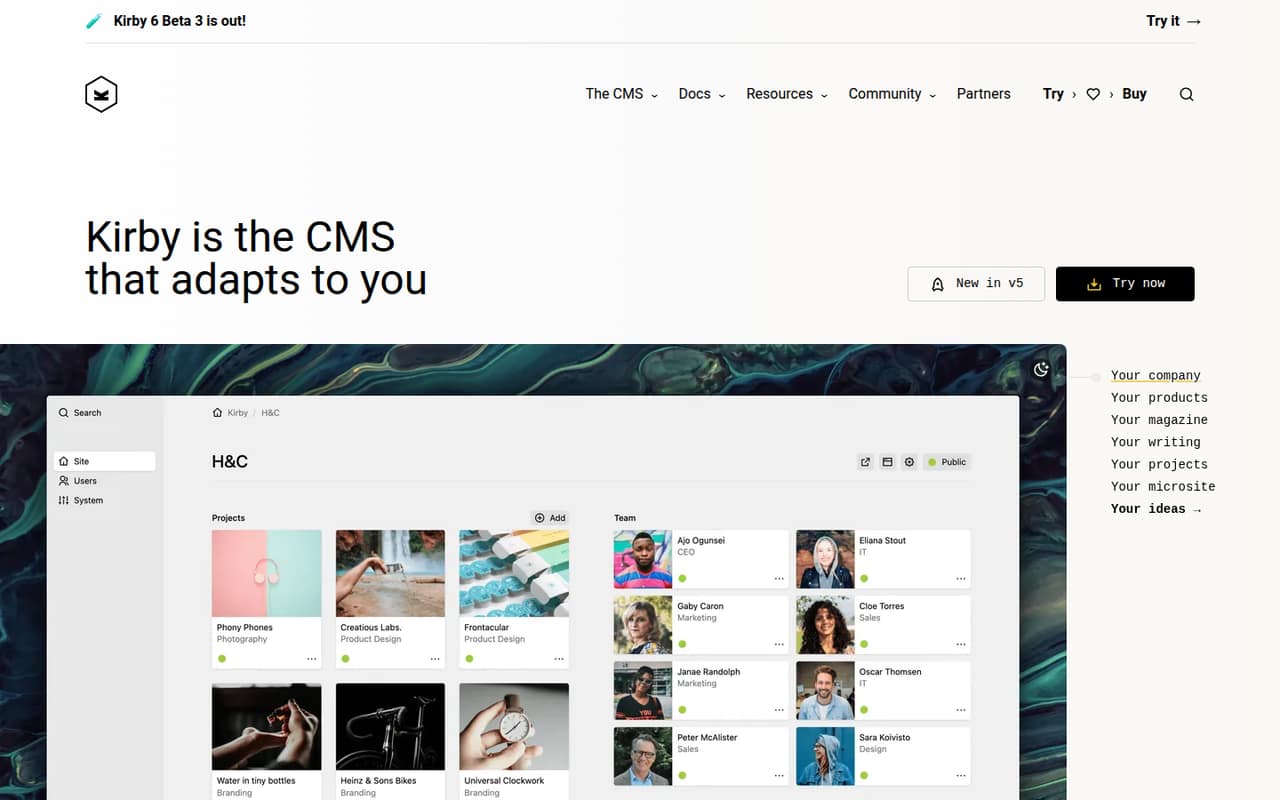
Kirby is a customizable CMS for websites and digital projects, with a Panel for managing content. Its homepage example shows projects, team members, clients and site pages, and lists PHP 8 and Vue.js.
There’s no free plan. Kirby Basic costs $115 one-time per site, while Kirby Enterprise costs $399. Both include all features, but the vendor doesn’t publish seat limits, so ask how your team can share one installation.
Good fit if
- Teams building a custom website
- Small organizations under €1 million
- Teams comfortable asking about seat limits
Skip it if
- Teams that need a free CMS
- Buyers who require published seat limits
- Teams wanting monthly billing
ScoresHow it rates
What works
- One-time pricing instead of monthly billing
- Kirby Basic costs $115 per site
- All features are included in both plans
- Content can be customized to client needs
- The Panel is described as simple
What doesn't
- No free plan is listed
- Seat limits are not published
- Each license covers one site
- Trial features and limits are not published
- The vendor doesn’t publish setup time
01Who Kirby is for
Kirby is a customizable CMS for a small team building or managing a website or another digital project. It makes the most sense when you have a developer or designer involved, want control over how content is organized, and can spend money upfront instead of paying a monthly subscription. The homepage presents Kirby to developers, designers, creators and clients, and its example groups content into projects, team members, clients and site pages.
For an organization under €1 million in annual revenue or funding, Kirby Basic costs $115 one-time per site. That can be a manageable purchase for one website, but don’t assume the price covers any number of teammates: the vendor doesn’t publish a seat limit. If your organization is over that threshold, Kirby Enterprise costs $399 per site. Ask Kirby how many people can use one installation before comparing the cost with other CMS tools.
02Kirby free plan and trial
Kirby doesn’t list a free plan. It does list a trial with no time limit, but the vendor doesn’t publish what features the trial includes or whether it has other limits. Confirm those details before planning a site around a trial.
The cheapest listed purchase is Kirby Basic at $115 one-time per site. It covers one installation on one domain and includes all features. It’s for organizations under €1 million in annual revenue or funding. The vendor doesn’t publish a seat limit, so a team should check whether everyone who needs the Panel can work under one license. If your organization doesn’t qualify for Basic, Kirby Enterprise is the listed option at $399 one-time per site.
03What a small team pays for Kirby
Kirby charges per site, not per seat, and lists no monthly or annual subscription price. One person using one site would pay $115 one-time for Kirby Basic if the organization is under €1 million in annual revenue or funding. A team of 3 or 5 using that same site also sees a listed price of $115, but the seat limit isn’t published; confirm that the license fits your team. If each person needs a separate site, each site needs its own license.
Kirby Enterprise costs $399 one-time per site for organizations of any size. Both plans include all features and one installation on one domain. The optional three-year update extension is $65 for Basic or $285 for Enterprise, excluding VAT; prices in euros are also listed. Kirby lists a 5% volume discount for 5 or more licenses, but doesn’t publish overage costs. There are no monthly or annual prices to compare.
04Getting started with Kirby
Plan for a developer or designer to shape the site and its content structure: Kirby is presented as customizable, and its homepage example separates projects, team members, clients and site pages. That gives a small team a useful picture of the kind of content it can organize, but the vendor doesn’t publish a typical setup time or the effort required for a particular project.
The homepage example lists PHP 8 and Vue.js, but doesn’t describe them as required integrations or explain a day-one integration list. The vendor also doesn’t publish a setup checklist or learning-curve estimate in the pricing details. Before committing, ask what technical skills your site needs, which integrations are supported for your project, and whether the trial includes the features your team plans to use. The Panel is described by a customer quote as simple, but that doesn’t establish how easy your own setup will be.
05When small teams outgrow Kirby
The first reason to revisit Kirby is organizational eligibility: Basic is for organizations under €1 million in annual revenue or funding. Kirby Enterprise, at $399 one-time per site, has no revenue limit. The two plans list all features, so the published pricing doesn’t show a feature-based upgrade path for teams that need more capabilities.
Team size is harder to judge because the vendor doesn’t publish seat limits or overage costs. A growing team should confirm whether everyone who needs access can use the same installation before buying, rather than assuming the per-site price covers unlimited people. If you add separate websites, the listed license is per site, and a 5% volume discount applies to 5 or more licenses. Kirby may stop being a fit if your team needs published per-seat pricing, clear capacity limits or a monthly subscription; ask the vendor about those requirements before you scale.
Questions people ask
Does Kirby have a free plan?
Kirby doesn’t list a free plan. It lists a trial with no time limit, but the vendor doesn’t publish the trial’s feature coverage or other limits. The cheapest listed purchase is Kirby Basic at $115 one-time per site for eligible organizations.
How much does Kirby cost for a small team?
Kirby Basic is $115 one-time per site for organizations under €1 million in annual revenue or funding. The vendor doesn’t publish a seat limit, so confirm whether one site license covers your team. Kirby Enterprise costs $399 per site for organizations of any size.
Does Kirby charge per user?
The listed plans are priced per site, not per user. Each covers one installation on one domain, and the vendor doesn’t publish a seat limit or overage costs. Ask Kirby to confirm how many people can use one installation before buying.
What’s the difference between Kirby Basic and Enterprise?
Kirby Basic is $115 one-time per site and is for organizations under €1 million in annual revenue or funding. Kirby Enterprise is $399 one-time per site and has no revenue limit. Both plans list all features and one installation on one domain.
Does Kirby include updates?
Kirby lists an optional three-year update extension for $65 with Basic or $285 with Enterprise, excluding VAT. The vendor also lists euro prices for those extensions. Check the pricing page or ask Kirby what updates are included without an extension.