
We may earn a commission if you buy through links on this page. It never changes a score or a ranking. How we make money
The bottom line
A free starting point for visual content; Pro gets expensive as you add seats.
MiriCanvas gives small teams templates for presentations, social posts, videos and other visuals, plus AI tools for slides, images and video. Its free plan includes 50,000+ templates and 350,000+ photos and graphics, making it worth considering if your team needs regular design work without a new subscription.
Pro costs $11.99 per user monthly or $129.99 per user annually. That is manageable for one person, but a three- or five-person team should compare the seat cost with its need for premium assets, AI tools and shared asset management.
Good fit if
- Small teams making regular social content
- Solo designers who want templates
- Teams drafting slides and short videos
Skip it if
- Teams needing a published integration list
- Businesses requiring clear multi-seat pricing
- Teams needing extensive user feedback
ScoresHow it rates
What works
- Free plan includes 50,000+ templates
- Free plan includes 350,000+ photos and graphics
- Templates cover presentations and social media
- AI tools generate presentation drafts
- Pro includes unlimited premium templates and photos
What doesn't
- Free plan storage is limited to 1 GB
- Pro costs $11.99 per user monthly
- Annual Pro requires $129.99 per member upfront
- Enterprise pricing is flexible, not listed
- Public setup and integration requirements are unclear
01Who MiriCanvas is for
A small team does not need design software just because it has a logo. But if one to ten people regularly need social posts, presentations, thumbnails, posters or videos, MiriCanvas puts those jobs in one template-based editor. You can start from a design or use a prompt for an AI presentation or image.
The free plan makes it a sensible first stop for a budget-conscious team that can work within 1 GB of personal storage. A solo creator can move to Pro for premium assets and AI productivity tools; at $11.99 monthly per person, that choice adds up quickly across several seats. Teams that need organizational collaboration and managed shared assets should look at Enterprise, though its pricing is flexible rather than published as a fixed amount. Reddit feedback is limited, but one small-business commenter says the templates are nice.
02MiriCanvas free plan and trial
The pricing page lists a Free plan at $0 per month. It includes 1 GB of personal storage, 50,000+ templates and 350,000+ photos and graphics. That is a useful starting library for basic designs, and you can make and assess visuals before committing to a paid plan.
The free plan does not list unlimited premium templates and photos, unlimited background removal, task history and restoration, or AI productivity tools; those are included with Pro. MiriCanvas lists no free-trial terms for Pro, so do not count on a separate paid-plan trial when budgeting. The page also does not state a free-plan seat or team-storage limit. Ask MiriCanvas how the plan handles shared work if several people need to access the same assets.
03What a small team pays for MiriCanvas
The pricing page lists Pro at $11.99 per user per month, or $129.99 per user annually ($10.83 per month when averaged across the year). One Pro seat costs $11.99 month to month or $129.99 for a year. Three seats cost $35.97 monthly or $389.97 annually, equivalent to about $32.50 per month. Five seats cost $59.95 monthly or $649.95 annually, about $54.16 per month.
Pro includes 10 GB of personal storage, unlimited premium templates and photos, unlimited photo background removal, seven-day task history and restoration, and AI productivity tools. The pricing page lists no add-ons. Enterprise includes organizational collaboration, scalable storage and smart asset management, but its flexible pricing is not published. For a small team, the key question is whether those Pro features justify paying per person; if you need Enterprise-level shared asset management, ask MiriCanvas for a quote before planning a budget.
04Getting started with MiriCanvas
The basic workflow should be approachable for a small team: choose a template for a presentation, social post or other visual, then adapt it to the task. For AI presentations, enter a topic to generate a draft; text-to-video and image-generation tools offer other prompt-led starting points. Photo tools include background or object removal and image upscaling.
That template-first setup is likely simpler than beginning with a blank canvas, though MiriCanvas does not publish a setup-time estimate. Public setup and integration requirements are not specified in its plan details. If your team needs to connect existing storage, publishing or identity tools, ask MiriCanvas whether those connections are supported before rollout. Reddit feedback offers a small positive signal: one small-business commenter says the templates are nice, but it does not explain onboarding or team setup.
05When small teams outgrow MiriCanvas
The first pressure point is storage: Free includes 1 GB of personal storage, while Pro raises that to 10 GB. The next is seat cost. At five Pro seats, the listed price is $59.95 month to month or $649.95 annually, before considering whether every teammate needs premium tools. The pricing page does not list a lower-cost team tier between Pro and Enterprise.
A team that needs platform-wide collaboration, scalable storage or smart asset management may need to ask about Enterprise, whose price is flexible and not published. Teams should also confirm how shared assets and user access work before relying on MiriCanvas as a central brand library. Reddit feedback is too limited to establish how the product handles growth: one commenter likes its templates, while another mentions strict contributor guidelines in a discussion about submitting artwork. That is not evidence about the design team's collaboration features.
From the threadsWhat users say
The available Reddit comments give a small, mixed-to-positive signal: one person likes the templates, while other comments mostly express curiosity or compare it with Canva. There is not much user feedback to judge support or team workflows.
I use it sometimes, they have some nice templates
Seems like Canva for Contributors.. they have strict guidelines though
It's basically like Canva but I guess it's Korean
Is MiriCanvas worth trying?
Questions people ask
Is MiriCanvas free to use?
Yes. The pricing page lists a Free plan at $0 per month. It includes 1 GB of personal storage, 50,000+ templates and 350,000+ photos and graphics. Pro features such as unlimited premium templates and photos, unlimited background removal and AI productivity tools are listed under the paid plan.
How much does MiriCanvas Pro cost?
The pricing page lists Pro at $11.99 per user per month, or $129.99 per user when billed annually. The annual price averages $10.83 per month. Three annual seats total $389.97, and five total $649.95; the page lists no add-ons.
Does MiriCanvas offer a free trial?
The pricing page lists a free plan, but it does not publish terms for a separate Pro trial. A Reddit post mentions a free trial, but that does not confirm current availability or duration. Ask MiriCanvas whether a trial is currently offered before budgeting around one.
What can I make with MiriCanvas?
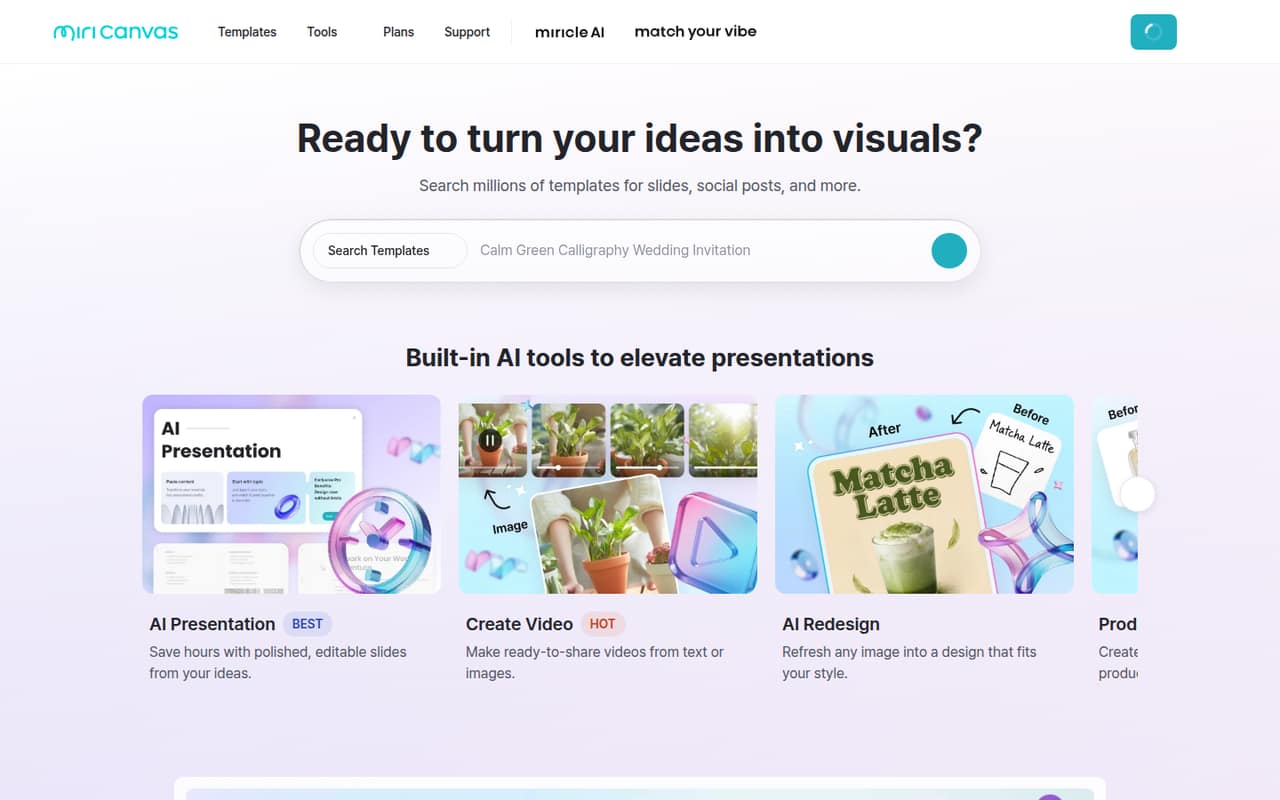
MiriCanvas offers templates for presentations, social media, YouTube thumbnails, posters and other designs. Its listed AI tools can draft presentations from a topic, create videos from text or images, generate images from prompts and redesign existing images. The homepage also lists photo editing and design elements such as icons, audio and animation effects.
Does MiriCanvas have a plan for teams?
The pricing page lists Enterprise for companies needing shared asset management. It includes platform-wide organizational collaboration, scalable storage and smart asset management, with flexible pricing rather than a published rate. Pro pricing is per user, so ask MiriCanvas for an Enterprise quote and confirm how seats and shared assets work.