
We may earn a commission if you buy through links on this page. It never changes a score or a ranking. How we make money
The bottom line
A strong tutoring feature set; confirm what the free plan includes and how team hours are billed.
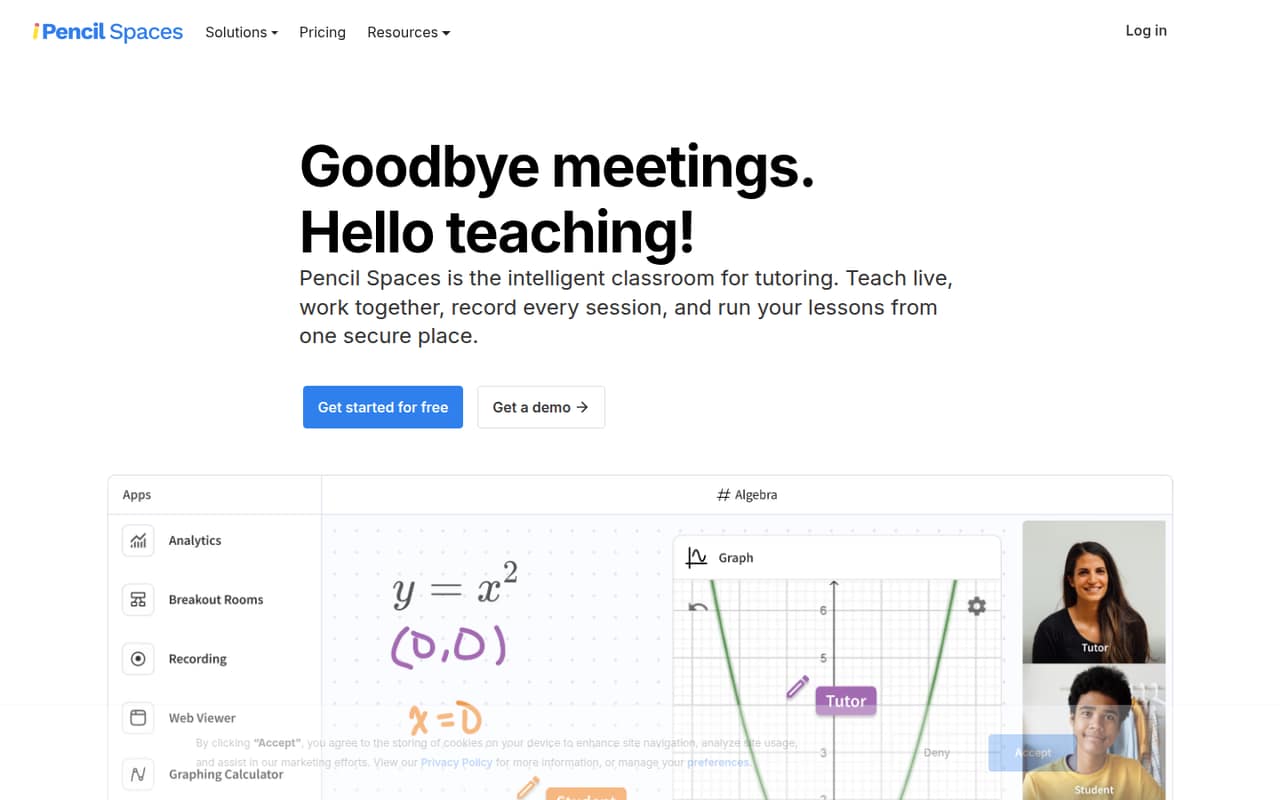
Pencil Spaces brings video, chat, screen sharing, a collaborative whiteboard, scheduling, attendance tracking, and engagement insights into a virtual tutoring classroom. That focus makes it a better fit for tutors than teams looking only for general-purpose video calls.
There is a free Starter plan, while Pro starts at $4 per month for a 10-hour minimum. Pricing is based on session hours, not a published per-seat fee, so a small team should confirm how shared usage is billed before budgeting.
Good fit if
- Tutoring teams teaching online
- Tutors who need a shared whiteboard
- Educators tracking attendance and engagement
Skip it if
- Teams needing simple video calls
- Buyers who need seat-based pricing
- Tutors needing published free-plan limits
ScoresHow it rates
What works
- Free Starter plan is available
- Whiteboard, video, chat, and screen sharing
- Automated attendance and engagement insights
- Pro includes 24/7 customer support
- Expert adds recording and built-in apps
What doesn't
- Free-plan inclusions are not listed
- Paid plans have a 10-hour monthly minimum
- Team costs are not stated per seat
- Extra-participant hourly rate is not published
- Annual prices are not listed
01Who Pencil Spaces is for
Pencil Spaces suits solo tutors and small tutoring teams that teach online and need more than a video link. It combines video calling, chat, screen sharing, and an infinite collaborative whiteboard with teaching tools. The platform also offers scheduling, automatic attendance tracking, and engagement insights, so it is aimed at running lessons as well as hosting them.
For a team of 1–10, the key budget question is how many session hours you will use and how those hours are billed across educators. The pricing page lists a 10-hour monthly minimum for paid plans, rather than a per-seat rate. That can work for a small operation with modest lesson volume, but it makes a straightforward per-person budget harder to set. If your team mainly needs occasional video calls, this tutoring-specific tool may be more than you need. If you want teaching tools and lesson operations in one place, it is a closer fit.
02Pencil Spaces free plan and trial
The pricing page lists a free Starter plan for people starting with online teaching. It does not list the Starter plan’s included features, usage limits, or restrictions, so we would not assume that the whiteboard, video, scheduling, or attendance tools are all available without charge. Check those details before moving a regular class onto the free plan.
Pencil Spaces also lists a 14-day free trial, but the pricing details do not specify which plan or features the trial covers. Ask the vendor whether the trial requires payment information, what happens when it ends, and whether it includes the tools your tutors need. If the free plan is too limited, Pro is the cheapest listed paid option: $4 per month minimum for 10 session hours, with additional usage billed at month-end.
03What a small team pays for Pencil Spaces
The pricing page lists Pro at $0.40 per session hour with a 10-hour monthly minimum, making the minimum $4 per month. Expert costs $1 per session hour with the same minimum, or $10 per month. Master is $5 per session hour, with a $50 monthly minimum. No annual prices are listed.
These are usage-based amounts, not published per-seat prices. If one person has a plan and uses the 10-hour minimum, Pro is $4 per month. If three or five people each need a separate 10-hour minimum, the arithmetic is $12 or $20 monthly on Pro. But the pricing page does not say whether a team can share hours or how accounts are structured, so confirm that before treating those figures as your team bill. If three or five people share 10 total session hours, the listed minimum remains $4, subject to the vendor’s billing rules.
Hours beyond the minimum are billed at month-end. Sessions with more than four participants have a reduced hourly rate for each additional participant, but that rate is not published. Ask for a quote if larger classes are part of your plan.
04Getting started with Pencil Spaces
The vendor does not publish a setup-time estimate or a list of required integrations in its pricing details. That means we can’t promise a same-day rollout or say which calendar, payment, or learning-management connections your team will need. Ask the vendor for its onboarding steps and confirm whether your current scheduling process can connect before you commit.
A sensible first step is to map one lesson from booking through attendance, then check that the educator can use video, screen sharing, and the whiteboard in the same classroom. Test the student view controls and the built-in tools you expect tutors to use. These are practical checks, not a claim about how long setup takes. The platform’s mix of classroom and operations features may take more orientation than a basic video-call tool, but no learning curve or training requirement is published. Pro lists 24/7 customer support; the pricing details do not describe onboarding help.
05When small teams outgrow Pencil Spaces
The first pressure point is likely usage. Paid plans have a 10-hour monthly minimum, and hours beyond that are billed at month-end. As lesson volume rises, compare the per-hour rate on your current plan with the next tier: Pro lists $0.40 per session hour, Expert $1, and Master $5. Moving up is not automatically cheaper; each tier adds different features, so match the upgrade to what your tutors actually need.
Expert may make sense if your team needs cloud recording with 90-day storage, 1,000+ built-in apps, or automated lesson summaries. Master adds tutor coaching, autograding, and AI safeguarding. For teams running thousands of session hours, the pricing page lists Enterprise from $1,000 per month, with custom pricing and a starting rate of $0.002 per participant minute. Before growing into larger classes, get the additional-participant rate in writing; the vendor does not publish it. If you need clear seat-based budgeting, ask whether a team plan supports it.
Questions people ask
How much does Pencil Spaces cost?
Pencil Spaces lists a free Starter plan. Paid Pro starts at $0.40 per session hour with a 10-hour monthly minimum, or $4 per month. Expert starts at $10 monthly minimum and Master at $50. Hours beyond the minimum are billed at month-end, and annual prices are not listed.
What is included in the Pencil Spaces free plan?
The pricing page lists a free Starter plan for people starting with online teaching, but does not list its features or usage limits. Confirm whether it includes the classroom tools and session capacity you need before relying on it for regular lessons.
Does Pencil Spaces offer a free trial?
The pricing details list a 14-day free trial but do not specify which plan or features it covers. Before signing up, ask whether payment information is required and what happens when the trial ends.
Is Pencil Spaces priced per user or per session hour?
The listed paid plans charge by session hour and have a 10-hour monthly minimum. The pricing details do not explain whether teams can share hours or whether separate educator accounts each require a minimum, so ask the vendor how your team would be billed.
Which Pencil Spaces plan includes lesson recording?
Expert lists cloud recording with 90-day storage, along with 1,000+ built-in apps and automated lesson summaries. Pro’s listed features do not include recording. Check with the vendor if you need different storage terms or want to confirm what the 14-day trial includes.