
We may earn a commission if you buy through links on this page. It never changes a score or a ranking. How we make money
The bottom line
Strong client galleries and review tools, but extra-seat pricing needs clarification.
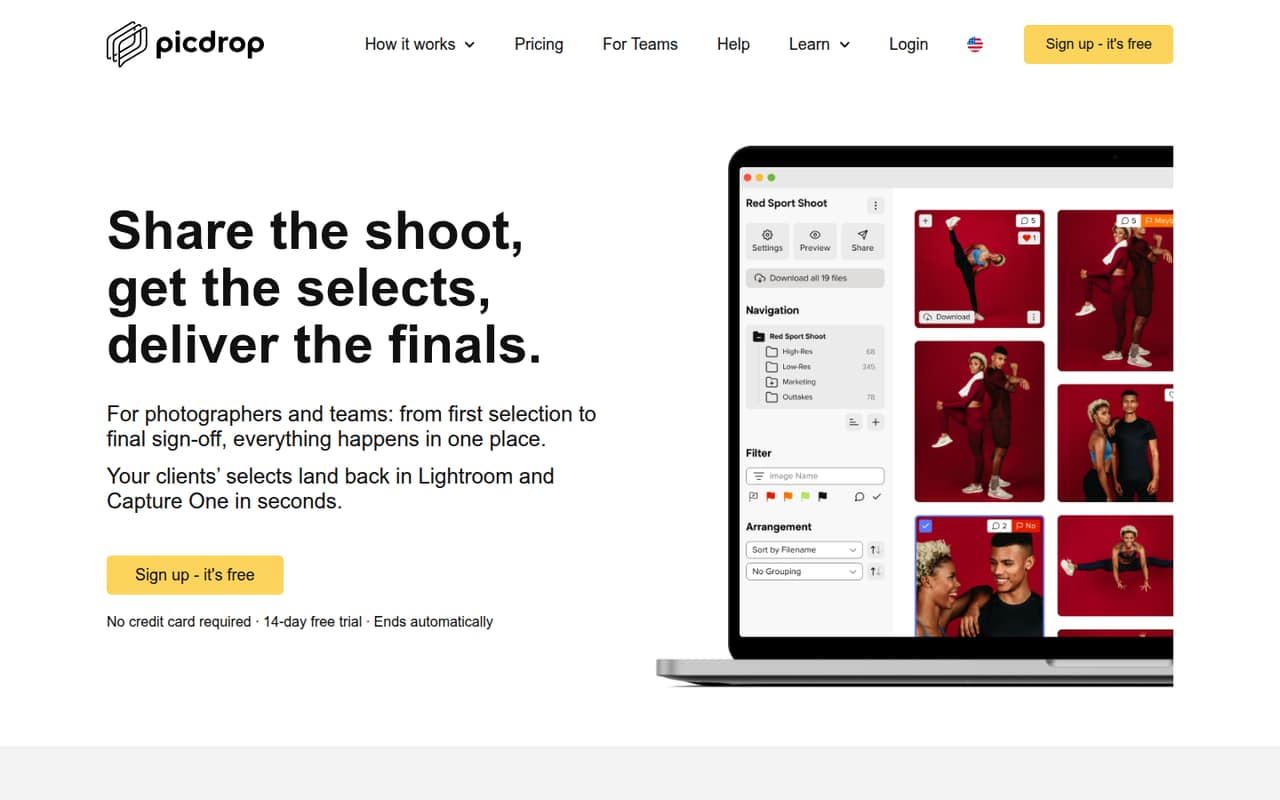
picdrop brings client selections, comments, image annotations and final-file delivery into online galleries. Its Free plan is useful for light use, but caps you at 1 GB, three galleries and one user.
For a solo user needing more room, Pro starts at $15.99 per month with annual billing, or $18.99 month to month. Small teams should check the extra-seat cost: Advanced includes two team members, and picdrop does not publish additional seat prices.
Good fit if
- Photographers sharing client galleries
- Teams collecting image selections
- Studios delivering finished files
Skip it if
- Teams needing predictable seat costs
- Photographers sharing raw previews
- People needing extensive free storage
ScoresHow it rates
What works
- Clients can like, tag, vote, comment and annotate images
- Branded galleries support viewing and downloading final photos
- Smart export returns selections to Lightroom and Capture One
- Free plan includes three galleries and basic collaboration
- Live Push supports camera-to-gallery delivery
What doesn't
- Free plan is limited to 1 GB and three galleries
- Only one user is included on Free and Pro
- Advanced includes two team members; extra seat prices are unpublished
- Storage and video conversion allowances vary by plan
- A Reddit user reported no .cr3 previews after uploading
01Who picdrop is for
picdrop is for photographers and small creative teams that need clients to review images, choose favorites and download finished work without juggling separate gallery and feedback tools. A solo photographer can use it to share a shoot, collect likes or color tags, and deliver final photos. Teams can also use voting, comments and image annotations to keep approvals in the gallery.
The Free plan is a sensible starting point for occasional work: it includes 1 GB of storage, three galleries and one user. If you regularly deliver client shoots or need more space, Pro is the first paid option. Teams should look at Advanced or Business, but check the cost of any additional seats before budgeting. picdrop is less suited to a team that needs a fully predictable per-person bill, since extra-seat prices are not published.
02picdrop free plan and trial
The Free plan costs $0 and includes 1 GB of storage, three galleries, one user and basic collaboration. That is enough to try client galleries or handle occasional small jobs, but three galleries at a time can be a real constraint for a working photographer. One Reddit poster specifically said the gallery cap made the free plan hard to justify for ongoing use.
For more room, Pro starts at $15.99 per month with annual billing, or $18.99 month to month. It includes 500 GB, unlimited galleries, one user, one Inbox and one hour of video conversion each month. picdrop also lists a 14-day free trial. The trial’s eligibility and exact limits are not published in the pricing details, so check those before relying on it.
03What a small team pays for picdrop
For one person, Pro costs $18.99 per month, or $15.99 per month on annual billing. The latter is a monthly equivalent; the annual lump sum is not published. Pro includes 500 GB and unlimited galleries, but only one user.
For a three-person team, Advanced is the closest fit: $56.99 month to month or $47.49 per month with annual billing. It includes two team members, so the third person’s price is extra and not published. The plan supports up to four team members. For five people, Business costs $141.99 month to month or $117.99 per month with annual billing, and includes five team members. That works out to $23.60 per included person at the annual monthly rate, before any later seat additions. Advanced’s annual rate is $23.75 per included person across its two included seats, but that is not the full cost for three. Storage upgrades and extra video conversion hours can add to the bill.
04Getting started with picdrop
The basic workflow is easy to understand: create a gallery, add images, then let clients review, comment on or select files. Presentation galleries are for viewing and downloading finished photos; client selections can be returned to Lightroom and Capture One through Smart export. Live Push is available for sending images directly from a camera to picdrop, though the pricing page limits connections by plan.
The setup effort for importing existing galleries, configuring a team or connecting software is not published in the pricing details. For a small team, the day-one essentials are likely to be making a gallery and confirming that the client can select and download what they need. One Reddit user reported that picdrop did not support previews for .cr3 files after upload. If clients need to review raw files, check current format support first; other commenters suggested sending JPEGs for selection.
05When small teams outgrow picdrop
The first pinch point is often storage or gallery count. Free stops at 1 GB and three galleries; Pro removes the gallery cap and raises storage to 500 GB, but still has one user. Advanced gives a team two included seats, with up to four members, while Business includes five and supports up to nine. Additional seat prices are not published, so a team should ask picdrop for a quote before planning around a larger headcount.
Storage can also push an upgrade: Advanced starts at 1 TB and Business at 3 TB, with paid storage increments listed for both. Higher plans add more video conversion, collections, Inboxes or Live Push connections. One Reddit poster liked the gallery’s presentation and review tools but found the Free plan’s three-gallery ceiling limiting. If your team needs predictable seat pricing or more than the included allowances, compare the full quote with other gallery and DAM tools before moving up.
From the threadsWhat users say
The Reddit comments are mixed: one photographer praises the gallery presentation, while another finds the free gallery limit too restrictive. One commenter also praises support speed, but the discussions are too limited to establish broad sentiment.
I like how it presents the gallery, give voting, commenting and filtering options
I can only have three galleries at the same time on the free plan
Vor allem der super schnelle Service ist der hammer
after uploading I saw they don't support previews for .cr3 files
Questions people ask
Is picdrop free?
Yes. The Free plan includes 1 GB of storage, three galleries, one user and basic collaboration. It is a reasonable option for occasional sharing, but the gallery and storage limits may not suit regular client work. picdrop also lists a 14-day free trial.
How much does picdrop cost for one photographer?
Pro is the paid plan for one user. The pricing page lists it at $18.99 per month, or $15.99 per month with annual billing. It includes 500 GB of storage, unlimited galleries, one Inbox and one hour of video conversion each month.
How much does picdrop cost for a small team?
Advanced costs $56.99 per month or $47.49 per month with annual billing, and includes two team members. Business costs $141.99 or $117.99 per month, respectively, and includes five. Additional seat prices are not published, so ask picdrop for the total cost for your headcount.
Can clients select and comment on photos?
Yes. picdrop supports likes, color tags and team voting for selections. Clients can comment on files and annotate images in online galleries. The feature set is designed to keep visual feedback and approvals with the images being reviewed.
Does picdrop support Lightroom and Capture One?
picdrop’s Smart export feature can return client selections to Lightroom and Capture One. The pricing details do not specify setup steps or which versions are supported, so check the current documentation if your team depends on a particular workflow.
Sources
- picdrop homepage
- picdrop pricing, compiled via web search from pelli.io, sendphoto.io, picdrop.com, xposureapp.net
- Reddit: Something similar to picdrop?
- Reddit: Send .cr3 photos to client for selection? Tools like picdrop?
- Reddit: Selfhosted alternative to PicDrop - Picture gallery for delivery to client?
- Reddit: Picdrop and capture one ratings