
We may earn a commission if you buy through links on this page. It never changes a score or a ranking. How we make money
The bottom line
Promo brings video creation and publishing together, but small teams pay per seat and get no free plan.
Promo combines video editing, stock media, AI video creation and social publishing in one product. That can suit a small team making branded video regularly, though the Basic plan does not include PromoAI videos.
There’s no free plan or listed free trial. Basic starts at $29 per user per month with annual billing, or $59 month to month; teams that need PromoAI start at Standard, $59 per user monthly with annual billing.
Good fit if
- Small teams making branded videos
- Marketers needing stock media
- Teams scheduling social video
Skip it if
- Teams that need a free tool
- Creators who need PromoAI on Basic
- Teams seeking published setup guidance
ScoresHow it rates
What works
- Combines video editing and social publishing
- Includes Getty Images and iStock media
- Offers AI video creation on Standard and Pro
- Supports saved assets and multiple brands
- Has both monthly and annual billing
What doesn't
- No free plan or free trial is listed
- Basic includes no PromoAI videos
- Monthly billing costs more than annual billing
- Price for Business is not published
- Supported social platforms are not specified
01Who Promo is for
Promo is for a small marketing team that makes branded video often enough to justify a recurring subscription. It combines an online editor, stock media, AI video creation, brand controls, and social planning and publishing. That gives a team a place to make and manage video content rather than buying separate tools for every step.
For a solo creator or a team of three to five, Basic is the lower-cost entry point at $29 per user per month with annual billing. But it includes no PromoAI videos, so teams that want AI-generated videos need Standard, starting at $59 per user per month with annual billing. Both plans also have month-to-month prices.
Promo makes the most sense when stock footage, licensed music, and social publishing are part of the regular workflow. If the team only needs an occasional simple video, the per-seat cost may be hard to justify. A team should also confirm that Promo supports the social channels it uses before committing.
02Promo free plan and trial
Promo does not list a free plan or a free trial. That means there is no free tier to use for ongoing video creation, and a small team should budget for a paid subscription before setting up its workflow.
The cheapest way in is Basic: $29 per user per month when billed annually, or $59 per user per month with monthly billing. Basic includes 120 Getty Images clips, 2 GB of upload storage, one brand, and 200 licensed music tracks. It does not include PromoAI videos, so it is not the entry plan for teams that specifically want AI video generation.
Standard starts at $59 per user per month with annual billing or $119 month to month. It includes 360 PromoAI videos, 3,600 Getty Images clips, 10 GB of storage, three brands, and 1,000 licensed music tracks. Ask Promo about a demonstration or other evaluation option if you want to check the workflow before paying; a free trial is not listed.
03What a small team pays for Promo
Basic costs $29 per user per month on annual billing, paid upfront for the year, or $59 per user month to month. For three people, that works out to $87 monthly equivalent and $1,044 billed for the year, or $177 each month. For five, it is $145 monthly equivalent and $1,740 billed for the year, or $295 each month.
If the team needs PromoAI videos, Standard is the starting plan: $59 per user monthly with annual billing or $119 month to month. Three seats cost $177 monthly equivalent, billed as $2,124 upfront for the year, or $357 each month. Five cost $295 monthly equivalent, billed as $3,540 upfront, or $595 each month.
The pricing page lists no add-ons. The main cost jump is moving from Basic to Standard, which adds PromoAI videos and larger media, storage, brand, and music allowances. Business pricing is not published, so teams needing its unlimited allowances should ask Promo for a quote.
04Getting started with Promo
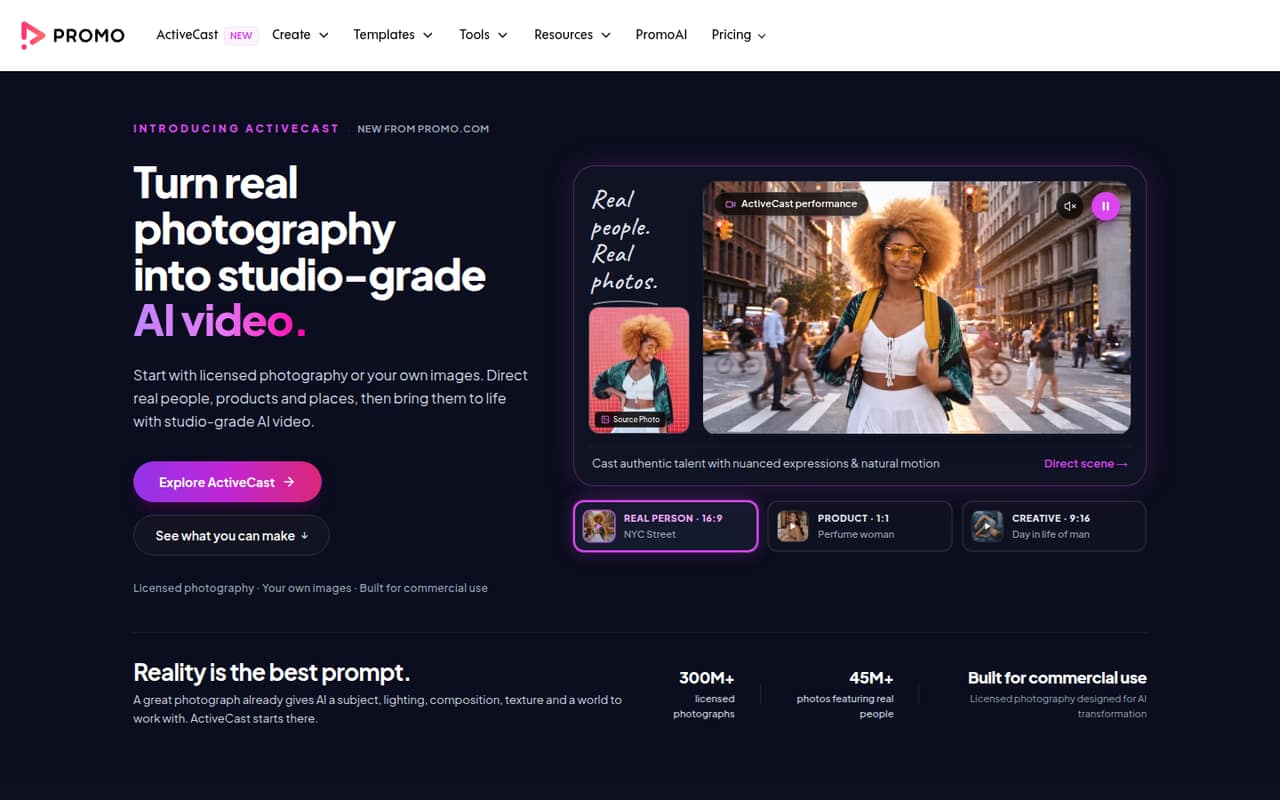
Promo’s features suggest a straightforward starting workflow: choose or create a video, edit scenes and text, apply brand assets, then plan or publish social content. The online editor handles scenes, layouts, text, and pacing. Teams can also use licensed stock media or ActiveCast to turn licensed photography or their own images into AI video.
Promo does not publish a setup time or a detailed learning curve in the available product and pricing information. It also does not specify which social platforms are supported, or how publishing connections are configured. Those details matter on day one: ask Promo to confirm that your channels are supported and whether connecting accounts requires an administrator or other setup.
For a team, decide who owns the brand assets and publishing calendar before inviting everyone. The plan allowances vary by brand count, storage, and media, so check that the selected plan matches the team’s workflow. We can’t give a reliable setup estimate without those vendor details.
05When small teams outgrow Promo
The first clear limit is Basic’s lack of PromoAI videos. A team that starts on Basic and later wants AI video creation must move to Standard, which costs $59 per user per month with annual billing or $119 month to month. The price change applies per seat, so the jump is more noticeable for a team of five than for one creator.
Plan allowances may also prompt an upgrade: Basic has one brand, 2 GB of upload storage, 120 Getty Images clips, and 200 licensed music tracks. Standard raises those limits to three brands, 10 GB, 3,600 clips, and 1,000 tracks. Pro is aimed at professional marketers and agencies, with 10 brands, 50 GB, and white-label and reselling rights; its listed price is $199 per user monthly with annual billing or $399 month to month.
Teams that need unlimited allowances may look at Business, but Promo does not publish its price. A growing team should compare the per-seat cost and confirm channel support before moving up or choosing another tool.
Questions people ask
What is Promo used for?
Promo is a tool for creating, editing, scheduling, and publishing branded marketing videos. It combines an online editor with stock media, brand controls, social publishing, and AI video features on eligible plans. Teams can also use ActiveCast to turn licensed photography or their own images into AI video.
Does Promo have a free plan or trial?
Promo does not list a free plan or free trial. Its lowest-priced option is Basic, which costs $29 per user per month with annual billing or $59 per user per month with monthly billing. Ask Promo whether it offers another way to evaluate the product before subscribing.
Which Promo plan includes AI video creation?
Standard includes 360 PromoAI videos, and Pro includes 3,600. Business lists unlimited PromoAI videos, but its price is not published. Basic includes no PromoAI videos, so it is not the plan to choose if AI video creation is a requirement.
Can I use my own images with Promo?
Yes. Promo’s ActiveCast product turns licensed photography or your own images into AI video. The plan information also lists upload storage allowances: 2 GB on Basic, 10 GB on Standard, 50 GB on Pro, and unlimited storage on Business.
Does Promo include stock footage and music?
Yes. The plans list Getty Images clips and licensed music, with the allowances increasing by plan. Basic includes 120 Getty Images clips and 200 licensed music tracks; Standard includes 3,600 clips and 1,000 tracks. Pro and Business list larger or unlimited clip allowances.