
We may earn a commission if you buy through links on this page. It never changes a score or a ranking. How we make money
The bottom line
A generous free tier and one-time licenses make it budget-friendly, with setup and security to assess.
A small team may not need a paid remote-access tool if one person can handle support and the free limit of 10 controlled devices is enough. Remote Utilities also offers file transfer, unattended access, and options for routing connections through a self-hosted server.
The pricing page lists paid licenses as one-time purchases, starting at $99 for one concurrent user. Reddit discussion is mixed: users appreciate self-hosting and the price, while others raise security and platform-compatibility concerns.
Good fit if
- One-person IT support
- Teams managing up to 10 devices free
- Buyers avoiding recurring license fees
Skip it if
- Teams needing many simultaneous operators free
- Linux-first remote support teams
- Businesses requiring a vendor security review
ScoresHow it rates
What works
- Free plan covers one user and 10 controlled devices
- Free sessions have no time limit or ads
- Paid licenses are one-time purchases
- Includes file transfer and unattended access
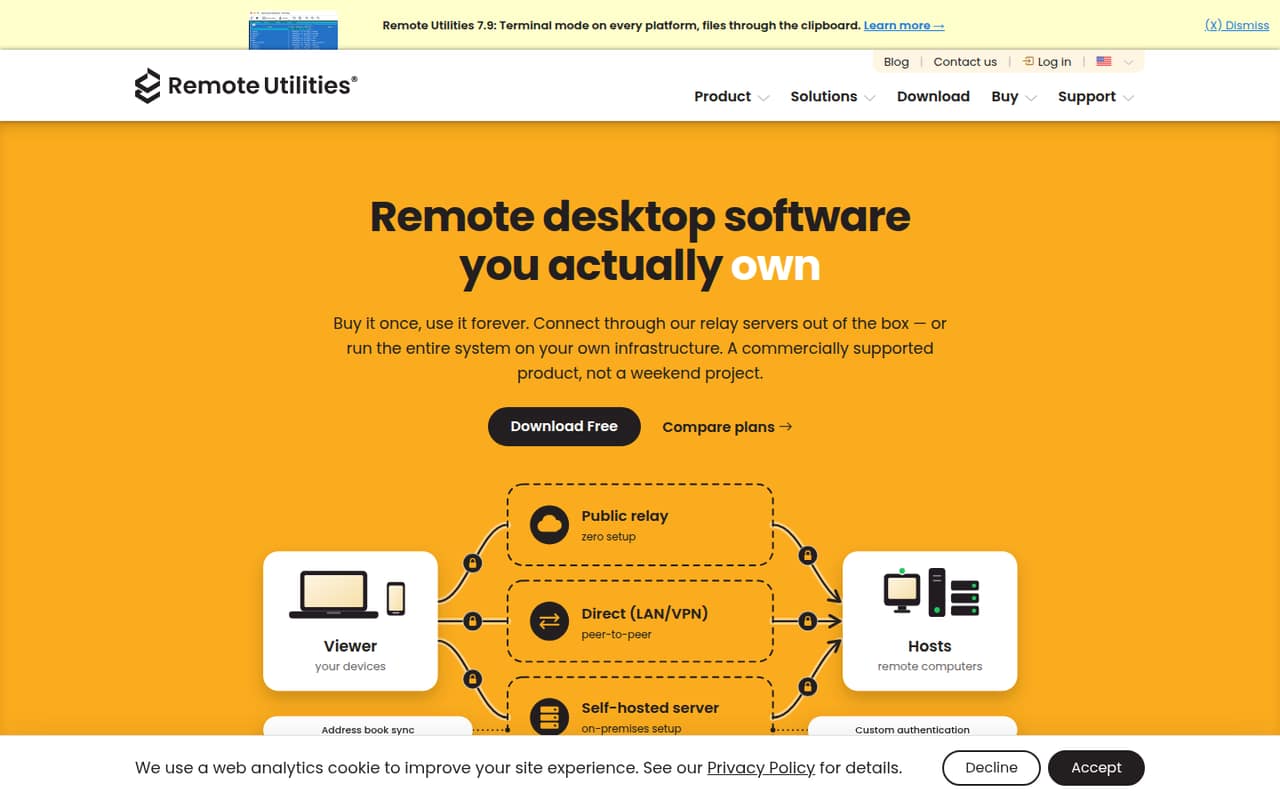
- Self-hosted server can route connections
What doesn't
- Free plan is limited to one concurrent user
- Paid licenses cover the current major version
- Paid plan prices beyond the starting price need checking
- Reddit users raise security and trust concerns
- A Reddit user reports Windows-only Host and server
01Who Remote Utilities is for
Remote Utilities is worth considering if your small team needs to access and manage computers without taking on a monthly remote-access bill. Its free plan covers one concurrent user and 10 controlled devices, which can suit a solo IT person or a very small business with a limited fleet. For a team that needs more devices or concurrent operators, paid licenses are sold per concurrent user as one-time purchases.
The software connects to remote computers in modes such as Full Control and View, and supports file transfers and unattended access. You can connect using internet relay or direct connections, or route traffic through a self-hosted server. The server option may appeal to organizations that want to manage their own connection infrastructure, including offline or isolated networks. It also offers Active Directory deployment features and custom Host installers. Before choosing it for client support, factor in your security requirements and check platform compatibility with the vendor.
02Remote Utilities free plan and trial
The FREE plan includes one concurrent user and up to 10 controlled devices. The pricing page lists community support, no session time limit, and no ads. That is a useful starting point for an owner-operator or a small team where one person handles remote support at a time.
The main constraint is both the device cap and the single concurrent user. If several teammates need to connect at once, the free license does not cover that; if you need more than 10 controlled computers, you will need a paid license. A free trial is not listed. The cheapest paid option is STARTER, with a listed starting price of $99 for one concurrent user and 20 controlled devices. Paid licenses are one-time purchases for the current major version, rather than monthly or annual subscriptions.
03What a small team pays for Remote Utilities
The pricing page lists STARTER at a starting price of $99 for one concurrent user and 20 controlled devices. It does not publish a monthly or annual payment option: paid licenses are one-time purchases for the current major version. The page lists volume pricing per user, also one-time. At the 2–4 user tier, STARTER is $94 per user, so three users work out to $282. At the 5–9 user tier, it is $88 per user, so five users cost $440.
Those figures buy concurrent-user seats, not simply a larger device allowance. PLUS covers 50 controlled devices per user, BUSINESS covers 100, and PRO has unlimited controlled devices; their listed volume prices are higher. SITE pricing is custom. The pricing page does not publish monthly or annual totals because those billing periods are not offered. Non-profits and educational institutions can request a 20% discount. Check the current quote for the exact tier and device needs before budgeting.
04Getting started with Remote Utilities
Setup means installing the Host component on computers you want to access, then connecting to them through a supported connection method. The Host can run as a service and start automatically after reboot, which supports unattended access. You can use internet relay or direct connections, or set up a self-hosted server to route traffic through your own infrastructure. That gives you options, but the server route adds infrastructure and administration work compared with a straightforward connection.
For a small team, the simplest path is likely to begin with a few Host installations and the connection method that fits your network. Active Directory support can push-install Host across an AD network and schedule computer imports into the address book. Custom installers let you brand Host installers and customize the Agent module. These features help with fleet deployment but may be more setup than a one-person operation needs. A Reddit user looking for Linux support reported that Host and server were Windows-only at the time of their post; confirm current platform support with the vendor.
05When small teams outgrow Remote Utilities
The free plan stops fitting when you need more than 10 controlled devices or more than one concurrent user. The paid STARTER license expands the device limit to 20 per user; PLUS raises it to 50, BUSINESS to 100, and PRO removes the device limit. Each paid license is per concurrent user, so estimate how many teammates need to work at the same time, not just how many people are on payroll.
A growing support team may also outgrow the product if its operating systems do not fit the Host and server requirements. One Reddit user said those components were Windows-only and wanted Linux Host support; treat that as a user report and verify current compatibility with the vendor. Reddit discussions also include concerns about the security responsibility of remote-access tools and self-hosting. If you manage client systems, weigh your organization’s security review and support requirements alongside the one-time license savings.
From the threadsWhat users say
Reddit sentiment is mixed: some users value self-hosting and the price, while others question security and platform fit. The discussion is cautious rather than a clear endorsement.
Personally I wouldn’t touch it. There’s no way I’d put a remote access tool on a customer’s site where I didn’t have a commercial agreement with a vendor
You still have to pay for the Commercial License
It just sucks because it's Windows only for server and host
The difference is that I’ve got control of the product
Questions people ask
What is Remote Utilities?
Remote Utilities is remote desktop software for accessing and managing computers. It offers connection options that include internet relay, direct connections, and a self-hosted server. Features include remote control modes, file transfer, unattended access, Active Directory deployment, and customizable Host installers.
Is Remote Utilities free?
Yes. The FREE plan includes one concurrent user and up to 10 controlled devices, with community support, no session time limit, and no ads. If you need more devices or simultaneous operators, the paid licenses add capacity. A free trial is not listed.
How much does Remote Utilities cost?
The pricing page lists a starting price of $99 for STARTER, which includes one concurrent user and 20 controlled devices. Paid licenses are one-time purchases for the current major version, not monthly or annual subscriptions. Volume pricing reduces the per-user price for teams of two or more.
Can Remote Utilities connect to computers unattended?
Yes. The Host component can run as a service and start automatically after reboot, enabling unattended access. Remote Utilities also offers modes such as Full Control and View, along with file transfer. Check the vendor’s setup guidance to confirm the right configuration for your computers.
Can I host the Remote Utilities server myself?
Yes. Remote Utilities offers a self-hosted server option for routing traffic through your own infrastructure, including offline or isolated networks. This adds infrastructure and administration work, so consider whether your team can manage it. A self-hosted setup does not make commercial licenses free.