
We may earn a commission if you buy through links on this page. It never changes a score or a ranking. How we make money
The bottom line
Good for quick social graphics; the free plan’s three monthly downloads are the catch.
Snappa is a straightforward option for making social, ad, blog, email, and infographic graphics without design experience. Its free plan includes templates and stock assets, but only three downloads a month.
For one person, Pro costs $10 per month with annual billing or $15 month to month. Teams of up to five pay $20 or $30, respectively, for collaboration and unlimited downloads.
Good fit if
- Solo creators making occasional graphics
- Small teams sharing design work
- Social and blog content creators
Skip it if
- People needing frequent free downloads
- Teams with more than five seats
- Print workflows needing confirmed specifications
ScoresHow it rates
What works
- Free Starter plan includes three downloads monthly
- More than 6,000 templates across plans
- Access to 5,000,000+ HD photos and graphics
- Preset dimensions cover common online graphic types
- Team plan includes five users and collaboration
What doesn't
- Starter limits users to three monthly downloads
- Pro is for one user, not a team
- Team pricing is listed only for five users
- Pricing for additional Team users is unpublished
- Reddit discussion offers little direct Snappa feedback
01Who Snappa is for
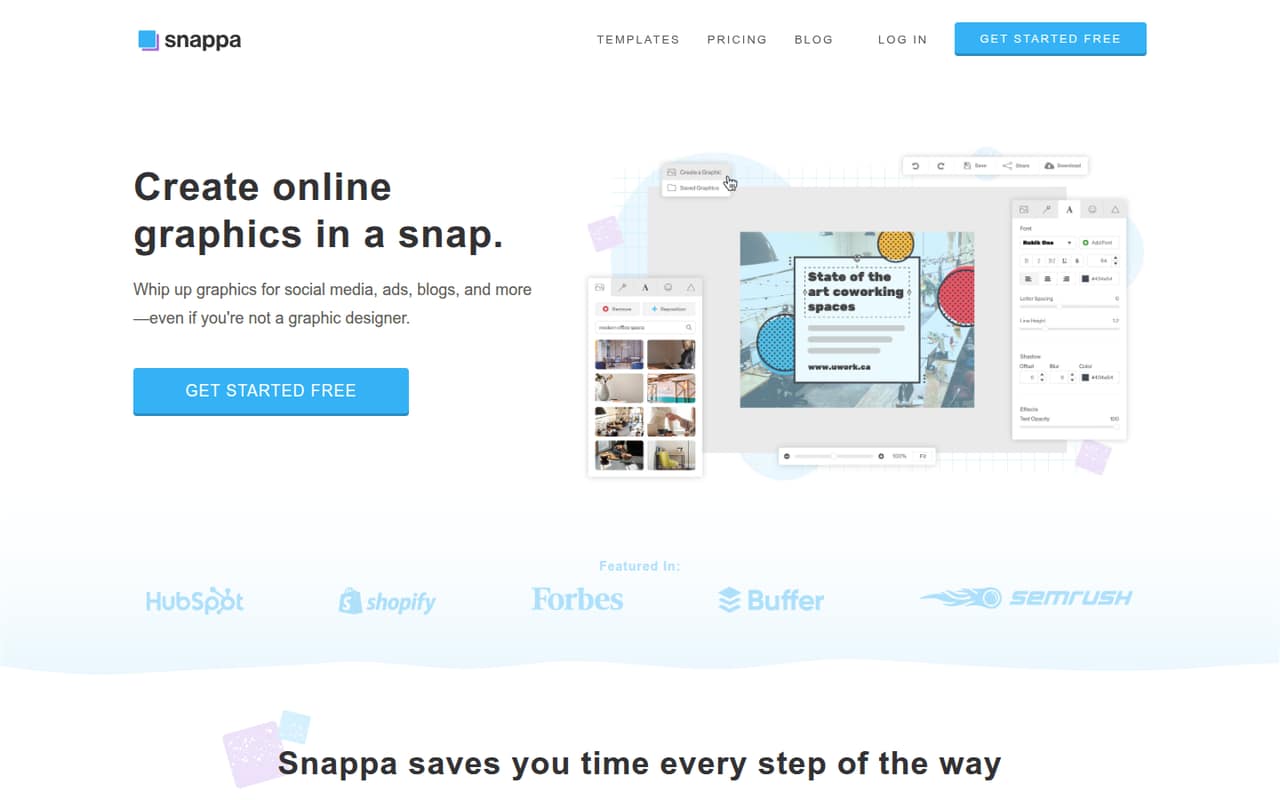
Snappa suits solo creators and small teams that need online graphics for social media, ads, blogs, emails, or infographics. It gives you preset dimensions, templates, stock photos, fonts, vectors, and shapes in a cloud-based design tool. Snappa describes the product as made for people without design experience, so it’s aimed at getting everyday graphics made without starting from a blank canvas.
For one person who makes graphics now and then, Starter costs nothing and includes three downloads a month. If graphics are part of a regular publishing routine, Pro is the paid option for one user. Teams of up to five can choose Team for collaboration and unlimited downloads. That makes Snappa a fit for a small content team watching its software spend, though a team of six or more should ask about seat pricing before settling on it.
02Snappa free plan and trial
The Starter plan is free and includes one user, 6,000+ templates, 5,000,000+ HD photos and graphics, and three downloads per month. That’s enough to make and download a few graphics, but it’s a firm limit if you publish often or need several versions of an image. Starter doesn’t list unlimited downloads, Buffer, or social media integrations among its included features.
Snappa’s pricing lists no paid trial. If you need more than three downloads, the cheapest paid route is Pro: $10 per month with annual billing, or $15 month to month. Pro is for one user, so it isn’t the team plan for shared work.
03What a small team pays for Snappa
For one person, Pro costs $10 a month with annual billing, or $15 month to month. That plan includes unlimited downloads and Buffer and social media integrations. Starter is free, but its three-download monthly cap makes it a limited option for regular production.
For a team of three, the listed Team plan costs $20 per month with annual billing, or $30 month to month. It includes five users, so that works out to about $6.67 per seat per month annually, or $10 per seat month to month. A five-person team pays the same totals and gets the same five seats: $20 or $30 per month, depending on billing. Team includes collaboration and unlimited downloads.
The pricing page lists annual-billing prices as monthly equivalents; the month-to-month prices are higher. For more than five Team users, Snappa asks you to contact the company, and additional-user pricing is not published. Ask for a quote before budgeting for a six-to-ten-person group.
04Getting started with Snappa
Snappa is cloud-based and its product description says it’s designed for people without design experience. A basic workflow is easy to understand: pick a preset size or template, add photos and text or graphics, then download, resize, or share the result. Preset dimensions cover social media, ads, blogs, emails, and infographics, so you can start with a format suited to the job.
Sharing options include Facebook and Twitter, while Pro lists Buffer and social media integrations. For a small team, decide who needs to create graphics and whether shared collaboration matters; that points to Pro for one person or Team for up to five. Snappa doesn’t publish a setup-time estimate in the pricing details, so we wouldn’t promise a specific onboarding time. The templates and presets should reduce the need to build each layout from scratch.
05When small teams outgrow Snappa
The first limit to hit may be Starter’s three downloads per month. Pro removes that cap, but it’s a one-user plan; a team that needs collaboration must move to Team, which lists five users. That covers a small group of up to five at the published price, but Snappa doesn’t publish the cost of extra seats. Teams growing to six or more should ask for that pricing before committing.
Also check that the product suits the work itself. Snappa’s stated focus is online graphics, so teams with print-production requirements should confirm that their dimensions and workflow needs are covered before choosing it. One Reddit thread about paperback covers raises a problem with keeping proportions right in Photoshop and asks about similar tools; it doesn’t report on using Snappa. That discussion is a reminder to verify a print workflow, not evidence for or against Snappa’s performance.
From the threadsWhat users say
The available Reddit discussion is about paperback-cover proportions and Photoshop, not a direct Snappa review. It provides little evidence about satisfaction with Snappa, so the sentiment score is neutral.
proper proportion and I had some trouble with it
it wasn't very good
Maybe drop into some graphic design Reddit’s
Could you elaborate on the exact issue you're having?
Questions people ask
Does Snappa cost money?
Snappa has a free Starter plan with one user and three downloads per month. Pro costs $10 per month with annual billing or $15 month to month. Team costs $20 per month with annual billing or $30 month to month and includes five users. The listed annual prices are monthly equivalents.
What does Snappa do?
Snappa is cloud-based graphic design software for making online graphics for social media, ads, blogs, emails, and infographics. It includes preset dimensions, templates, stock photos, text and graphics tools, background removal, and options to resize and share graphics.
What does Snappa’s free plan include?
Starter includes one user, 6,000+ templates, 5,000,000+ HD photos and graphics, and three downloads per month. That suits occasional graphic creation. If you need unlimited downloads, the listed option is Pro for one user, or Team for up to five users.
How much does Snappa cost for a small team?
The Team plan includes five users and costs $20 per month with annual billing, or $30 month to month. For three people, that is about $6.67 per seat per month annually or $10 month to month. A five-person team pays the same plan price.
Can I share graphics from Snappa?
Snappa lists options to resize and share graphics to Facebook, Twitter, and other social platforms. Pro also includes Buffer and social media integrations. The Starter plan’s listed features don’t include those integrations, so check the plan details if direct sharing is important to your workflow.