
We may earn a commission if you buy through links on this page. It never changes a score or a ranking. How we make money
The bottom line
A free, customizable Mac editor with useful coding tools—and mixed reports about its update pace.
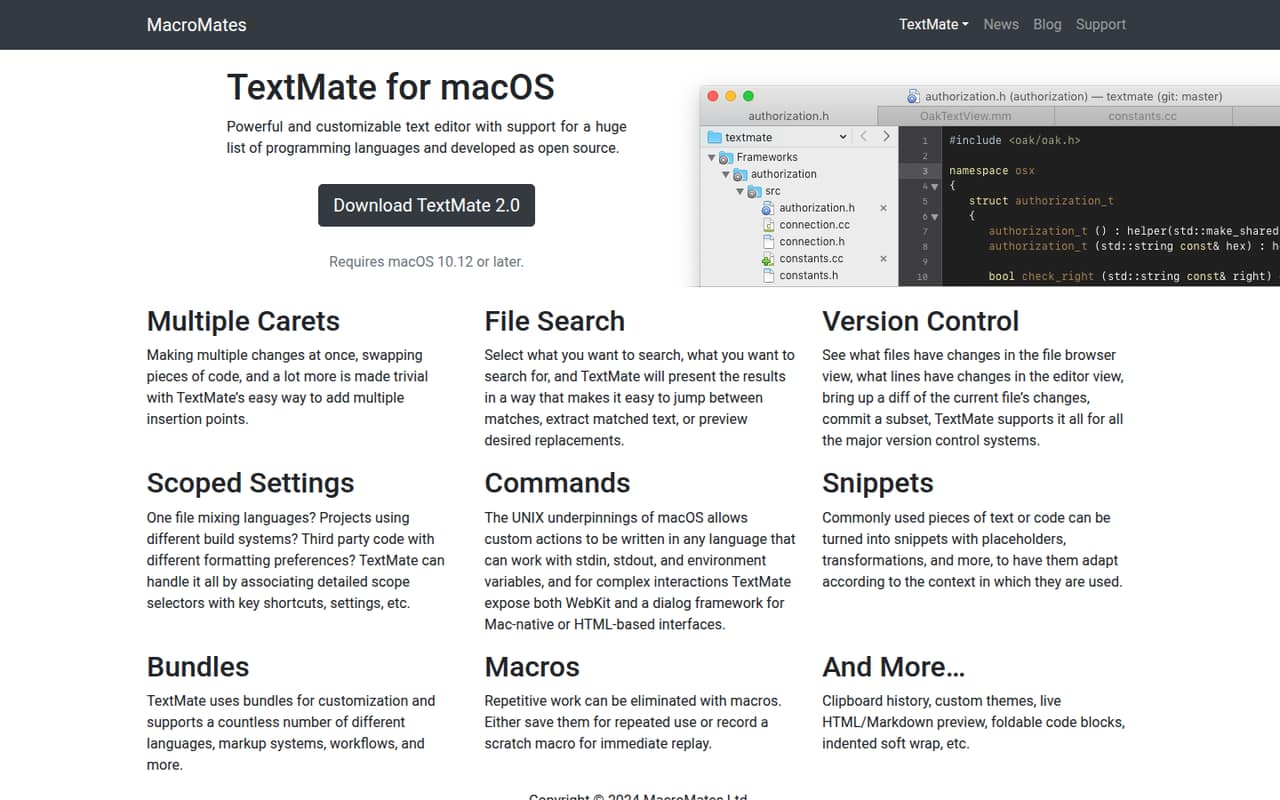
TextMate is worth considering if your small team uses macOS and needs a customizable editor for code, text, search, and version control. Its open-source price is hard to beat, and the feature set includes snippets, macros, bundles, and multiple carets.
The trade-off is uncertainty: the pricing page says license keys aren’t available for sale, and paid terms aren’t published. Reddit users disagree on whether the project feels stagnant; some say it still works well, while others have moved on.
Good fit if
- Mac-based teams watching software costs
- Developers who customize their editor
- People editing code and plain text
Skip it if
- Teams needing shared editing workflows
- Windows or Linux users
- Buyers who need clear vendor support
ScoresHow it rates
What works
- Free and open source
- Supports many programming languages
- Multiple carets speed up repeated edits
- Search can preview replacements
- Custom commands, bundles, snippets, and macros
What doesn't
- For macOS only
- Paid pricing and billing terms aren’t published
- License keys are unavailable for sale
- No published usage limits or team tier
- Reddit users report concerns about update pace
01Who TextMate is for
TextMate makes the most sense for a solo developer or a small, Mac-based team of up to 10 people that wants an editor without a recurring bill. It’s a text editor for code and other text, with tools for searching files, reviewing changes, and automating repeated edits.
The feature set goes beyond typing: you can use multiple carets to edit several spots, create snippets and macros, and customize commands and bundles for languages or workflows. Scoped settings let you apply preferences based on language or other selectors. That flexibility suits people who like shaping their editor, but it may be more than a team needs for occasional text changes.
TextMate is not presented as a shared team workspace. If your main need is a common place to review work together, or your team uses Windows or Linux, look elsewhere. For Mac users who want an inexpensive coding and text editor, the free price is a strong reason to take a closer look.
02TextMate free plan and trial
TextMate is free and open source, and the pricing information lists no paid plan or usage limit. That makes the free version the entry point for a solo user or a small team. The purchase page says license keys are unavailable for sale; the vendor does not publish paid pricing or billing terms.
There’s no free trial to weigh against a paid subscription: the listed offer is the free editor. The catch is that the vendor does not publish a separate team plan or seat limits, so ask about licensing if your company needs formal terms before adopting it. Reddit users describe using TextMate because it’s free, while others say they’re unsure when it was last updated. If dependable vendor support or a defined update schedule matters, check those points before standardizing on it.
03What a small team pays for TextMate
The listed price is $0 for the free, open-source editor. On that basis, one person costs $0, three people cost $0, and five people cost $0. There’s no published monthly or annual paid price to compare, and the vendor says license keys aren’t available for sale. Treat those totals as the listed cost, not as confirmation of your organization’s licensing terms; ask the vendor if you need that confirmed.
TextMate’s pricing information does not list paid add-ons, a team tier, or per-seat charges. It also does not publish usage limits. So there’s no listed subscription fee to add for extra editors, but there’s no priced upgrade route if your needs change either.
For a team keeping a close eye on subscriptions, that’s an appealing starting point. The practical cost is the time spent setting up shared preferences and deciding whether each person can work independently. TextMate’s listed features include version control, but the vendor does not publish a separate collaboration or administration package.
04Getting started with TextMate
TextMate’s feature set is built around editing files: search and replace, version control, language-scoped settings, bundles, snippets, and macros. A developer who already knows their preferred editor habits should find the core job familiar. Customizing commands, bundles, and scope-based settings is optional, but it adds decisions for a team that wants one shared setup.
The product is for macOS, so a mixed-platform team would need another editor for colleagues on other systems. The vendor does not publish named third-party integrations or a team onboarding process in the information available to buyers. Version control tools are listed as a built-in feature, but check the docs for the workflow and systems your team relies on.
For a first-day rollout, keep the bar low: agree on whether everyone needs the same settings and bundles, then let individuals customize from there. Reddit users report that TextMate still works for them, though some question how actively it is updated.
05When small teams outgrow TextMate
TextMate may stop fitting when a team needs more than a customizable editor for individual work. Its listed features cover editing, search, version control, and automation; they do not describe shared editing, team administration, or a paid tier with additional controls. The vendor also does not publish paid pricing, seat limits, or a support plan, so there’s no clear upgrade path to budget for.
Maintenance is another reason to reassess. In one Reddit thread, users describe TextMate as seeming abandoned or not updated recently. Others push back: one commenter says the project does get updates and another says they still use it daily. That’s mixed feedback, not a confirmed release schedule.
If your team needs predictable updates, published support commitments, or a common workflow across macOS and other operating systems, compare alternatives before making TextMate the standard. If the editor still meets your needs and the free price works, there’s no listed seat cost forcing you to move.
From the threadsWhat users say
Reddit sentiment is mixed: some users still rely on TextMate and say it works, while others worry that it has gone too long without updates. The free price is a clear draw, but buyers looking for a modern, actively maintained alternative are not all convinced.
I still use TextMate 2 every day. Still works great
I use Textmate, in part because it’s free
I'm unclear when it was last updated
I moved from Textmate to CotEditor a couple months ago and haven't looked back since
Questions people ask
Is TextMate free?
Yes. TextMate is listed as free and open source. The pricing information does not show a paid plan or usage limits. The purchase page says license keys are unavailable for sale, and the vendor does not publish paid pricing or billing terms.
Does TextMate work on Windows or Linux?
TextMate is described as a text editor for macOS. There’s no Windows or Linux version listed on the vendor's site, so teams using those operating systems should confirm availability with the vendor or choose another editor.
Does TextMate support version control?
Yes. Its listed version-control features include viewing file and line changes, inspecting diffs, and committing selected changes. The vendor does not publish a list of supported systems or integrations here, so check the docs for your team’s specific workflow.
Can I customize TextMate for my team?
TextMate lists scoped settings, shortcuts, commands, bundles, snippets, and macros. Those features let users shape the editor around languages and workflows. The vendor does not list a team administration or shared-settings plan, so ask how to distribute common settings across your team.
Is TextMate still being updated?
The vendor does not publish an update schedule in the available pricing information. Reddit users disagree: some describe the project as stagnant, while others say it still gets updates and works for them. If regular releases are important, ask the vendor about current maintenance.