
We may earn a commission if you buy through links on this page. It never changes a score or a ranking. How we make money
The bottom line
Good for repeatable AI image workflows; less appealing if your team wants quick, simple generations.
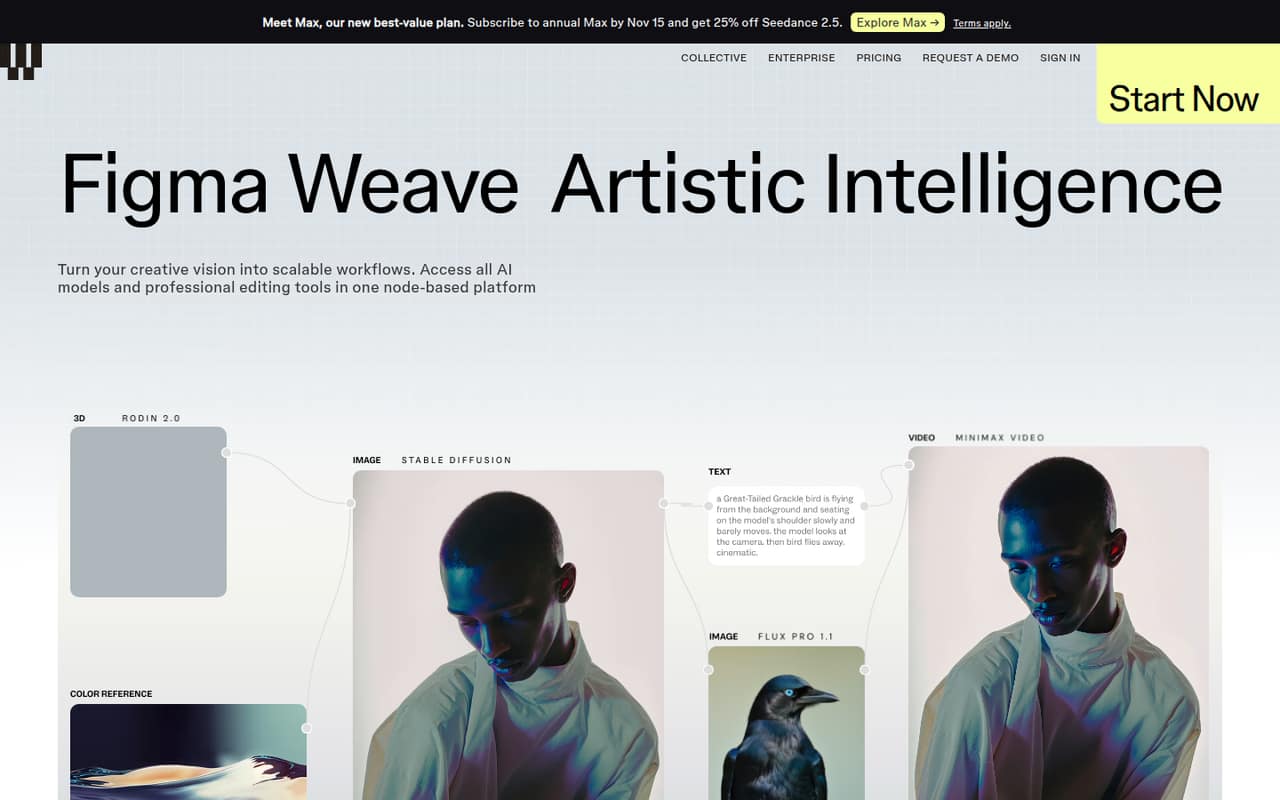
Weavy brings multiple AI models and image-editing tools into a node-based workspace for generating, editing, and compositing images. The Free plan includes 150 monthly credits and a commercial license, which is enough to explore before paying.
For a small team, the trade-off is learning the node workflow and paying per user for Team. Reddit users praise the control and flexibility, while some note a learning curve; the best fit is a team that will reuse workflows, not just make the occasional image.
Good fit if
- Teams reusing creative workflows
- Designers needing image-editing control
- Small agencies sharing AI credits
Skip it if
- Teams wanting instant, simple generations
- People who avoid node-based tools
- Teams with tight per-seat budgets
ScoresHow it rates
What works
- Free plan includes a commercial license
- Multiple AI models in one node-based platform
- Image tools include inpainting and relighting
- Unlimited workflows on Starter
- Team plan offers shared credits
What doesn't
- Free plan is limited to five workflows
- Free plan has 150 monthly credits
- Team monthly-billing price is not published
- Node-based workflows can take time to learn
- Starter credits do not roll over
01Who Weavy is for
Weavy is for small creative teams that make images regularly and want more control than a prompt box offers. Its node-based platform connects AI models with tools for image generation, editing, and compositing. You can crop, inpaint, outpaint, upscale, relight, and work with layers, type, and blend tools.
For a solo designer or a team of two to five, it makes most sense when you expect to reuse workflows for campaigns, product visuals, or other recurring work. Templates cover tasks such as camera-angle control and relighting, and Weavy can generate a simpler interface from a workflow. That may help a team standardize repeat work, though the core canvas still uses nodes.
The Free plan lets a small team explore without a subscription. Once more than one person needs a shared pool and credit management, the Team plan is the relevant option. Its per-user cost makes it a harder sell for teams that only create images now and then.
02Weavy free plan and trial
The Free plan costs $0 and includes 150 monthly credits, about 375 images, up to five workflows, and a commercial license, per the pricing page. That gives a solo creator a way to try the node-based workflow and check whether the available tools fit their work before committing to a paid plan.
The limits matter if you create frequently: Free has fewer credits than Starter and caps workflows at five. The pricing page lists no credit top-ups for Free, and it does not list a separate free trial. Starter is the first paid plan, at $24 per month with monthly billing or an annual-billing equivalent of $16.83 per month. If you need more than the free allowance, compare the expected credit use with Starter before upgrading.
03What a small team pays for Weavy
For one person, Starter costs $24 per month with monthly billing, or $16.83 per month on annual billing. It includes 1,500 monthly credits and unlimited workflows, but credits do not roll over. Professional costs $45 monthly or $31.50 per month on annual billing, with 4,000 credits and rollover up to three times the monthly allowance.
For shared team use, the Team plan lists $42 per user per month on annual billing. That makes three seats $126 per month, or $1,512 per year, and five seats $210 per month, or $2,520 per year. The pricing page does not publish a monthly-billing price for Team, so ask Weavy before budgeting for a month-to-month subscription. Team includes 4,500 credits per user in a shared pool and credit management.
Top-ups cost $10 per 1,000 credits on Starter and $10 per 1,200 credits on Team; they roll over for 12 months. Professional top-ups also cost $10 per 1,200 credits. Free has no top-ups.
04Getting started with Weavy
Weavy centers work on a node-based canvas, so the main setup task is learning how to connect models and editing tools into a workflow. The platform includes workflow templates for tasks such as relighting and camera-angle control, and it can generate a simplified interface from a workflow. Those features may help once a workflow is ready to reuse.
A commenter on r/weavyai says the nodes can involve a learning curve for people without node-based production experience, though they describe Weavy's setup as fairly intuitive. That makes the learning effort depend partly on your team's prior experience. The vendor does not publish a typical setup time or a day-one integration checklist. Weavy lists multiple AI models in one platform, but ask the vendor about any specific external apps or integrations your team needs before choosing a paid plan.
05When small teams outgrow Weavy
You may outgrow Free once five workflows or 150 monthly credits no longer cover your work. Starter removes the workflow cap and raises credits to 1,500, but has no credit rollover. Professional adds rollover up to three times its monthly credits; Max raises the allowance to 10,000 credits and rollover up to four times. Top-ups can bridge occasional shortfalls, but frequent purchases are a sign to compare a higher plan with your actual usage.
For teams, the next pressure point is seats: Team lists $42 per user per month on annual billing, and the monthly-billing price is not published. Its shared credit pool and team credit management are useful for group work, but the per-seat cost can climb as people join. Reddit users describe Weavy as flexible and controllable, while one commenter says simpler tools can be quicker for rapid iterations. If your team mostly wants one-off generations, the node workflow and ongoing seat costs may be more than you need.
From the threadsWhat users say
Reddit comments are generally positive about Weavy's control and flexibility, especially for users comfortable with node-based workflows. Sentiment is mixed on ease: some find it intuitive, while others say simpler tools are faster for quick results.
Weavy's node-based approach is solid for control but Freepik's simpler if you just want quick iterations without the learning curve
There might be a little bit of a learning curve if you don't know how to deal with the nodes, although to be fair it's pretty basic in Weavy
weavy allows you to build out systems more easily with LLM integration so if you spend more time up front setting up a workflow it can be more repeatable with less work
I don't think any program outside of comfy allows for as much customization
Questions people ask
Does Weavy have a free plan?
Yes. The Free plan includes 150 monthly credits, about 375 images, five workflows, and a commercial license, per the pricing page. It does not include credit top-ups. If you need unlimited workflows or more credits, Starter is the first paid option.
Does Weavy offer a free trial?
The pricing page does not list a separate free trial. It lists a Free plan with 150 monthly credits and five workflows, so you can explore the platform without starting a paid subscription. Check with Weavy if you need a trial of a specific paid feature.
How much does Weavy cost for a small team?
The Team plan lists $42 per user per month on annual billing. That works out to $126 per month for three users or $210 per month for five. Weavy does not publish a monthly-billing Team price, so ask the vendor if you need month-to-month billing.
Do unused Weavy credits roll over?
Free and Starter do not list credit rollover. Professional allows unused credits to roll over up to three times the monthly credit allowance, while Max allows up to four times. Team also lists rollover up to three times the monthly allowance. Top-ups roll over for 12 months.
Can a small team use Weavy for commercial work?
The Free plan includes a commercial license, per the pricing page. If your team has specific licensing, client, or usage requirements, confirm the relevant terms with Weavy before using generated work in a commercial project.