
We may earn a commission if you buy through links on this page. It never changes a score or a ranking. How we make money
The bottom line
Great for catching test traffic; confirm shared access before choosing a paid plan.
Webhook.site gives you a unique URL and email address to capture requests and messages, with no signup required. Its free option is useful for quick debugging, but URLs expire after a week and keep up to 50 requests.
Paid plans start at $7.50 per month with annual billing. The main small-team catch is access: the pricing lists 10 included users on Enterprise, but doesn't list user allowances for Basic or Pro.
Good fit if
- Developers debugging incoming webhooks
- Small teams inspecting email and DNS traffic
- Quick tests without an account
Skip it if
- Teams needing long free request history
- Groups needing clear low-cost shared access
- Teams wanting a published integration catalog
ScoresHow it rates
What works
- Capture requests without signing up
- Inspect headers, query strings, and bodies
- Capture email and DNS activity
- Free option covers quick, short-lived tests
- Paid plans include visual workflows
What doesn't
- Free URLs expire after one week
- Free request storage stops at 50
- Basic and Pro user allowances aren't listed
- Enterprise is the only plan listing included users
- Reddit reports mention self-hosted setup and container issues
01Who Webhook.site is for
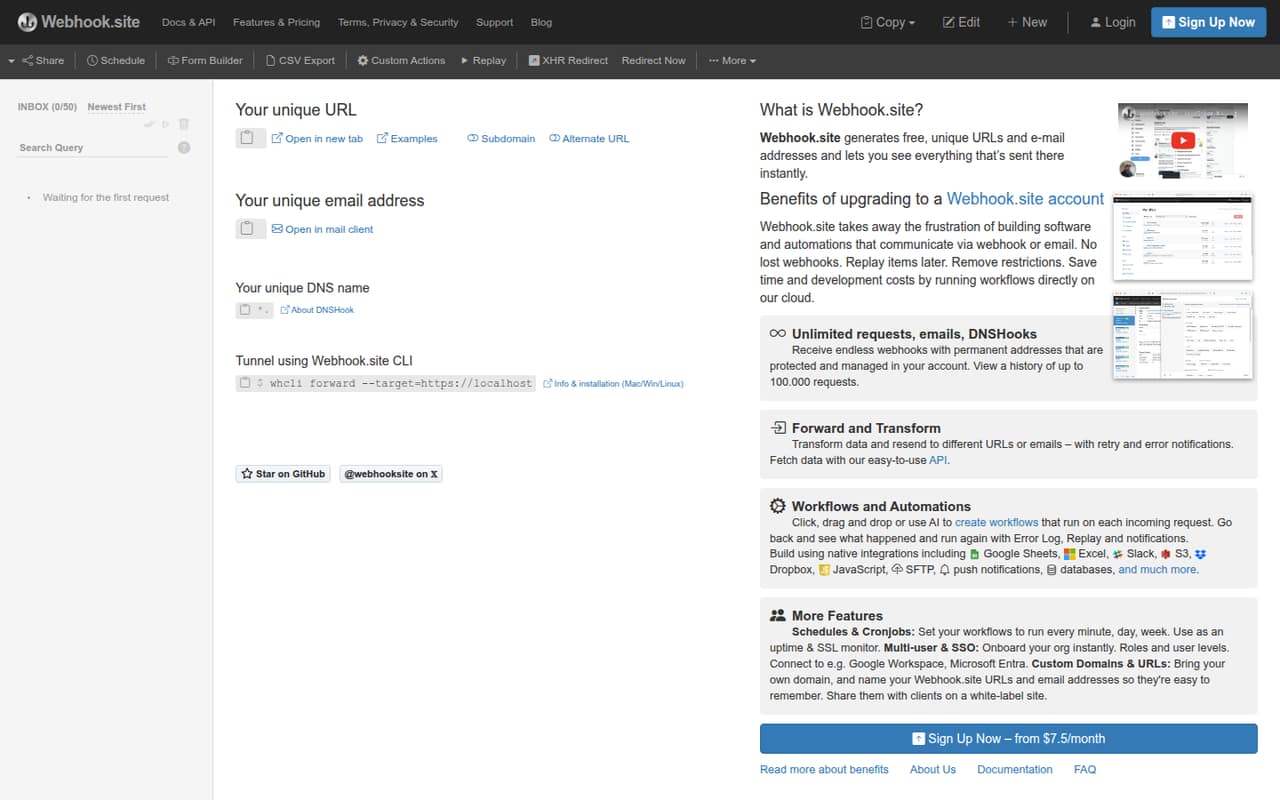
Webhook.site suits a solo developer or a small team that needs to see what an app sends to a webhook endpoint. It creates a unique URL for incoming HTTP requests and an email address for captured messages, then displays their contents. DNSHook captures lookups too. You can inspect headers, query strings, bodies, and email attachments.
For a team watching its budget, the free option is enough for an occasional test, while paid plans add more URLs and request history. Visual workflows can filter, transform, forward, or respond to incoming traffic; scripts add logic when those steps are not enough. The key buying question for a team of 3–10 is access: Enterprise lists 10 users, while Basic and Pro don't list user allowances. We’d confirm how many teammates can use the lower plans before treating them as shared team accounts.
02Webhook.site free plan and trial
The free option needs no signup and gives you a unique URL and email address for capturing incoming traffic. Its limits are clear: free URLs expire after one week and store up to 50 requests. That makes it a good fit for a quick integration check, but a poor place to keep a running history or a test endpoint you revisit later.
A free trial isn't listed. The cheapest paid option is Webhook.site Basic at $9 month to month, or $7.50 per month when billed annually ($90 for the year). Basic lists one URL, unlimited requests, 1,000 request history, one schedule, and one database. Those are plan limits, not a published promise of multiple user accounts.
03What a small team pays for Webhook.site
Webhook.site Basic costs $9 monthly or $90 annually ($7.50 per month) for one URL. Pro costs $19 monthly or $190 annually ($15.83 per month) and lists 50 URLs, unlimited requests, 10,000 request history, five schedules, and one database. Enterprise costs $69 monthly or $699 annually ($58.25 per month); it lists unlimited URLs and schedules, 100,000 request history, and 10 users included.
For a team of three or five that needs listed shared access, Enterprise works out to $23 or $13.80 per person monthly, respectively; with annual billing, the monthly equivalents are about $19.42 or $11.65. Those are simple divisions of the plan price, not per-seat prices. Basic and Pro user allowances aren't listed, so we can't confirm whether those plans work for a shared team. No paid add-ons are listed. The cheapest plan for a few people depends on the access arrangement Webhook.site confirms.
04Getting started with Webhook.site
For a quick test, setup is light: Webhook.site creates a capture URL without requiring signup, and you send your test request to that URL to inspect what arrives. You can use a generated email address to capture messages as well. No code is needed just to view incoming requests.
More involved use takes extra configuration. The visual workflow builder handles filtering, transforming, forwarding, and responding; WebhookScript or JavaScript can add custom logic. CLI forwarding is available for sending captured requests to localhost or a private network. The product details don't name specific third-party integrations, so check the vendor's docs for your sender and workflow before committing. One Reddit commenter points to a generic web server setup guide in the docs for self-hosting, while another reports trouble with the container image on Azure Web App for Containers.
05When small teams outgrow Webhook.site
The first limit to outgrow is the free plan's one-week URL expiry and 50-request storage. Basic raises request history to 1,000 and Pro to 10,000; Enterprise lists 100,000. Teams needing more URLs, schedules, or history can compare those plan limits, but the bigger budget question is shared access. Only Enterprise lists included users—10—so ask Webhook.site how Basic and Pro handle teammates before buying for a group.
Some teams may also prefer to keep captured payloads on infrastructure they control. In one Reddit thread, a commenter says the open-source version lacks some features and another reports trouble with its container image on Azure Web App for Containers. A different commenter says multipart/form-data wasn't shown in the version they tried. Those are reports about self-hosted use, not proof of limits in the hosted service; check the version and deployment you plan to use.
From the threadsWhat users say
Reddit comments show interest in self-hosting, but also mention setup and feature snags with the open-source version. The comments offer little direct feedback on the hosted plans, so sentiment is mixed rather than a clear endorsement.
there is an open-source version of webhook.site that you can host yourself
it doesn't show multipart/form-data. That's one feature I really need
I had trouble with the webhook.site container image on Azure Web App for Containers
Questions people ask
Can I use Webhook.site without signing up?
Yes. Webhook.site creates a unique capture URL and email address without requiring signup. The free URL expires after one week and stores up to 50 requests, so it suits short tests better than ongoing request history.
What does Webhook.site cost?
Basic is $9 month to month or $90 per year. Pro is $19 monthly or $190 annually. Enterprise is $69 monthly or $699 annually. The annual prices work out to $7.50, $15.83, and $58.25 per month, respectively.
Does Webhook.site have a free trial?
A free trial isn't listed. There is a free option with no signup, but free URLs expire after one week and store up to 50 requests. The lowest-cost paid plan is Basic, starting at $7.50 per month with annual billing.
Can Webhook.site capture emails and DNS lookups?
Yes. The product captures emails sent to a unique address, including headers, body, and attachments. DNSHook captures DNS lookups sent to a unique DNS name. It can also capture incoming HTTP requests and show their headers, query strings, and bodies.
Which Webhook.site plan is best for a small team?
Pro is labeled for small organizations and costs $19 monthly or $15.83 per month with annual billing. However, its included user count isn't listed. Enterprise lists 10 users and is the plan with shared access called out, at $69 monthly or $58.25 per month annually.
Sources
- Webhook.site homepage
- Webhook.site pricing page
- Reddit: Any self hosted version for requestbin or webhook.site?
- Reddit: I built a self-hosted webhook.site alternative — capture, inspect, and replay webhooks. One-click deploy to Railway.
- Reddit: What's missing in webhook.site or requestinspector.com ?
- Reddit: Webhook.site MCP Server – Enables interaction with Webhook.site to create, manage, and monitor endpoints for capturing HTTP requests, emails, and DNS lookups. It provides 16 tools for testing webhooks and inspecting incoming data through the Model Context Protocol.