
We may earn a commission if you buy through links on this page. It never changes a score or a ranking. How we make money
The bottom line
A useful free time-zone planner for small teams, not a full team calendar.
World Time Buddy helps a small team compare local times, convert meeting times, and schedule or share events. Its listed features are free, including saving settings after signing in, so there’s no per-seat bill for a few coworkers.
The tradeoff is scope: it focuses on time zones and meeting coordination rather than broader calendar work. One Reddit thread also reports that the app was unavailable in a user’s region, so check access for your team before relying on it.
Good fit if
- Small teams coordinating across time zones
- Budget-conscious meeting planners
- People scheduling occasional international calls
Skip it if
- Teams needing a full shared calendar
- Buyers who need published support commitments
- Teams requiring guaranteed regional app access
ScoresHow it rates
What works
- World clock displays local times across locations
- Compare multiple time zones at once
- Convert times by hovering over hours
- Schedule and share events for free
- Save settings by signing in
What doesn't
- No paid team or per-seat plan is listed
- Monthly and annual billing schedules aren't published
- Support channels and response times aren't published
- A Reddit user reported regional app unavailability
- Its listed focus is time zones, not a full calendar
01Who World Time Buddy is for
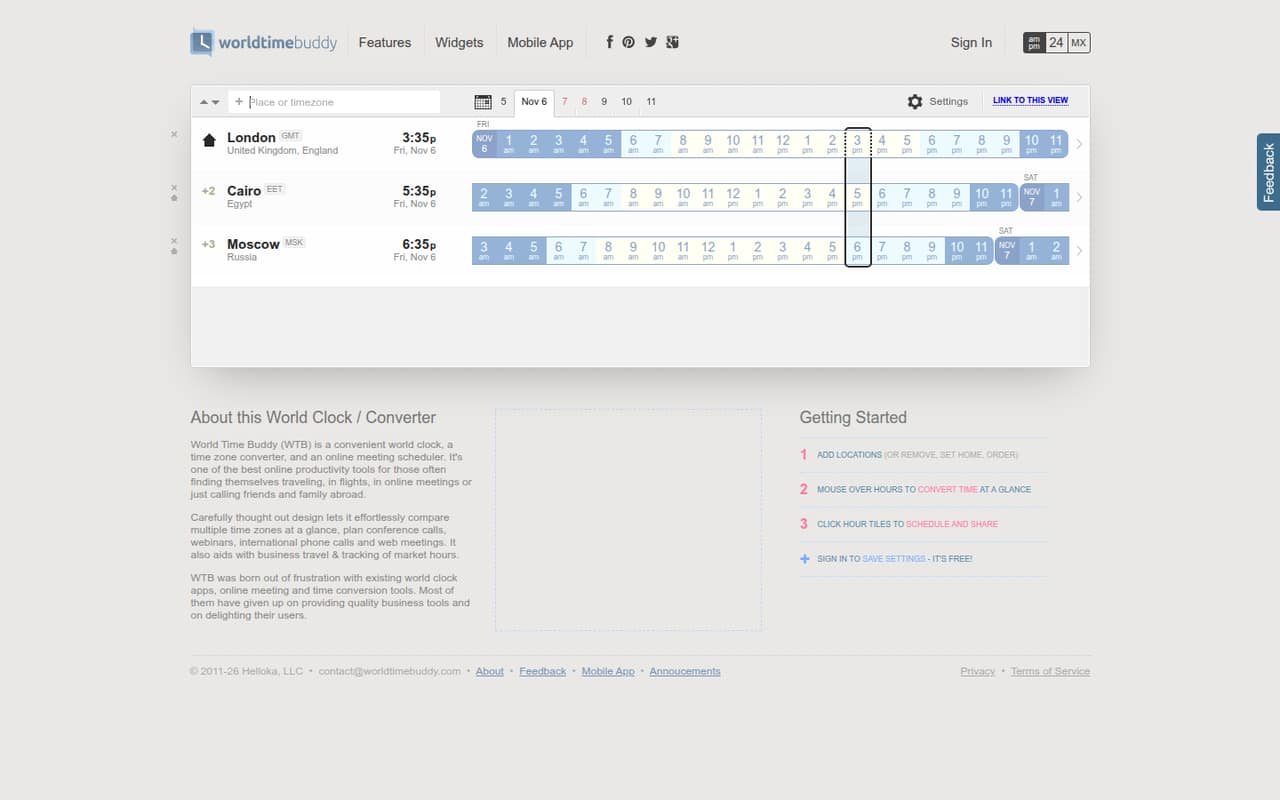
World Time Buddy suits a one-to-ten-person team that regularly schedules calls across time zones but wants to keep software spending low. It displays local time across multiple locations, lets you compare zones and convert times by hovering over hours, and provides tools to schedule and share events.
That makes it a useful companion for a small remote team, an executive assistant coordinating calls, or a founder arranging a webinar with attendees in different regions. It can also help with business travel planning. The main job is working out when an event happens for each location; the listed features don’t make it a replacement for a team’s broader calendar system. For a team that mainly needs a clear time comparison and a way to share an event, the free offering keeps the decision simple. If you need a full scheduling workflow, check that the available calendar options cover your process.
02World Time Buddy free plan and trial
The listed Free plan includes a world clock and time-zone converter, comparisons across multiple time zones, scheduling and sharing events, and saving settings after signing in. The pricing information says paid subscriptions were discontinued on May 5, 2022, and that all features are free. No paid plan, trial, or billing schedule is listed, so there’s no published upgrade price to budget for.
For a small team, that means the core time-zone planning features can be used without a subscription fee. Saving settings requires signing in; the listed plan doesn’t say that every teammate needs an account to compare times or view shared events. The vendor’s plan details don’t publish user limits or team-specific controls, so ask the vendor if you need a confirmed seat limit or admin setup.
03What a small team pays for World Time Buddy
The listed starting price is $0 per month. Since the Free plan has no published per-seat charge, the listed cost works out to $0 for one person, $0 for three people, and $0 for five people. There’s no separate annual price or monthly-versus-annual discount listed; the pricing information says paid subscriptions were discontinued on May 5, 2022, and all features are free.
No add-ons are listed, and there’s no paid plan or seat-based tier to calculate for a growing team. That makes the direct subscription cost easy to budget for a small group. The catch is that the vendor doesn’t publish a billing schedule, user limit, or team pricing model, so don’t assume the free setup includes particular admin or account-management controls. If your team needs confirmed seat limits or a formal purchasing arrangement, ask the vendor before making it part of a wider scheduling process.
04Getting started with World Time Buddy
Setup should be light for a team that only needs to compare locations and plan a meeting: the listed features center on viewing local times, hovering over hours to convert them, and clicking hour tiles to schedule and share events. Signing in lets you save settings for free. The vendor doesn’t publish a setup-time estimate, so allow time to add the locations your team uses and agree on a shared way to send event details.
The page shows Outlook/iCal and Google Calendar options. Those are useful starting points for a team already using those calendars, but confirm the exact calendar workflow you need before relying on it. One Reddit commenter says they keep five cities in an iPhone’s built-in world clock, while another mentions Outlook time zones; those are alternatives people use, not World Time Buddy setup instructions. A Reddit user also reported that the app wasn’t available in their region, so check access for your team.
05When small teams outgrow World Time Buddy
A team may outgrow World Time Buddy when its need shifts from comparing time zones to managing a broader scheduling process. The listed features cover clocks, conversions, and scheduling or sharing events; the vendor doesn’t list paid team tiers, seat pricing, or a billing path for a larger group. If your team needs confirmed user limits, admin controls, or specific calendar behavior, ask the vendor whether those needs are covered before making it a core workflow.
Access is another point to check. In one Reddit thread, a Sydney user said the app was no longer available in their region, and a commenter described seeing an app-unavailable message for their country or region. Another commenter said the service had gone down in the Philippines before returning. These are individual reports, not a measure of overall reliability, but they suggest checking regional access and keeping a backup way to compare times. Other commenters said they use built-in clock or calendar time-zone features instead.
From the threadsWhat users say
The Reddit discussion includes praise from people who found World Time Buddy useful for juggling several time zones. It also includes concerns about regional app availability and a report of temporary downtime, so sentiment is positive about the use case but mixed on access.
I keep 5 cities up all the time and add other cities if I’m coordinating meetings or travel in other time zones
It seriously was the best app for time zones as I sometimes work with 4 at the same time
all of a sudden the one I have been using World Time Buddy is no longer available from my region (Sydney, Australia)
It went down in the Philippines last time but it went back up
Questions people ask
Is World Time Buddy free?
The listed Free plan includes the world clock, time-zone converter, comparisons across multiple locations, event scheduling and sharing, and saved settings after signing in. The pricing information says paid subscriptions were discontinued on May 5, 2022, and all features are free. No paid price or billing schedule is listed.
Can I save my time-zone settings?
Yes. The listed Free plan includes saving settings by signing in. The vendor doesn’t publish a user limit or a team-specific account setup in the plan details, so ask if you need to know how settings work across several teammates or accounts.
Can World Time Buddy schedule and share meetings?
Its listed features include scheduling and sharing events: click hour tiles to schedule and share. The page also shows Outlook/iCal and Google Calendar options. Check the calendar workflow you need, since the available details don’t specify how those options work with every team calendar setup.
Does World Time Buddy have a mobile app in every region?
A Reddit user in Sydney reported that the app was unavailable in their region, and another commenter described an app-unavailable message for their country or region. That doesn’t establish availability everywhere. Check access for your location before depending on an app; the product is also described as an online world clock and time-zone converter.
What support does World Time Buddy offer?
Support channels and response times aren’t published in the pricing details. If your team needs a response-time commitment, onboarding help, or a particular support channel, ask the vendor before relying on World Time Buddy for time-sensitive scheduling.