
We may earn a commission if you buy through links on this page. It never changes a score or a ranking. How we make money
The bottom line
A strong free chat option for teams that like tidy, topic-based conversations.
Small teams that struggle to follow busy chat channels should consider Zulip. Its topics, threaded replies, and unread inbox keep conversations organized, and the Cloud free plan includes 10,000 messages of search history and 5 GB of total file storage.
The trade-off is a learning curve: some Reddit users like being able to follow specific topics, while others find it awkward to create a topic for every conversation. Paid Cloud starts at $8 per user monthly, or $6.67 per user with annual billing.
Good fit if
- Teams juggling many chat topics
- Budget-conscious open-source teams
- Teams comfortable learning new chat habits
Skip it if
- Teams wanting familiar, casual chat
- Organizations requiring SSO on a small budget
- Groups reluctant to switch chat tools
ScoresHow it rates
What works
- Free Cloud plan includes 10,000 messages of search history
- Topic-based conversations keep replies in context
- Free Cloud includes guest accounts and hundreds of integrations
- Open-source software can be self-hosted
- Cloud and self-hosted plans are available
What doesn't
- Some users find the topic-first workflow confusing
- Free Cloud search history is limited to 10,000 messages
- Plus requires a 10-user minimum
- Business self-hosted requires a 25-user minimum
- Switching can mean asking people to install another chat app
01Who Zulip is for
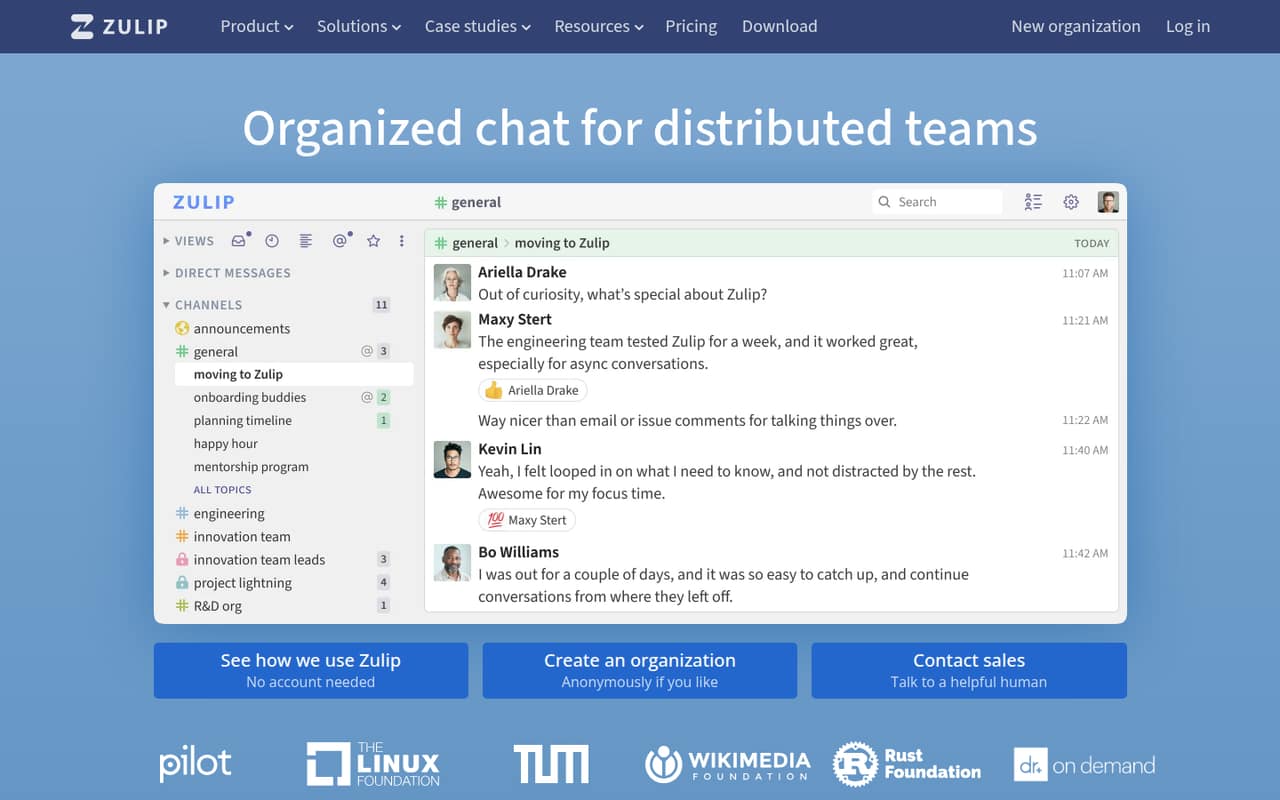
Zulip is worth a look for a team of one to ten that has several conversations going at once and loses track of replies in ordinary chat. Instead of putting every message in one channel timeline, people start conversations with a topic and reply in context. An unread inbox helps people catch up on conversations they follow.
The free Cloud plan makes it a practical option for a small team watching its software budget. Teams that want to run their own server can also use Zulip’s open-source software, with paid self-hosted options for mobile notifications and support. The catch is the chat habit: a Reddit commenter found the topic requirement overwhelming, while another said it helped them follow only the discussions they cared about. Zulip is a better fit when the team values that structure more than a familiar, free-flowing chat experience. It can also be moved between Cloud and self-hosting, and Zulip supports moving from tools including Slack and Teams.
02Zulip free plan and trial
Zulip lists a Free (Cloud) plan at no charge, with 10,000 messages of search history, 5 GB of total file storage, hundreds of integrations, and guest accounts. That is enough to try topic-based chat with a small team without committing to a monthly bill. The vendor does not list a free trial; the free plan is the no-cost way in.
The main published limit is search history: teams needing unlimited search history must move to Standard (Cloud). Storage is 5 GB total on Free, compared with 5 GB per user on Standard. There is also a Free (Self-hosted) plan. Zulip lists all features on that plan, but mobile notifications are unlimited only for eligible communities; other organizations get notifications for up to 10 users. Check eligibility with Zulip if you are using it for a workplace.
03What a small team pays for Zulip
For a managed service, Standard (Cloud) is the practical paid plan for a small team: the pricing page lists it at $8 per user monthly, or $6.67 per user per month with annual billing. That works out to $8 or $6.67 for one person, $24 or about $20.01 for three, and $40 or about $33.35 for five. Annual billing is the lower listed rate.
Standard adds unlimited search history, 5 GB of file storage per user, custom groups, message retention policies, and priority commercial support. Plus (Cloud) costs $12 per user monthly or $10 with annual billing, but has a 10-user minimum—so even a smaller group pays for at least 10 seats: $120 monthly or $100 per month with annual billing.
For a team willing to manage its own server, Basic (Self-hosted) is $3.50 per user per month, billed monthly: $10.50 for three people or $17.50 for five. The page lists $20/month off Basic and Business for the first year. It also says compliance customization and support are billed hourly for those self-hosted plans.
04Getting started with Zulip
The lowest-effort start is Zulip Cloud: your team can use the hosted service rather than setting up its own server. Self-hosting means your team takes on server management; Zulip lists it as an option for teams that want to control their own deployment. The vendor does not publish a setup-time estimate, so ask about migration and administration needs before planning a switch.
The bigger adjustment is how people start conversations. Zulip asks users to give each conversation a topic, then keeps replies together. Some Reddit users appreciate being able to focus on a specific topic; others say coming up with a topic for every message feels like friction. A commenter suggested starting with a broad “need help” topic and refining it later.
For day one, the pricing page lists hundreds of integrations on Free (Cloud). The feature set also includes an unread inbox and guest accounts. Decide on a few simple topic conventions before inviting the whole team, especially if people are used to unstructured chat.
05When small teams outgrow Zulip
The first reason to upgrade is usually the free Cloud plan’s 10,000-message search history or 5 GB total storage. Standard (Cloud) removes the search limit and changes storage to 5 GB per user, at $8 per user monthly or $6.67 with annual billing. For a team that needs SAML SSO, SCIM user and group sync, or a custom domain, Plus has those features—but its 10-user minimum makes it an expensive step for a smaller group.
Self-hosted workplaces that need email and chat support, SAML or Microsoft Entra ID SSO, or AD/LDAP sync may look at Business, which has a 25-user minimum. That minimum can be a poor fit for a growing team that is still well below 25 people. Compliance customization and support are billed hourly on Basic and Business.
There is also a people-side limit. Reddit users report that Zulip’s topic-first interface can feel less intuitive than familiar chat, and that switching costs rise when a community already uses other apps. If the team won’t adopt the structure, the organization features won’t help much.
From the threadsWhat users say
Reddit sentiment is split. Some users value the structure for following busy discussions, while others find the topic-first interface unfamiliar or say switching chat communities is hard.
Zulip makes it easy to keep up with just the topics I care about
They already have slack/discord installed on their phones, laptops, and other devices
it's good that it's open source and self hosted
Questions people ask
Is Zulip open source?
Yes. Zulip describes its self-hosted software as open source. Teams can run it on their own server, and the pricing page lists a free self-hosted plan as well as paid options. The paid self-hosted plans include services such as mobile notifications and support, depending on the plan.
How much does Zulip Cloud cost?
Zulip Cloud has a free plan. Standard costs $8 per user monthly or $6.67 per user per month with annual billing. Plus costs $12 monthly or $10 with annual billing, and requires at least 10 users.
Does Zulip have a free trial?
The pricing page lists a free Cloud plan, but does not list a separate free trial. Free Cloud includes 10,000 messages of search history, 5 GB total file storage, hundreds of integrations, and guest accounts.
Can a small team self-host Zulip?
Yes. Zulip lists a Free (Self-hosted) plan and a Basic (Self-hosted) plan at $3.50 per user per month. Running your own server means your team manages the deployment. The free plan’s mobile notification limits depend on whether your organization is eligible.
How is Zulip different from other team chat?
Zulip organizes conversations around topics and keeps replies in context, rather than relying only on a channel timeline. It also includes an unread inbox to help people follow conversations. Some users like this structure; others say the topic-first approach takes getting used to.