
We may earn a commission if you buy through links on this page. It never changes a score or a ranking. How we make money
The bottom line
Useful call coaching and analysis, with pricing that gets less straightforward beyond five seats.
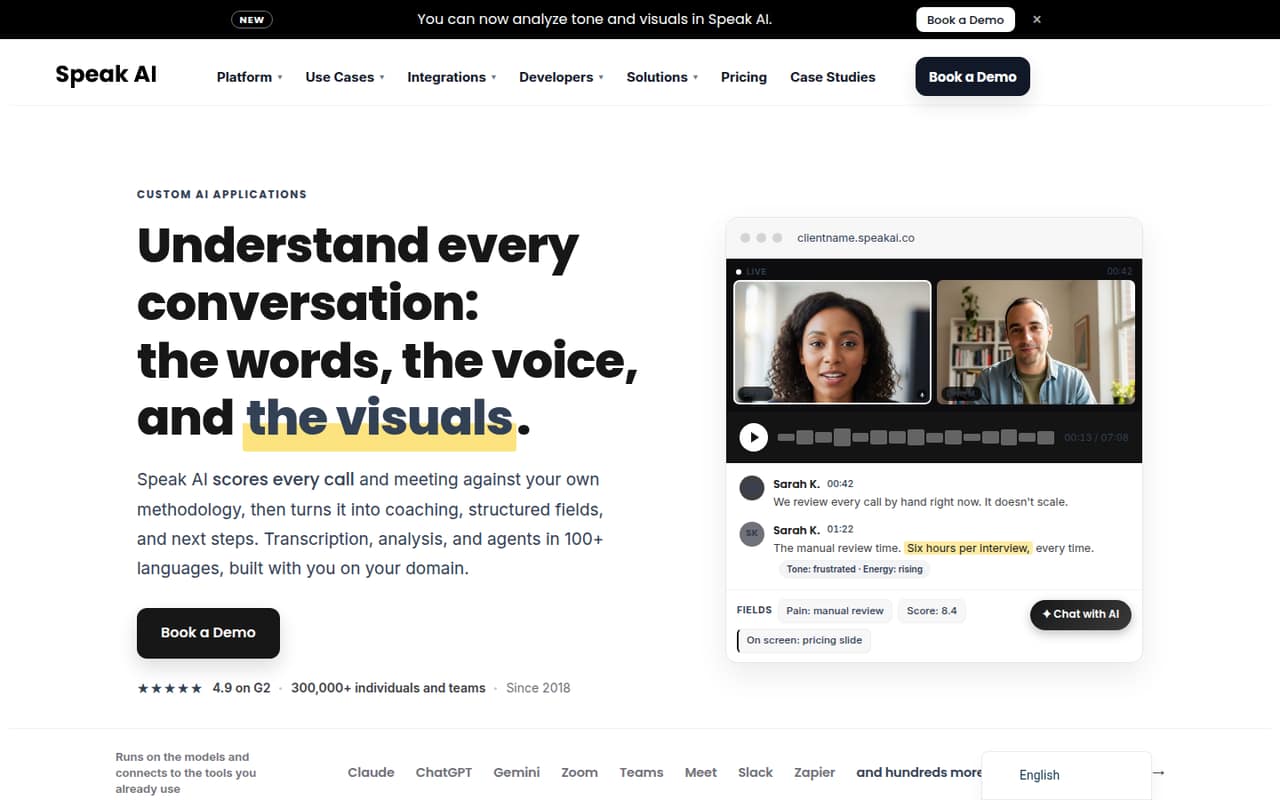
Speak captures and transcribes conversations, then analyzes words, voice, and visuals. Teams can score calls against their own methodology and turn results into coaching or structured insights.
For a small team, the key trade-off is clear: Pro costs $25 per user monthly or $20 per user monthly with annual billing, and covers up to five users. Speak lists a free plan and a seven-day trial, but doesn't publish the free allowance.
Good fit if
- Teams coaching people on calls
- Researchers transcribing recorded conversations
- Teams needing custom call scoring
Skip it if
- Teams needing more than five Pro seats
- Buyers wanting clear free-tier limits
- Teams needing published support details
ScoresHow it rates
What works
- Scores calls against a team's own methodology
- Captures Zoom, Teams, Meet, and Webex meetings
- Transcribes in more than 100 languages
- Pro includes 25 credits per user monthly
- Enterprise offers white-label applications and custom scoring
What doesn't
- Pro is limited to five users
- Free-plan allowance isn't published
- Usage can require paid credits
- Enterprise pricing is custom
- Support details aren't published
01Who Speak is for
Speak is for small teams that need more than a meeting transcript: sales, research, or service teams can use it to review how conversations go and turn calls into coaching or structured data. It captures and transcribes conversations, then analyzes transcript content alongside tone, energy, and visuals. Teams can score calls using their own methodology.
For a team of one to five, Pro is the clearest subscription fit: the pricing page lists $25 per user monthly, or $20 per user monthly with annual billing. That is a meaningful recurring cost, so it makes most sense when the team will regularly use call analysis, not just occasional transcription. Speak also lists a no-subscription Pay as you go option, which may fit occasional use. Teams needing custom applications, white-labeling, or more than five Pro users should ask about Enterprise.
02Speak free plan and trial
Speak lists a free plan and a seven-day free trial. The pricing page does not publish the free plan's usage allowance or the trial's specific limits, so we can't say how many hours, credits, or features a team can use without paying. Ask Speak whether the free option includes transcription credits and whether the trial requires a payment method.
The published Pay as you go option has no subscription fee, but it is not the same as unlimited free transcription: usage costs credits, and top-ups start at 10 credits. Speak lists each credit at US$1. Standard transcription costs 2 credits per hour, premium languages cost 3, and meeting transcription costs 4. That makes this a flexible entry point, but regular use can cost more than the subscription price.
03What a small team pays for Speak
The pricing page lists Pro at $25 per user monthly, or $20 per user monthly with annual billing. One person pays $25 month to month or $240 for a year. Three people pay $75 monthly, or $60 per month equivalent with annual billing ($720 upfront per year). Five people pay $125 monthly, or $100 per month equivalent annually ($1,200 per year). Pro includes up to five users, 25 credits per user monthly, about 25 hours of standard transcription per user, and 10 GB storage per seat.
Pay as you go has no subscription fee, but credits cost $1 each and top-ups start at 10 credits. Standard transcription uses 2 credits an hour; premium languages use 3, and meeting transcription uses 4. Translation costs 12 credits per 100,000 characters, while AI chat starts at about 0.08 credits per chat. Enterprise pricing is custom, so teams should request a quote for white-label features or larger seat needs.
04Getting started with Speak
The basics are straightforward to understand: connect conversations, get transcripts, and analyze or score them. Speak lists automatic meeting capture for Zoom, Microsoft Teams, Google Meet, and Webex, along with transcription in more than 100 languages, speaker identification, and timestamps. That covers the core workflow for a team that wants to review calls after meetings.
Setup effort depends on how much of Speak a team wants to use. Capturing meetings is a smaller first step than defining a scoring methodology, configuring custom fields, or building agents and applications around a workflow. Speak offers live and post-call agents, plus an MCP server and developer API, but the amount of configuration required isn't published. We’d start with one meeting source and a single call-review goal, then ask Speak what onboarding and setup help comes with the chosen plan.
05When small teams outgrow Speak
The clearest limit is Pro's five-user maximum. A team that grows beyond five seats should ask Speak about Enterprise, which lists unlimited users and seats but uses custom billing. Enterprise also includes custom domains and white-labeling, custom fields, scoring, AI agents, volume transcription rates, and a dedicated account manager. The vendor doesn't publish Enterprise prices, so get a quote before building it into a budget.
Usage can also become a budgeting issue before a team adds seats. Pro includes 25 credits per user monthly; teams that need more transcription or use meeting transcription at 4 credits per hour may need to purchase additional credits. Pay as you go makes the usage charge visible, but offers no subscription bundle. For a growing team, compare actual monthly hours and credit use against the per-seat Pro cost, and confirm how unused credits are treated before committing.
Questions people ask
Does Speak have a free plan?
Speak lists a free plan and a seven-day trial, but it doesn't publish the free plan's included credits, hours, or feature limits. Its Pay as you go option has no subscription fee, though usage requires credits and top-ups start at 10 credits. Ask Speak to confirm what you can use at no cost.
How much does Speak Pro cost?
The pricing page lists Pro at $25 per user per month, or $20 per user per month with annual billing. Annual billing is $240 per user for the year. Pro supports up to five users and includes 25 credits per user each month.
How do Speak credits work?
Speak lists credits at US$1 each, with Pay as you go top-ups starting at 10 credits. Standard transcription costs 2 credits per hour, premium languages cost 3, and meeting transcription costs 4. Translation and AI chat also use credits, at rates listed on Speak's pricing page.
Can Speak automatically join online meetings?
Speak lists automatic meeting capture for Zoom, Microsoft Teams, Google Meet, and Webex. The published pricing details don't specify whether every meeting-capture feature is available on every plan, so confirm plan access with Speak before setting up your team's workflow.
How many languages does Speak transcribe?
Speak says it transcribes conversations in more than 100 languages and includes speaker identification and timestamps. Its pricing page charges 3 credits per hour for premium languages, compared with 2 credits per hour for standard transcription. Ask Speak which category applies to the languages your team needs.