
We may earn a commission if you buy through links on this page. It never changes a score or a ranking. How we make money
The bottom line
Promising portfolio visibility, but verify the Timesheets Cloud pricing matches the Tempo product you need.
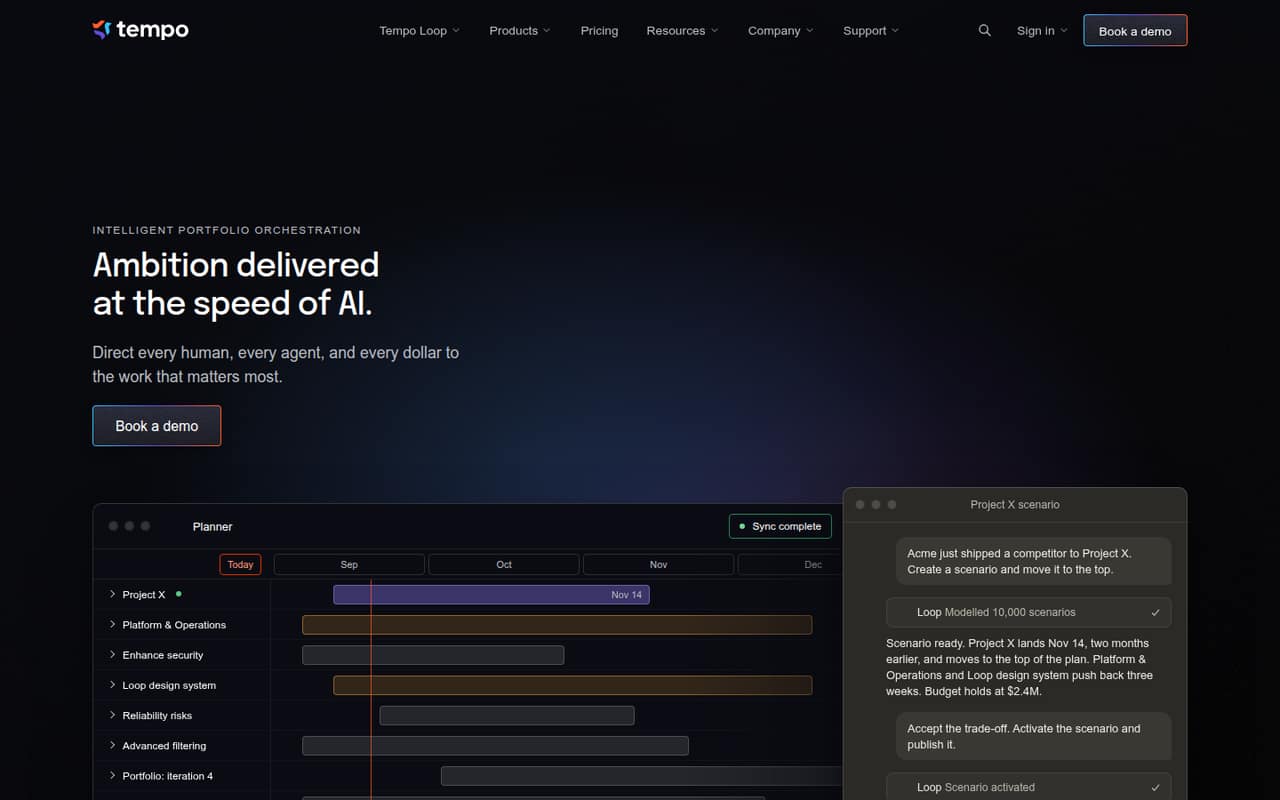
Tempo is designed to connect work, people, agents and budgets across tools such as Jira, Azure DevOps and Linear. Its portfolio features cover visibility, scenario planning, capacity and financial planning, and adapting plans as work changes.
For a small team, the price needs a careful look: the listed $10 entry plan is Timesheets Cloud for 1–10 users, not a clearly named portfolio-orchestration plan. There is no free plan listed, and you should confirm which Tempo license includes the features you want before signing up.
Good fit if
- Teams coordinating work across tools
- Jira teams that track time
- Leaders comparing plans and budgets
Skip it if
- Teams seeking a free tier
- Teams needing simple task lists
- Buyers wanting clear portfolio pricing
ScoresHow it rates
What works
- Connects portfolio plans across tools
- Supports scenario and capacity planning
- Links financial visibility with work
- Entry Timesheets Cloud plan covers 1–10 users
- Monthly pricing is listed for multiple team sizes
What doesn't
- No free plan is listed
- Trial availability is not published
- Timesheets pricing may not cover portfolio features
- Annual rates are not published
- Tempo license must match Jira license
01Who Tempo is for
Tempo is aimed at teams that need to coordinate plans, people, budgets and work spread across tools such as Jira, Azure DevOps and Linear. Its portfolio view is more relevant to a team managing several projects or shifting priorities than to a small group that only needs a shared task list.
For a team of 1–10, the practical question is whether portfolio visibility, scenario planning and capacity modeling solve a real planning problem. Those capabilities may help a founder or delivery lead compare options and see how changes affect cost and timelines. But the listed entry price is for Timesheets Cloud, so it should not be treated as a confirmed price for every portfolio feature. A budget-conscious Jira team should check which product and license it needs before committing. Tempo does not publish a free plan, and the listed monthly entry point is $10.
02Tempo free plan and trial
Tempo does not list a free plan. The cheapest published option is Timesheets Cloud, 1–10 users, at a flat $10 per month. That covers the stated 1–10-user band, and the Tempo license must match the Jira license.
The pricing page has Monthly and Annual options, but it lists monthly rates only; annual rates are not published. A free trial is not listed either, so ask Tempo whether a trial is available and what it includes before you plan around one. Also confirm that Timesheets Cloud is the right product for your needs: Tempo describes portfolio orchestration features, while the listed entry plan is named for timesheets. The published price alone does not establish which portfolio features it includes.
03What a small team pays for Tempo
For 1–10 users, Timesheets Cloud is listed at a flat $10 per month. That means a one-person account and a team of three or five pay the same listed monthly fee, as long as they remain in that user band. The pricing page offers Monthly and Annual options, but publishes monthly rates only; annual rates are not published.
The next listed band, Timesheets Cloud, 11–100 users, is priced per user per month. The pricing lists $599/month shown and a $5.99 average per user. That is a substantial change from the flat-fee entry band, so check the exact quote for your headcount before expanding.
The main extra budget consideration is that Tempo’s license must match the Jira license. The listed pricing does not show a separate add-on price. More importantly, the schedule names Timesheets Cloud, while Tempo’s product description focuses on portfolio orchestration. Confirm which license covers the features you plan to use and whether any separate product charges apply.
04Getting started with Tempo
Tempo describes connecting work across Jira, Azure DevOps and Linear, with visibility into workforce activity, costs and delivery. A small team should first identify which of those tools it needs to connect and confirm that its Tempo and Jira licenses match. Those are the clearest setup considerations stated for a buyer.
Tempo does not publish a setup-time estimate or a step-by-step onboarding outline in its product details. The description also does not spell out the configuration required for a small team to connect its tools or build a first plan. That makes setup effort hard to budget from the published information alone. Before buying, ask Tempo which integrations are available on the specific license you need, what information you must prepare, and whether onboarding help is included. The number of setup steps and the learning curve are not published.
05When small teams outgrow Tempo
The first pricing threshold is headcount: the flat-fee Timesheets Cloud plan covers 1–10 users, while the next band is 11–100 users and switches to per-user pricing. The pricing lists $599/month shown and a $5.99 average per user for that larger band. Ask for a quote before adding seats; do not assume the small-team flat fee continues past ten users.
A different kind of mismatch may matter sooner than growth. Tempo’s product description covers portfolio planning and orchestration, but the published price bands are named Timesheets Cloud. If your team needs those portfolio features, confirm which plan includes them and whether it has a separate price. Teams may also need to reconsider their budget if their Jira license changes, because Tempo says its license must match Jira’s. Annual rates and a setup estimate are not published, so growing teams should get those details directly from Tempo.
Questions people ask
Does Tempo have a free plan?
Tempo does not list a free plan. Its cheapest published option is Timesheets Cloud, 1–10 users, at a flat $10 per month. The pricing page does not list a free trial either, so ask Tempo whether a trial is available before purchasing.
How much does Tempo cost for a small team?
Timesheets Cloud, 1–10 users, is listed at a flat $10 per month. The same monthly fee applies to a team of one, three or five, provided it stays within that user band. Annual rates are not published.
Does the Timesheets Cloud plan include portfolio planning?
Tempo describes portfolio visibility, scenario planning, capacity planning and financial visibility, but its published price bands are named Timesheets Cloud. Confirm with Tempo which product and license include the portfolio features you need.
Which tools can Tempo connect?
Tempo describes connecting work across tools such as Jira, Azure DevOps and Linear. Check with Tempo which integrations are available for the specific product and license you plan to buy.
Does Tempo offer annual billing?
The pricing page has Monthly and Annual options, but the published rates are monthly only. Annual rates are not published, so ask Tempo for the annual cost and any billing terms before budgeting.