
We may earn a commission if you buy through links on this page. It never changes a score or a ranking. How we make money
The bottom line
A feature-rich task organizer with a free tier, but team pricing needs clarification.
Toodledo combines tasks, notes, custom lists, outlines, and habit tracking. Its free plan includes unlimited tasks, but limits folders, list and outline items, habits, and collaborators.
The pricing page lists paid plans from $3.99 per month when billed annually. Plus lists up to five collaborators, but the pricing basis for multiple seats isn't clear, so confirm the total before committing.
Good fit if
- Detail-oriented task planners
- Small teams sharing lists
- People tracking habits and notes
Skip it if
- Teams needing clear per-seat pricing
- People who want minimal task entry
- Teams requiring known integrations
ScoresHow it rates
What works
- Free plan includes unlimited tasks
- Organizes tasks with folders, tags, and filters
- Combines notes, lists, outlines, and habits
- Plus lists up to five collaborators
- Paid plans include a 14-day trial
What doesn't
- Free plan allows only one collaborator
- Free plan caps folders, list items, and habits
- Pricing basis for multiple seats is unclear
- Reddit users report a learning curve
- Named integrations aren't published in the listed details
01Who Toodledo is for
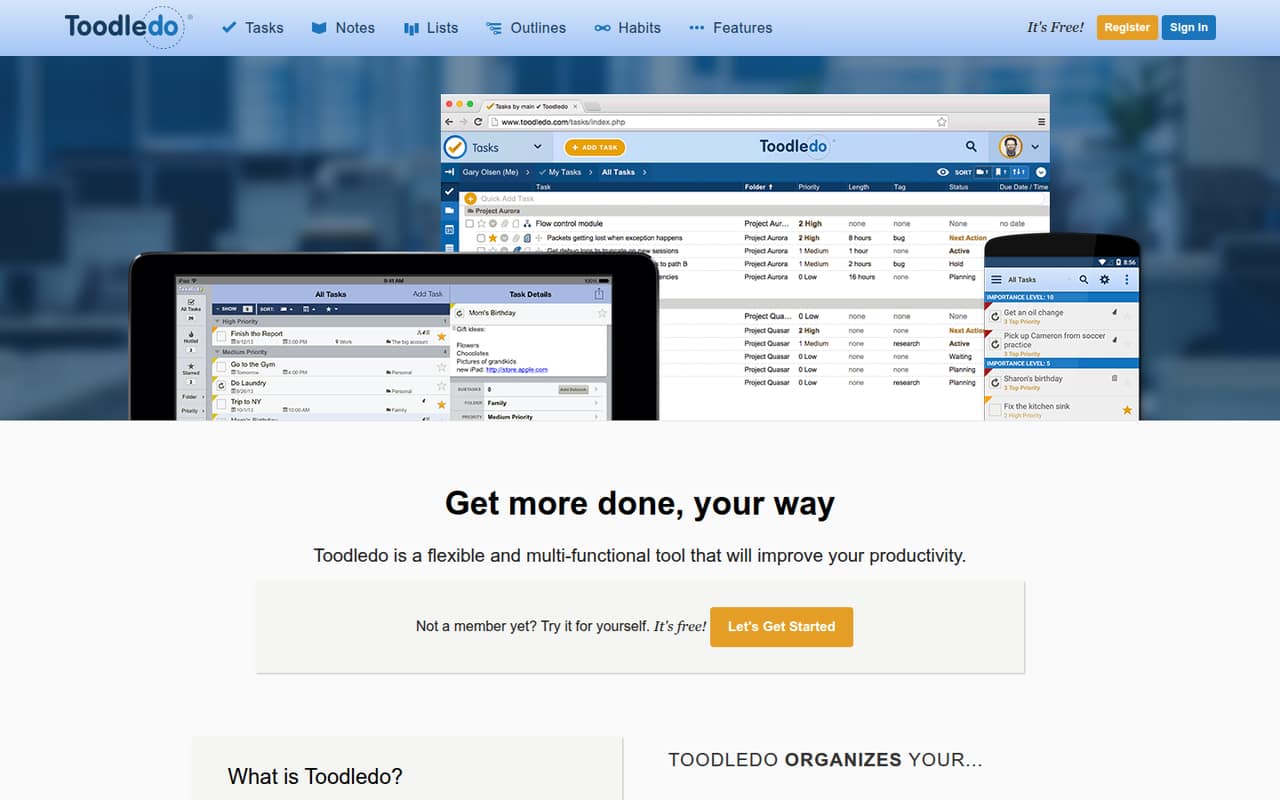
Toodledo fits a small team that wants more than a shared to-do list: think task-heavy work, recurring routines, reference notes, or structured project plans. Tasks can be sorted with folders, subtasks, tags, contexts, priorities, and filters. The app also includes notes, configurable lists, hierarchical outlines, and habit tracking.
For a team of one, the free plan may cover basic task management. A team of two or more should look closely at the collaborator limits and Plus plan before relying on it for shared work. The pricing page lists Plus at $5.99 per month with annual billing or $7.99 month to month, and says it supports up to five collaborators. The pricing basis isn't explicit, so ask Toodledo how the listed price applies to your team. This is a better fit for people who value detailed organization than for a group that wants the simplest possible task entry.
02Toodledo free plan and trial
The pricing page lists a $0 Free plan with unlimited tasks, one collaborator, up to 10 folders, 30 items per list and outline, and five habits. That gives an individual room to manage tasks and try the app's other organizing tools, but the collaborator and item caps can pinch if you want shared work or substantial lists and outlines.
Standard raises the limits to unlimited folders, 100 items per list and outline, and 20 habits, and includes one year of history. It costs $4.99 per month or $3.99 per month when billed annually. The pricing page also lists a 14-day free trial, but doesn't specify which plan or features the trial includes. Confirm those details before planning a migration or team rollout.
03What a small team pays for Toodledo
The pricing page lists Standard at $4.99 per month, or $3.99 per month billed annually, and Plus at $7.99 per month, or $5.99 per month billed annually. For one person, those are the listed monthly prices; annual billing lowers the monthly rate. Free remains $0. Plus includes up to five collaborators, 10GB of file storage, file uploads, full lists, outlines, habits, and history, plus priority support.
The listed prices are per month, but the pricing details don't say whether a team pays once per plan or per user. So a reliable total for three or five people isn't published. If the Plus price is per user, three seats would work out to $23.97 monthly or $17.97 per month on annual billing; five would be $39.95 or $29.95, respectively. Treat those as conditional calculations, not confirmed team quotes. No add-ons are listed. Business pricing is not published; contact Toodledo about custom integrations, file storage, and support.
04Getting started with Toodledo
Setup effort depends on how much structure your team wants. You can begin with tasks, then add folders, tags, priorities, filters, notes, lists, outlines, or habits as needed. That range is useful, but it may take time to settle on a shared system for fields and categories. The listed features include syncing across devices and reminders by email or in mobile apps; location-based reminders are also available.
Named third-party integrations aren't published in the listed details, so ask Toodledo about any connections your team needs before adopting it. A commenter on r/productivity said task entry had involved too many clicks in their experience. Another commenter described using slash-style input to set details such as due dates, priority, and tags, while noting it wasn't as intuitive as automatic parsing. That suggests a learning curve for teams expecting quick, natural-language entry.
05When small teams outgrow Toodledo
The first pressure point is collaboration: Free allows one collaborator, Standard allows up to one, and Plus allows up to five. A team that needs more than five collaborators will need to ask about Business, whose price is not published. The free plan's caps of 10 folders, 30 items per list and outline, and five habits may also prompt an upgrade as workflows expand.
Another reason to reconsider is fit. Toodledo offers several ways to organize work, but that flexibility may feel like extra effort to people who want fast, simple task entry. In one r/productivity thread, commenters disagreed about the trade-off: one praised its organization, while another said entering tasks took too many clicks. In a separate r/toodledo discussion, a long-time user described daily backups as preparation for a possible move, and another cited concern after losing access to the user forum. Those are individual reports, but they make support access and backup plans worth checking with the vendor.
From the threadsWhat users say
Reddit sentiment is mixed: some users value Toodledo's detailed task organization, while others report friction entering tasks or worry about support and continuity. These are individual accounts, not a consensus.
Toodledo is easy on the brain
There were too many clicks involved and I just spent more time entering tasks than anything else
Still not as easy and intuitive as the automatic parsing
when access to the users forum disappeared, it really got me concerned
Questions people ask
Does Toodledo have a free plan?
Yes. The pricing page lists a Free plan at $0 per month with unlimited tasks, one collaborator, up to 10 folders, 30 items per list and outline, and five habits. Standard and Plus raise several of those limits. The page also lists a 14-day trial, but doesn't specify which plan it covers.
How much does Toodledo cost?
The pricing page lists Standard at $4.99 per month or $3.99 per month with annual billing. Plus is $7.99 month to month or $5.99 per month billed annually. Business pricing is not published. The pricing details don't state whether the listed amounts are per user or per plan, so ask Toodledo for a team quote.
How many people can collaborate on each Toodledo plan?
The listed limits are one collaborator on Free, up to one on Standard, and up to five on Plus. Business plan collaboration limits are not published. Since the pricing details don't explain whether collaborators include the account owner, confirm the exact number of people who can access a shared workspace with Toodledo.
What can I organize in Toodledo?
Toodledo supports tasks, notes, custom lists, project outlines, and habits. Tasks can use folders, subtasks, tags, contexts, priorities, and filters. You can set email or mobile-app task reminders; location-based reminders are also available. The pricing page lists higher limits for lists, outlines, and habits on paid plans.
Does Toodledo support integrations and syncing?
Toodledo supports syncing data across devices, according to its feature description. Named third-party integrations aren't published in the listed details, so ask Toodledo whether it connects to the specific calendar, automation, or work tools your team relies on. Check this before moving shared workflows into the app.